
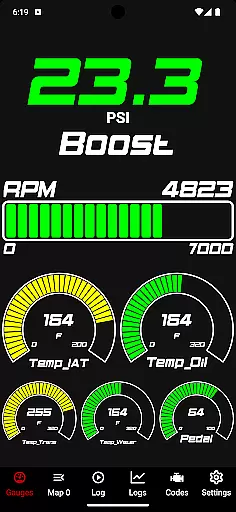
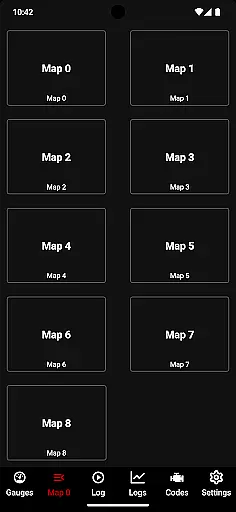
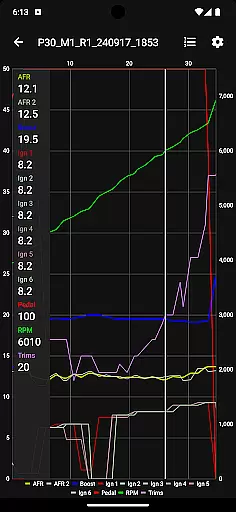
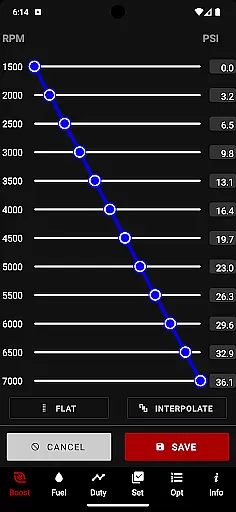
JB4 Mobile is a cutting-edge sports performance tuning application designed specifically for vehicles equipped with the JB4 tuner from Burger Motorsports. This powerful tool allows automotive enthusiasts to monitor and log critical engine parameters in real time, providing valuable insights into their vehicle's performance. The app offers a comprehensive suite of features including live gauge monitoring, data logging capabilities, and advanced parameter adjustments.
What sets JB4 Mobile apart is its ability to provide precise measurements of various engine metrics such as boost pressure, RPM, fuel trims, air/fuel ratios, and ignition advance. These features are presented through a modern user interface that has been completely rewritten from scratch, offering users a seamless experience while interacting with their vehicle's performance data. Additionally, the application supports firmware updating and map switching on the fly, making it an indispensable tool for both casual drivers and serious automotive tuners.
The app's value extends beyond mere data collection, as it enables users to make informed decisions about their vehicle's tuning and performance optimization. Whether you're a professional tuner or an enthusiast looking to maximize your vehicle's potential, JB4 Mobile provides the tools necessary to achieve optimal performance while maintaining complete control over your JB4-equipped car's settings.
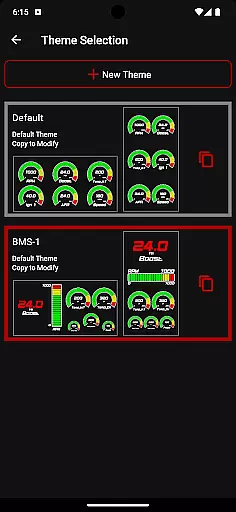
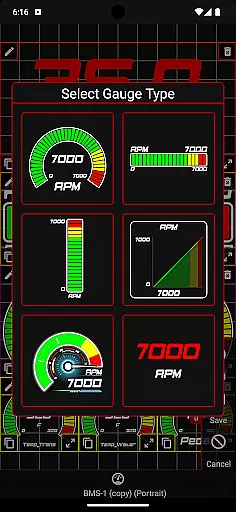
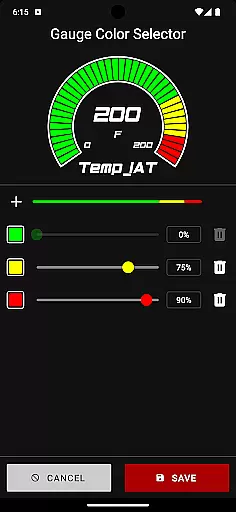
JB4 Mobile stands out in the sports tuning category with its comprehensive feature set tailored specifically for performance-oriented vehicle owners. One of its most notable aspects is the ability to customize gauge themes, giving users the freedom to personalize their monitoring interface according to their preferences. This customization capability extends to the revamped User Adjustment and Water Methanol Injection (WMI) data editors, which allow for precise modifications of crucial engine parameters such as boost levels, fuel settings, and injection configurations.
The application's technical capabilities are equally impressive, featuring a built-in raw CSV data viewer that enables users to analyze logged information in detail. Its modern UI architecture, completely rewritten from the ground up, ensures smooth navigation and responsive performance across various devices. The seamless integration with backend servers facilitates efficient firmware updates and real-time data synchronization, while the Auto Wide-Open Throttle (WOT) logging function automatically captures critical performance data during high-load situations.
Additional features include multiple parameter monitoring, data graphing capabilities, and log export functionality through email. The app also supports code reading and deletion, making it a versatile diagnostic tool. These features collectively contribute to a comprehensive tuning solution that empowers users to optimize their vehicle's performance while maintaining complete control over various engine parameters and settings.
Gameplay realism in JB4 Mobile is achieved through precise data logging and monitoring of multiple parameters from the JB4 equipped car. This includes tracking boost, RPM, fuel trims, air/fuel ratios, and ignition advance among others.
The app's ability to provide live gauges and data graphing adds a layer of authenticity to the experience. Users can visualize real-time changes in their vehicle's performance, making each driving session an accurate representation of the car's capabilities.
With features like Auto WOT logging and JB4 Firmware Updating, JB4 Mobile ensures that the virtual experience closely mirrors the physical one. These functionalities help maintain the integrity of the driving dynamics captured in the app.
For automotive enthusiasts and professionals alike, this level of detail offers an immersive environment where they can experiment with different settings such as boost and fuel adjustments, thus experiencing firsthand how these modifications affect the vehicle's performance.
JB4 Mobile excels in providing an intuitive control scheme that simplifies user interaction with complex vehicle data. The interface is designed for ease of use, allowing users to effortlessly navigate through various features including live gauges, data logging, and code reading/deletion.
Switching maps on the fly and modifying User Adjustable settings like boost and fuel are seamlessly integrated into the appu2019s modern UI. This responsiveness empowers users to make quick adjustments without detracting from their driving focus.
Additionally, the step-by-step instructions provided for both JB4 Connect Kit and BMS Data Cable users ensure that even those new to the platform can easily establish a connection with their vehicles. This guidance removes potential barriers to entry for newcomers while streamlining the process for experienced users.
Overall, JB4 Mobile's thoughtful design prioritizes clarity and efficiency, ensuring that drivers can concentrate on what truly mattersu2014their driving experienceu2014while still having comprehensive control over their vehicle's tuning parameters at their fingertips.
User-friendly interface
Comprehensive tuning options
Real-time data monitoring
Customizable gauge themes
Seamless firmware updates
Requires specific hardware
Limited vehicle compatibility
Complex for beginners
Bluetooth connectivity issues
No iOS support

Realistic golf, real courses
 4.10
4.10
Online app with multiple arenas! Live PvP multiplayer grand slam sports league.
4.60
This is the most realistic 3D bowling game on the Android phones.
4.70
Run the ball into the endzone in AR.
4.2
Establish a stable of talented boxers to take on the world.
4.80
Push your skills, express your style, or just enjoy the ride.
4.60
Play with friends and join millions of players in the king of bowling games!
4.60
Sports app that presents matches' details from the most important championships.
4.50
The NFHS Network delivers high school sporting events from across the country.
3.70
Score as a Super Star in Football Strike: Action Multiplayer Online Soccer Game!
4.70
Real-time 1v1 basketball game! Dunk, shoot & win like MVP basketball superstars!
4.70
Shoot, score, and outplay your rival in a fast-paced basketball battle duel!
4.60
Build a soccer club from scratch and see if you can conquer the World!
4.50
Realistic PvP Multiplayer Dart game blending sports games and simulation fun!
4.50
Out of the Park Baseball Go is a strategy & sports gaming fan’s dream come true.
4.40
Build, manage & coach your NFL dream team in this American Football sports game!
4.40
The My Epic app unlocks the mountain and elevates your experience.
3.90
The Hudl app helps coaches and athletes win using video.
3.70
Play T20 Cricket World Cup 2025. Real matches, offline & tournament mode!
4.1


User Reviews