
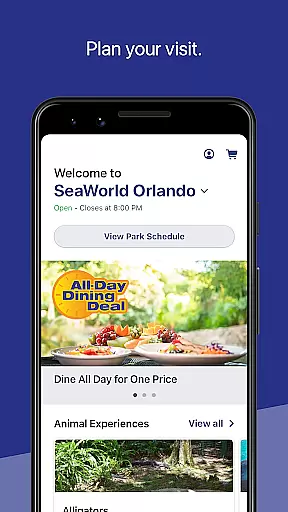
SeaWorld is a comprehensive travel companion app designed to enhance your park experience. The application serves as an all-in-one guide, offering detailed park information including animal experiences, showtimes, ride wait times, and dining options. It also allows for upgrading your visit with special offers like Quick Queue or reserved seating.
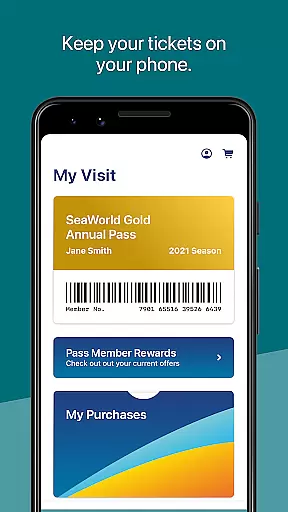
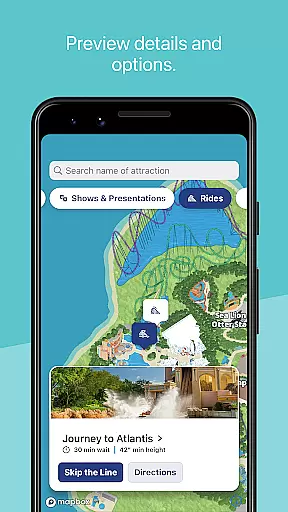
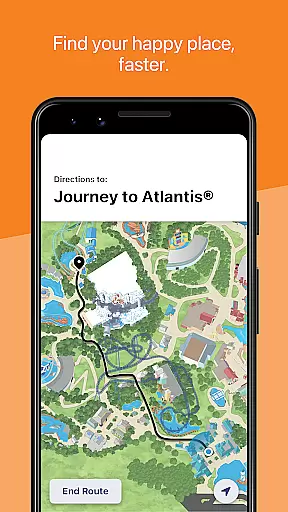
The app's mapping feature provides interactive navigation, helping you find attractions, restrooms, and points of interest easily. Additionally, it functions as a digital ticketing system, storing annual passes and purchase barcodes for seamless in-park transactions. Whether planning your itinerary or navigating the park, SeaWorld ensures a more organized and enjoyable visit.
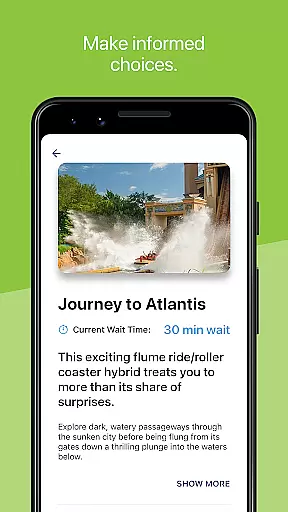
SeaWorld app stands out with its robust feature set tailored for optimal park navigation and planning. The guide functionality lets users browse through various park amenities while providing real-time updates on ride wait times and show schedules. Users can conveniently upgrade their experience with add-on features like priority queues and reserved seating options.
A key highlight is the interactive map system that uses geo-location to display nearby attractions and amenities. This mapping tool includes filtering options for different point types and amenity categories, plus turn-by-turn directions to help visitors navigate efficiently. The app's digital wallet integration for managing tickets and purchases further streamlines the visitor experience.
When planning a visit to SeaWorld, having reliable booking information is crucial for a seamless experience. The SeaWorld app provides verified and accurate booking details for various in-park services and amenities.
Through the app, users can make legitimate reservations for shows, dining, and even special experiences like Quick Queueu00ae. Each booking is confirmed instantly, ensuring that visitors have a guaranteed spot for their selected events or services.
The app's booking system is directly integrated with SeaWorld's management systems, meaning all reservation data is up-to-date and precise. This integration minimizes the chances of overbooking or errors, giving guests peace of mind.
By offering transparent booking options and immediate confirmations, the SeaWorld app ensures that every visitor can enjoy their day without worrying about the authenticity of their reservations.
Understanding the costs associated with your SeaWorld visit is essential for budgeting and planning. The SeaWorld app excels in providing clear and comprehensive price transparency across its offerings.
Users can view detailed pricing for tickets, annual passes, and in-park upgrades such as the All Day Dining Deal or Reserved Seating for shows. The app displays all costs upfront, eliminating hidden fees and allowing visitors to make informed decisions.
In addition to showing individual prices, the app also offers comparisons between different packages and deals. This feature helps guests choose the most cost-effective options tailored to their needs.
With its commitment to honest pricing and clear information, the SeaWorld app empowers visitors to manage their expenses effectively while enjoying everything the park has to offer.
User-friendly interface
Comprehensive park guide
Interactive mapping system
Real-time updates
Digital ticket management
Limited to SeaWorld parks
Requires constant connectivity
Premium upgrades needed
Occasional GPS inaccuracies
Platform-specific features

A packing list app that helps you remember what to pack for a trip.
 3.10
3.10
It drives. You ride.
4.90
Replace your car trips with the world’s largest shared electric vehicle company.
4.90
Travel light with our easy-to-use mobile app, the perfect flying companion.
4.40
Walt Disney World Resort maps, wait times, tickets, dining & more.
4.50
Managing your travel should be easy. With the Amtrak app, it is.
4.30
Offline WiFi Hotspot Finder, eSIM, Caller ID, Dialer, Home Screen Launcher & VPN
4.20
Now you can book homes, experiences, and services—all in our redesigned app.
4.40
Examine the planet
3.80
Find your perfect somewhere with last minute hotel & travel deals!
4.80
Book your whole trip in one app.
4.80
Bus tickets at unbeatable prices with routes across the US. All aboard FlixBus!
4.70
With the Spirit Airlines app, easily manage all your trips in one place.
4.70
Get all MTA services, Subway, Bus, LIRR, Metro-North and More all in one place.
4.60
Earn hotel and travel rewards, find hotel offers, and access your Digital Key.
4.50
View US public land boundary maps on your device.
3.70
Real-time flight tracking with live maps and flight status updates.
3.70
Find the best prices, pay for the cheapest gas, and save on every fill up
3.30
The official app of Allegiant Travel & Allegiant Airlines
3.30


User Reviews