







Walmart is a comprehensive shopping application that allows users to purchase a wide range of products, from fresh groceries to the latest tech gadgets. The app offers multiple fulfillment options including pickup, delivery, and shipping, ensuring customers can get their orders when and where they want. With features like Home VR for virtual furniture placement, personalized shopping suggestions, and easy barcode scanning, Walmart makes online and in-store shopping seamless and efficient.
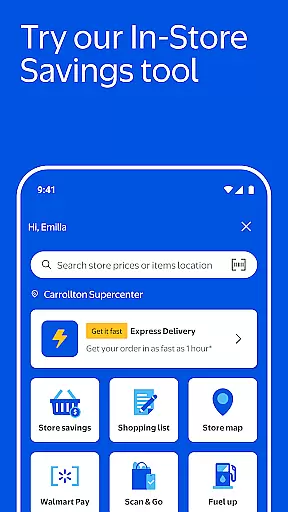
The app also includes time-saving tools such as real-time order tracking, Walmart Pay for contactless checkout, and detailed store maps. Additionally, Walmart+ members enjoy exclusive benefits like Scan & Go for in-store purchases and fuel discounts at thousands of locations nationwide. Whether you're managing prescriptions through the pharmacy section or using Sparky, the AI-powered shopping assistant, Walmart provides a complete shopping solution tailored to modern consumer needs.
One of the standout features of the Walmart app is its versatile shopping options. Users can choose between curbside pickup, express delivery within an hour, or fast two-day shipping for eligible orders over $35. This flexibility caters to various customer preferences and urgency levels. Furthermore, the app's integration with Home VR technology lets shoppers visualize furniture and decor in their space before purchasing, enhancing decision-making.
Personalized online shopping suggestions streamline the buying process by recommending frequently purchased items and groceries. The built-in barcode scanner simplifies price checking and list creation. Real-time order tracking keeps users informed about their deliveries, while Walmart Pay offers a convenient way to check out using multiple payment methods. Store maps help navigate physical locations efficiently, and the pharmacy section manages prescriptions and health-related services seamlessly.
When it comes to online shopping, product variety and clear categorization are essential for a seamless user experience. The Walmart app excels in this area by offering an extensive range of products, from fresh groceries to the latest tech gadgets. This vast selection ensures that customers can find everything on their list within a single platform.
The app's interface is designed to make shopping intuitive and efficient. Products are systematically organized into well-defined categories, making it easy for users to navigate through different sections. Whether you're looking for household essentials or specific tech items, the app's structured categorization helps you locate your desired products quickly and effortlessly.
Moreover, the Walmart app provides personalized shopping suggestions based on users' purchase history and preferences. This feature not only saves time but also enhances the shopping experience by recommending relevant products that users are likely to need or appreciate.
In addition to its broad product range and smart categorization, the Walmart app includes convenient features like barcode scanning. This allows shoppers to check prices and add items to their cart simply by scanning product barcodes, streamlining the shopping process even further.
Pricing transparency is crucial for building trust with consumers, and the Walmart app delivers this by providing clear and competitive pricing across all its products. Users can easily compare prices and take advantage of various discounts and promotions available directly within the app.
The app goes a step further by offering price matching and rollbacks, ensuring customers always get the best deal possible. Eligible orders over $35 qualify for free shipping, adding another layer of cost-effectiveness to the shopping experience. These transparent pricing strategies empower users to make informed purchasing decisions without worrying about hidden fees or unexpected charges.
Furthermore, Walmart Pay enhances the checkout process by allowing users to pay using multiple payment methods while optimizing how totals are split among cards and balances. This feature not only simplifies payments but also maximizes savings potential for each transaction.
Real-time order tracking adds another dimension of transparency, as users receive live updates on their purchases directly to their phones. This visibility into order status keeps customers informed every step of the way, reinforcing trust and satisfaction with the overall shopping experience provided by the Walmart app.
User-friendly interface
Multiple fulfillment options
Exclusive Walmart+ benefits
AI-powered shopping assistant
Comprehensive product range
Express delivery fees
Limited international availability
Occasional app glitches
Membership required for full features
Some regions lack service options

Get rewarded for every purchase you make, online or in-store!
 4.60
4.60
Shop shoes, sneakers, activewear, and clothes from the adidas shopping app
4.80
Prescriptions, coupons, photos and shopping - it's all in the Walgreens app.
4.60
Access free, exclusive savings on the go thanks to Capital One Shopping!
4.70
Shop anywhere, manage payments, get cashback, discover Klarna Card & more.
4.80
Create Wishes & Get Inspired
3.20
The Live Shopping Marketplace
4.60
Save money. Live in style!
3.80
Browse, search & buy millions of products right from your Android device.
4.40
Easily split payments online & in-store. Buy now & pay later with Zip.
4.80
Earn cash back and rewards from games, surveys, receipts and more
4.70
The Costco Mobile App is the easiest way to save time and money on the go.
4.70
Earn rewards when you shop, play games, and order online. Live rewarded.
4.70 4.60
4.60
Shopping easy, fresh, and affordable just got easier.
4.50
A world-leading B2B marketplace
4.40
Scan receipts, earn gift cards & fetch rewards with CoinOut receipt scanner app.
4.30
Smiles found here
3.90
Earn Cashback and maximize your savings when you shop and book your travel plans
3.90


User Reviews