

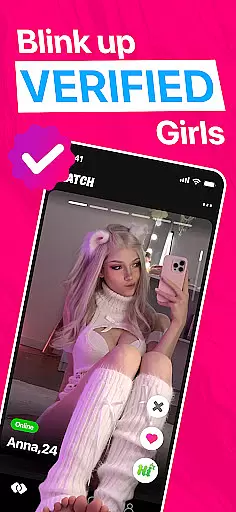



BlinkUP is a casual dating app designed for Gen Z women seeking meaningful connections. With its swipe-based matching system, users can explore potential matches nearby or globally while maintaining control over their dating preferences.
The app emphasizes safety and authenticity by verifying all profiles and removing fake information. It offers engaging features like fun icebreakers and interactive games to foster genuine conversations in a vibrant community built on honesty and respect.
BlinkUP stands out with its user-friendly interface and innovative approach to modern dating. The app allows quick sign-ups so users can start swiping immediately, ensuring minimal hassle when beginning their journey.
One of the key highlights is the profile verification process, which enhances trust among users. Additionally, BlinkUP provides various ways to interact beyond traditional messaging, such as playing games together or using creative prompts to break the ice during chats.
User profile customization is a crucial aspect of any social platform, and BlinkUP excels in this area. The app allows users to create detailed and personalized profiles that reflect their true selves.
BlinkUP places a strong emphasis on authenticity verification. Every profile undergoes a verification process to ensure the information provided is genuine. This helps maintain a community of real people, enhancing trust and safety.
By combining robust customization options with stringent verification processes, BlinkUP ensures that users can present themselves accurately while interacting in a secure environment.
This focus on authenticity not only improves user experience but also increases the likelihood of meaningful connections, making BlinkUP a reliable choice for those seeking genuine relationships.
Connection discovery is at the heart of BlinkUP's functionality, designed to help users find and connect with like-minded individuals effortlessly.
The app employs advanced algorithms to recommend potential matches based on user preferences and behavior. These recommendations are continuously refined as users interact with the app, ensuring more accurate and relevant suggestions over time.
BlinkUP offers various interactive features such as icebreaker games and chat functionalities that facilitate engaging conversations. This encourages users to explore different ways of connecting beyond just swiping.
With its innovative approach to connection discovery, BlinkUP stands out by providing a dynamic and enjoyable dating experience tailored to individual needs and preferences.
User-friendly design
Verified profiles
Engaging icebreakers
Vibrant community
Global reach
Limited to Gen Z
Potential paywall
Fewer older users
Game dependency
Location limits

Video call, live video chat & talk to strangers. Meet people on Omega!
 3.60
3.60
Honest dating app where real people find genuine love and real matches.
4.20
Swipe, Meet & Chat Real People
3.80
Follow the Truth! Join America's leading free-speech social platform.
3.10
Date single & make friend
4.60
Unlimited messages, WiFi Calling, Texting app. Text now with Second Phone Number
4.10
Instant messaging — simple, fast, secure, and synced across all your devices.
4.00
Go Live, Chat & Meet New People! Friends. And more than friends.
3.80
Create & share photos, stories, & reels with friends you love
3.90
Widget Together, Share Whatever! Keep Pets & Share Sleep, Poop, Moods on Screens
4.70
The hottest live chat app so far. Video chat and meet great people...
4.60
Get your NGL Link
4.60
Reddit is where you’ll find your people and feel at home in every conversation.
4.60
Watch 24/7 great live stream, or go live to boost your social followers!
4.50
Global short video platform: epic effects, trending videos & vibrant community!
4.40
Watch 24/7 live stream, and make real friends nearby
4.30
Dive into diverse fandoms. Connect, create, reblog.
3.90
Chat and make new friends around the world!
3.90
This is to support the developer of Infinity for Reddit. No exclusive features.
4.2


User Reviews