
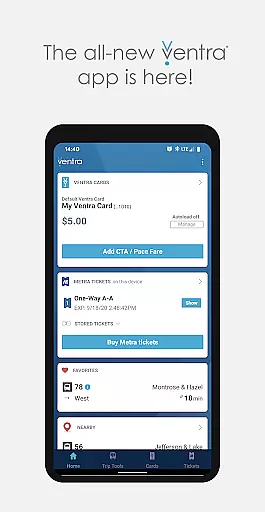
Ventra is a comprehensive transit management app designed specifically for navigating Chicago's public transportation system. This includes services provided by CTA, Metra, and Pace buses and trains. The app allows users to manage their fares effortlessly through a digital interface.
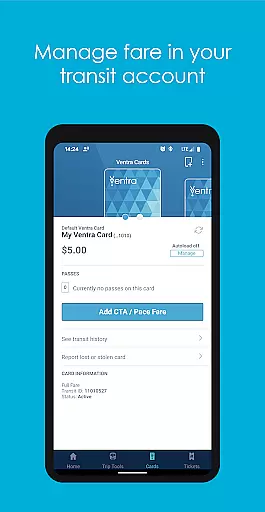
Key functionalities include checking account balances, loading transit value or passes instantly, and enabling or disabling the autoload feature. Additionally, Ventra offers mobile ticketing for Metra trains, real-time account notifications, and live arrival/departure updates across all major transit providers in one convenient location.
Whether commuting to work or exploring the city, Ventra ensures that users have all necessary transit information at their fingertips, making travel seamless and efficient.
Ventra stands out with its robust set of features tailored for Chicago commuters. One of the primary highlights is the ability to manage Ventra Card's transit accounts directly from the app. Users can check their balance, load value or passes instantly, and toggle the autoload feature for convenience.
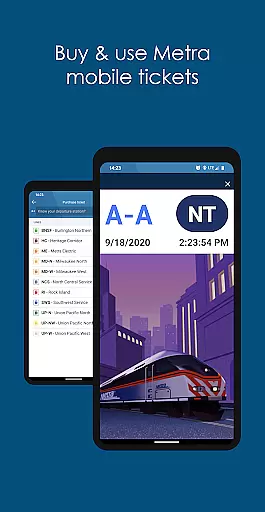
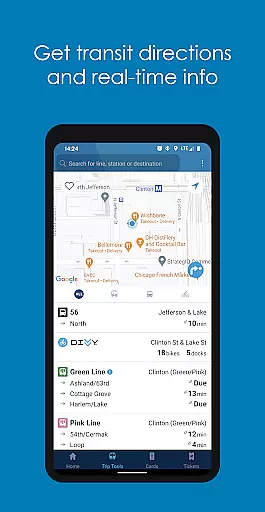
The app also provides mobile ticketing options for Metra trains, allowing users to purchase and store tickets digitally. Real-time notifications keep users informed about their account status, prompting timely fare reloads. Furthermore, Ventra aggregates real-time arrival and departure data from CTA, Metra, and Pace, offering a unified platform for all transit needs.
These features collectively enhance user experience by providing timely, accurate, and centralized transit information, thus simplifying daily commutes and travel planning.
Map accuracy is crucial for any navigation app, and Ventra excels in this area by providing precise transit information for Chicago's CTA, Metra, and Pace services. The app ensures that users can rely on the depicted routes and stops to be exactly where they are shown.
Ventra achieves this precision by integrating real-time data from all transit agencies within the Chicago area. This means that whether you're looking at train lines or bus stops, the locations presented are verified and updated regularly to reflect any changes or service disruptions.
For commuters, this level of map accuracy means no more guessing games when planning their journeys. They can trust that the next bus or train is stopping exactly where the app indicates, which significantly enhances the overall user experience and reliability of public transportation.
Effective route planning is a cornerstone of the Ventra app, designed to simplify the process of navigating Chicago's complex transit system. By offering comprehensive tools that integrate various modes of transport, Ventra makes it easy for users to plan their trips efficiently.
The app allows users to pick their starting point and destination, then suggests optimal routes using CTA, Metra, and Pace services. It factors in real-time arrival and departure times, ensuring that suggested plans are not only efficient but also feasible based on current conditions.
With features like favorites and location-based suggestions, Ventra streamlines daily commutes and occasional travel alike. Users benefit from seamless transitions between different transit modes, clear guidance on transfers, and timely alerts, making every journey as smooth as possible.
User-friendly interface
Comprehensive transit info
Instant fare loading
Real-time notifications
Mobile ticketing
Limited to Chicago
Occasional bugs
Requires internet
No offline mode
Ads present

GPX Viewer PRO shows tracks, routes and waypoints from gpx and kml files.
 4.60
4.60
Use GPS maps or search by property owner, address or parcel to view parcel data
4.30
Your real-time window to the world. Explore anywhere, anytime.
3.30
NJ TRANSIT information and ticketing at your fingertips
3.70
Drive safe with real-time speed camera radar, police, and traffic alerts
3.80
MapQuest is your go-to app for maps, GPS, voice navigation & live traffic.
3.80
Explore Earth with live GPS, satellite view & street navigation
3.60
GPS navigation offers route finder, compass, translator, currency converter, etc
4.30
Simple & easy to use a compass app. Get accurate directions.
4.20
GPS Speedometer & Odometer: Track car, bike, truck speed & distance in real-time
4.70
Ride or drive at YOUR price
4.70
Find trails, organize your locations and navigate with offline maps.
4.60
Explore with GPS Navigation with GPS offline, voice GPS, speed camera radar
4.60
Voice GPS with driving directions, offline maps navigation GPS for safe travel
4.50
Plan routes, share locations, and set custom alert zones
4.40
Find radar maps, GPS coordinates, altitude, offline maps, location, travel route
4.40
Route schedules, maps, and real-time tracking of MTA buses in New York City.
4.20
GPS Navigation: Get map directions and find the shortest routes to avoid delays!
4.00
Gas Station & Fuel Rewards Points
3.70


User Reviews