
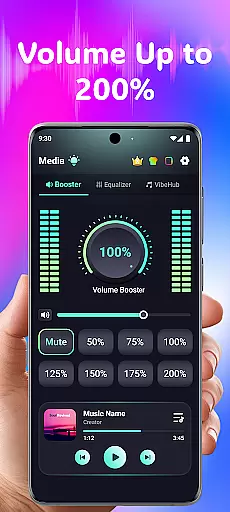
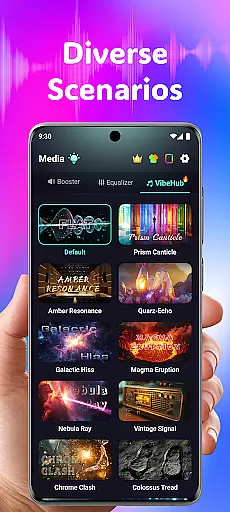
Volume Booster Bass Booster EQ is a versatile audio enhancement application designed to elevate your sound experience across various scenarios. This app allows users to amplify their device's volume up to 200%, making it ideal for outdoor parties, movie watching, and gaming sessions where sound clarity is crucial.
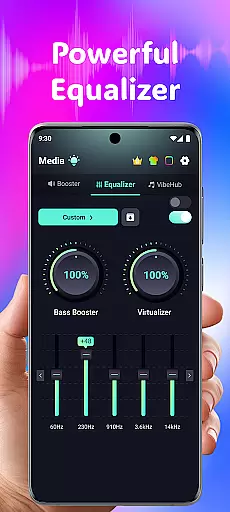
The application features an advanced equalizer with five bands, enabling detailed sound customization for different types of audio content. Additionally, its compatibility with multiple apps and devices ensures seamless integration, whether you're using headphones, Bluetooth devices, or speakers. The inclusion of a hearing support mode further extends its utility by offering independent ear adjustments and noise reduction.
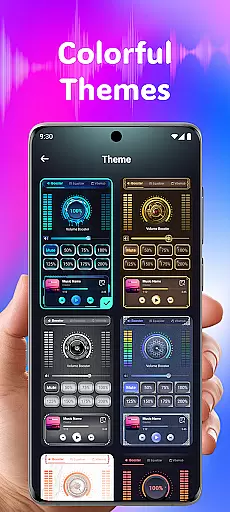
With its sleek interface and customizable themes, Volume Booster Bass Booster EQ caters to both casual listeners and audiophiles who demand superior sound quality and personalized settings. By addressing common audio issues like low volume and background noise, this app provides a comprehensive solution for enhancing auditory experiences in diverse environments.
Volume Booster Bass Booster EQ stands out with its robust suite of audio-enhancing features tailored for every user's needs. At the core of its functionality is the powerful volume boost capability, which allows precise amplification of media volume up to 200%. This feature is complemented by an advanced 5-band equalizer that lets users fine-tune bass, treble, and other frequencies for optimal sound output.
Beyond basic volume control, the app offers specialized modes such as Advanced Hearing Mode. This mode includes independent left and right ear adjustments, real-time noise reduction powered by AI, and six frequency amplifications ranging from deep rumbles to high-pitched sounds. These features collectively ensure crystal-clear audio in any setting, whether you're listening to music, watching videos, or engaging in conversations.
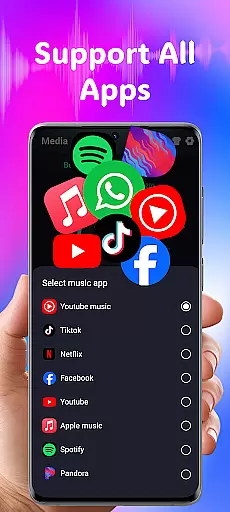
The app also boasts wide compatibility with popular streaming platforms and social networks, alongside optimized performance for various audio output devices. Its user-friendly design incorporates large buttons and intuitive navigation, making it accessible for users of all technical backgrounds. With additional features like stylish themes and live sound recording, Volume Booster Bass Booster EQ delivers a complete package for anyone seeking to enhance their audio experience.
In the realm of medical applications, content credibility is paramount for user trust and safety. Volume Booster Bass Booster EQ addresses this by providing a suite of features that are designed with audio health in mind. The app includes advanced frequency amplification which allows users to fine-tune specific sound ranges, aiding in clearer audio perception without necessarily increasing volume.
The app's commitment to expert-reviewed features is evident through its AI-powered real-time noise reduction capabilities. This functionality intelligently filters out unwanted background noises, ensuring that users receive only the most pertinent audio information. Such a feature not only enhances user experience but also aligns with recommendations from auditory health professionals regarding clarity over sheer loudness.
Furthermore, Volume Booster Bass Booster EQ offers an independent left and right ear control option, promoting balanced hearing practices. By allowing individualized adjustments for each ear, it supports users with asymmetrical hearing needsu2014this kind of precise personalization reflects input from audiological experts who understand the importance of tailored solutions in maintaining long-term auditory well-being.
While Volume Booster Bass Booster EQ does not directly provide teleconsultation services, it enhances the quality of remote communication experiences significantly. With its powerful volume boost feature, users can amplify media sounds up to 200%, making virtual consultations more audible and thus improving comprehension during important discussions with healthcare providers.
The inclusion of a robust 5-band equalizer further refines this experience by enabling users to tailor their audio settings according to different types of conversations or environments they might be in while consulting remotely. Whether itu2019s adjusting bass levels for deeper tones or tweaking higher frequencies for clearer speech details, these tools ensure that every word exchanged during a session is heard as intended.
Additionally, the app's live sound recorder and playback function adds another layer of utility for teleconsultations. Users have the ability to record sessions effortlessly, capturing key moments or advice given by medical professionals which can later be reviewed at leisure. This ensures no critical information slips through unnoticedu2014a vital aspect when dealing with sensitive health-related matters where accuracy and retention of communicated details are crucial.
Powerful volume boost
Advanced equalizer settings
Wide app compatibility
User-friendly interface
Real-time noise reduction
Potential speaker damage
No physical controls
Limited free features
High battery usage
Complex for beginners

Want to make it easier to manage your health? We’re with you, wherever you are.
 4.70
4.70
The Omada app enhances your program experience and helps you stay engaged.
4.50
Crush your paramedic exam with NREMT-style tests, ECGs, and top-tier prep!
3.90
Manage your prescriptions and pharmacy care anytime, anywhere.
4.80
Care Simplified by MyChart
3.40
Over 1,200 review questions and 5 exams—pass the NREMT with EMT Review Plus!
4.10
Boost reading, writing, speaking and listening with a scientifically proven app.
4.70
This app is simply 1 book (also large app) and 17 other apps combined into 1
4.70
Manage your healthcare through the FollowMyHealth® Universal Health Record.
4.80
The NightOwl Companion app allows you to interact with the NightOwl sensor.
4.70
Health Care at Your Fingertips
4.60
Identify pills, search different drugs, get drug information and much more!
4.50
The OptumRx app empowers you to become an advocate of your pharmacy benefits.
4.40
Download OctaApp for easy access to your plasma donation info
4.40
Assess and treat left neglect more effectively in stroke and brain injury rehab.
4.30
An easy way to earn money donating plasma. Book a visit, sit back, and get paid.
3.80
Update medical records, view upcoming appointments, message your provider & more
3.80
Conveniently receive lab results, schedule lab appointment and pay your bills
3.70
X-Vein: Advanced vein detection for medical practice
3.10


User Reviews