
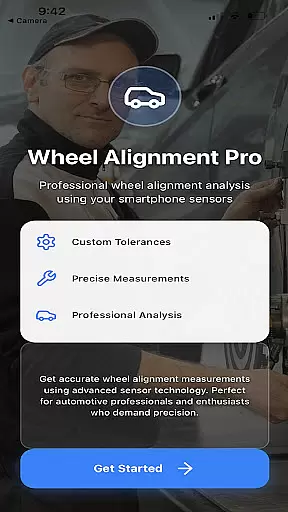
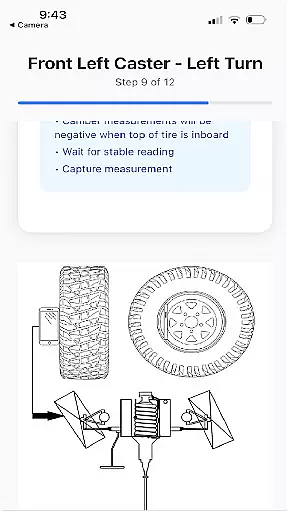
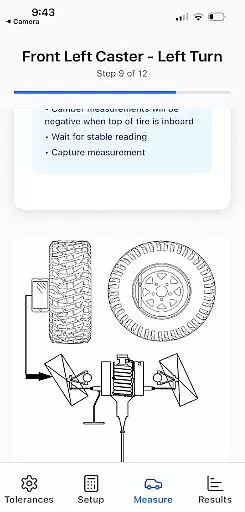
Alignment Pro is a specialized application designed for vehicle wheel alignment using your phone's internal sensors and a simple tape measurement. The app provides on-screen instructions to guide users through the data collection process, ensuring accurate results even on uneven surfaces. It incorporates industry-standard specifications that can be customized to match your specific vehicle's requirements, which are easily accessible online. This makes it an essential tool for both professional mechanics and car enthusiasts who need reliable alignment data.
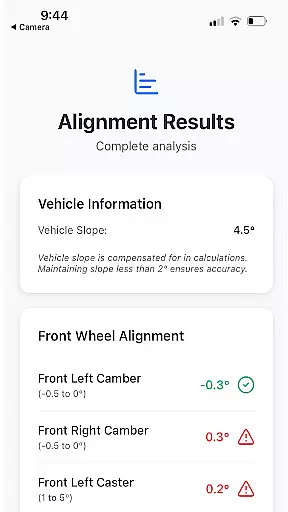
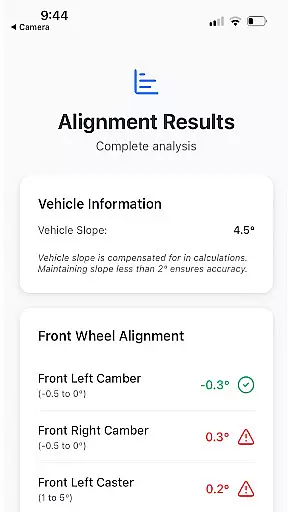
The app also features vehicle slope compensation, which adjusts measurements to account for uneven driveways or surfaces. Additionally, it offers a detailed alignment summary highlighting potential issues caused by out-of-tolerance conditions. These insights help users understand the implications of misalignment and explain these problems effectively to customers or peers. Alignment Pro bridges the gap between professional-grade tools and accessible, user-friendly technology.
Alignment Pro stands out with its innovative use of smartphone sensors to collect precise wheel alignment data. By following simple on-screen instructions, users can perform alignments without needing expensive equipment. The app supports industry-standard specifications but also allows manual input for vehicle-specific needs, making it versatile for different types of vehicles. This flexibility ensures that whether you're working on a sedan or an SUV, the app adapts to meet those requirements seamlessly.
One of the key features is the vehicle slope compensation mechanism, which corrects for uneven surfaces during measurements. This ensures accuracy regardless of where the vehicle is positioned. Furthermore, the app generates a detailed alignment summary that explains potential consequences of misalignment, such as uneven tire wear or handling issues. These summaries not only provide technical insights but also serve as valuable communication tools when explaining findings to clients or colleagues.
Alignment Pro provides comprehensive details about your vehicle's alignment specifications, ensuring accuracy and precision in the process. By utilizing your phone's internal sensors and a simple tape measurement, the app collects essential wheel alignment data.
The application allows users to input industry standards for their vehicle or manually update to specific alignment specifications, which can be easily sourced online. This feature ensures that each vehicle receives personalized attention based on its unique requirements.
In addition to collecting alignment data, the app also compensates for uneven driveways through vehicle slope compensation. This functionality ensures that measurements are accurate regardless of the surface conditions, providing reliable results every time.
With a detailed alignment summary, users can understand the implications of out-of-tolerance conditions. This helps in explaining to customers the potential issues that may arise due to improper alignment, enhancing transparency and trust between service providers and clients.
One of the standout features of Alignment Pro is its commitment to price transparency. Unlike traditional alignment services where costs can be ambiguous, this app provides clear insights into the expenses associated with wheel alignment.
By allowing users to access industry-standard specifications and manually input their vehicle's alignment needs, the app eliminates hidden fees. Users can find specific alignment specifications online, ensuring they are fully aware of what they are paying for.
The app's ability to display a detailed alignment summary further enhances price transparency. Customers can see exactly which aspects of their vehicle's alignment are out of tolerance and understand the associated costs for corrections.
This transparency not only builds trust with customers but also empowers them to make informed decisions regarding their vehicle maintenance, ultimately leading to a more satisfactory service experience.
User-friendly interface
Accurate sensor integration
Customizable specifications
Detailed alignment reports
Slope compensation feature
Requires manual input
Limited to phone sensors
Premium version needed
No automatic updates
Dependent on surface quality

Take Control of Your Car
 4.80
4.80
OBD1 ECMs application. Data log or tune directly from your phone or tablet!
4.60
Get your personalized financing options and shop for used cars today!
4.20
Oil change service & coupons for car maintenance at Valvoline Instant Oil Change
4.70
Car Values, Research and More
4.80
1M+ high-quality auto parts at your fingertips. Fitment guaranteed.
4.70
Monitor your behind-the-wheel behavior to become a safer driver and save.
4.10
Trip computer+car diagnostic tool with widest variety of features and dashboard!
4.70
Shop, finance, or sell today.
4.80
The Texaco App allows you to pay for fuel from the comfort of your car!
4.80
Get more out of your AAWireless adapter with this companion app | aawireless.io
4.80
View your car’s service records and find out when maintenance is due.
4.70
MySubaru: Download. Connect. Love.
4.70
OBDII - ELM327 Terminal tool for 96-00 Volvos
4.50
Your Path to Driving Licensing Success Begins Here! Develop your driving skills.
4.40
A smarter way to park and reserve your spot ahead of time.
4.40
By enthusiasts, for enthusiasts
4.00
Mobile Phone Parking - So easy to park
3.70
Better fuel to help keep you on the road
3.20


User Reviews