
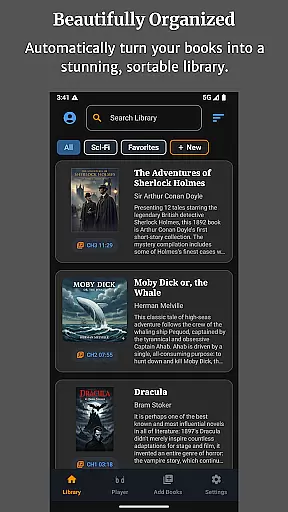
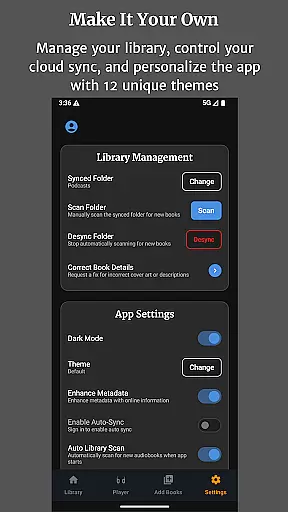
Audiobook Buddy is a comprehensive audiobook management app designed to transform your scattered audio files into an organized, visually appealing library. It supports syncing from local folders and popular cloud services like Google Drive, OneDrive, and Dropbox, creating a unified library with smart organization features.
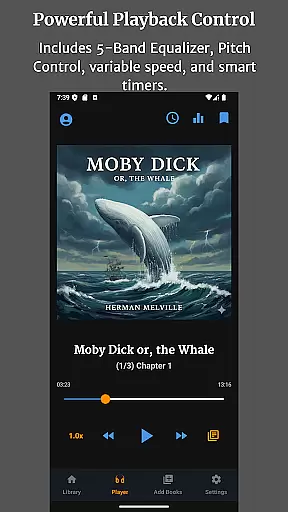
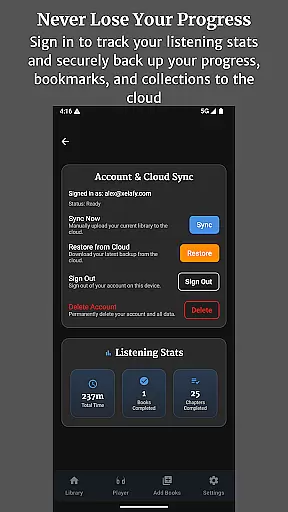
The app offers advanced playback controls including a 5-band Equalizer, Pitch Control, per-book speed settings, and a sleep timer. With full lock-screen controls, background playback, and customizable themes, Audiobook Buddy ensures a seamless listening experience. It also provides detailed tracking of listening time and completed books, with automatic cloud backups for bookmarks and progress.
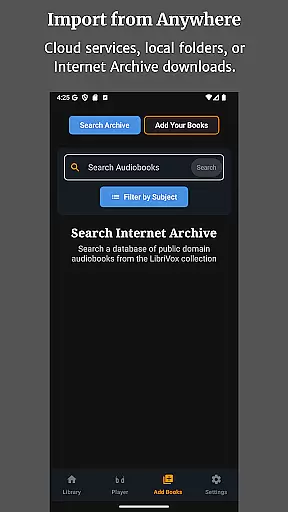
Audiobook Buddy stands out with its robust feature set tailored for audiobook enthusiasts. The app's smart library organization system automatically groups audiobooks into collections based on series, genres, or user-defined categories. Integration with LibriVox offers access to a vast library of public domain books, while supporting personal file imports in various formats.
Playback customization is exceptional, offering users precise control over their listening experience. The app supports multiple audio formats and metadata types, ensuring compatibility with most audiobook files. Its user-friendly interface includes lock-screen controls, a mini player, and optional home screen widgets, making it easy to manage playback anywhere.
Additional features include 11 customizable themes, multi-language support, and cloud-synced progress tracking. These capabilities make Audiobook Buddy a versatile tool for both casual listeners and dedicated audiobook collectors.
Audiobook Buddy offers an extensive library of public domain audiobooks sourced from LibriVox, providing users with a vast selection of titles to choose from. Beyond the built-in library, the app supports importing personal files and ZIP archives, allowing for the creation of a personalized collection that enhances the overall library size.
Regarding copyright authenticity, Audiobook Buddy ensures that all provided audiobooks comply with public domain standards, giving users peace of mind about the legality of their listening material. The app also allows users to import their own content, reinforcing the authenticity of the library as users can directly manage their legally acquired audiobooks.
The ability to sync from various cloud services like Google Drive, OneDrive, or Dropbox further expands the potential size of a user's library, making it easy to access a broad range of audiobooks from different sources while maintaining copyright compliance.
Audiobook Buddy boasts full support for a wide array of audio formats including MP3, M4A, M4B, AAC, OGG, FLAC, WAV, and WMA, ensuring that users can play audiobooks regardless of their file type. This comprehensive format compatibility eliminates the frustration of encountering unsupported files and contributes to a seamless user experience.
In addition to audio formats, the app reads metadata from CUE, NFO, and TXT files, which helps in organizing the library with accurate information about each audiobook. Cover art is also supported in multiple formats such as embedded art, JPEG, PNG, and WebP, enhancing the visual appeal and organization of the library.
It is important to note that DRM-protected audiobooks are not supported, directing users towards non-DRM titles available on platforms like Open Library and the Internet Archive, or encouraging them to import their personal collections, thus maintaining high standards of format compatibility within the app.
User-friendly interface
Extensive format support
Smart library organization
Customizable themes
Cloud sync functionality
No DRM support
Limited language options
Advanced features may overwhelm beginners
Occasional sync issues reported
Some features require account sign-in

Guide for dōTERRA® Products
 3.60
3.60
The Bible Audio Guide
4.80
The ultimate military vehicle identification (Equipment ID) guide.
4.40
“It is fun to have fun, but you have to know how!”
4.40
Read Trending Romance Stories
4.00
A companion for prayer, with Azan alarm, Quibla direction, and Holy Quran book
4.10
Fast loot guide for ARC Raiders. Simple tips, stats, maps, and item details.
4.1
Read the Quran in Arabic alongside its translation, with color coded Tajweed.
4.50
A Comprehensive Restoration of Sacred Scripture
4.50
Daily rosary and gospel reflections for catholic
4.90
Daily Prayer, personalized Bible Study, AI-guided Insights, and Spiritual Growth
4.80
“I am the Lorax. I speak for the trees.”
4.80
Powerful Bible study tools linked to every verse in an easy-to-use Bible reader!
4.60
Words spoken by native English speakers and full definitions.
4.60
Scan. Price. Grade.
4.60
Bilingual dictionary with English translations of Modern Standard Arabic words.
4.30
Shop over 13 million new and used books at up to 80% off list price
4.20
Prime novels await! Fantasy & Romance on JoyRead. Immersive reads!
4.20
University of North Carolina Herbarium presents the flora of TN, AL, & MS.
4.5


User Reviews