
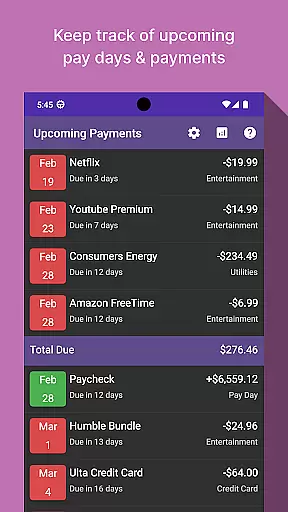
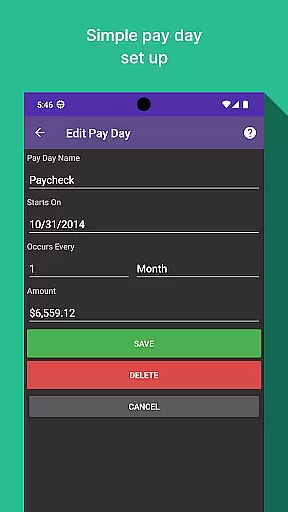
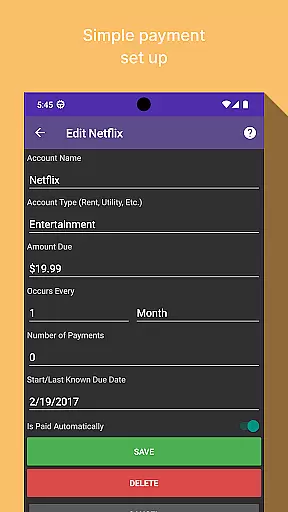
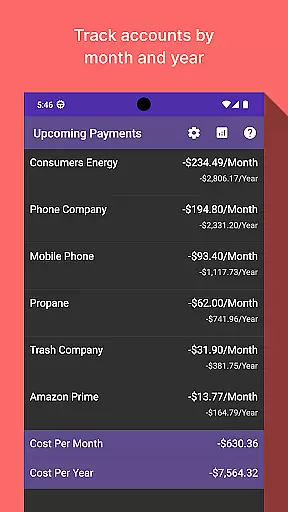
Bill Manager is a comprehensive financial management application designed to help users efficiently track and manage their upcoming bills. The app's core functionality revolves around bill tracking, ensuring you never miss a payment deadline again. By providing detailed information on pending bills, payment amounts, and upcoming paydays, it creates a reliable financial calendar for its users.
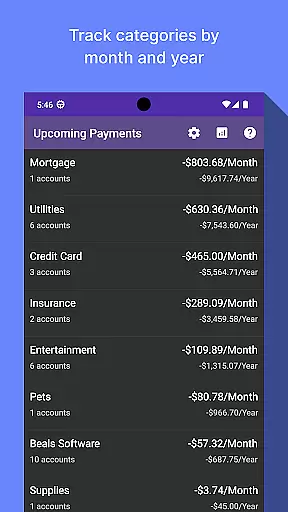
In addition to basic bill tracking, Bill Manager offers advanced analytics features that allow users to view their spending patterns by category and account. This breakdown is available on both a monthly and yearly basis, giving users deeper insights into their financial habits. Whether you're looking to better understand your recurring expenses or simply want to stay on top of your financial commitments, this app provides the tools necessary to maintain better control over your finances.
Bill Manager stands out with its comprehensive feature set tailored specifically for personal financial management. The app's primary feature is its intelligent bill tracking system, which not only lists upcoming payments but also calculates them against your next payday. This helps users plan their expenses more effectively and avoid late payments.
Another key feature is the advanced analytics dashboard, which provides detailed visual representations of spending patterns. Users can filter these analytics by month or year and view breakdowns by categories and accounts. This level of detail allows for more informed financial decision-making. Additionally, the app maintains a clean and intuitive interface, making financial management accessible even to those who aren't typically comfortable with numbers.
The combination of these features creates a powerful tool for anyone looking to gain better control over their financial obligations while also understanding their spending habits in greater detail.
Account and fund security is a critical aspect of any financial application, ensuring that users' sensitive information remains protected. Bill Manager employs advanced encryption protocols to safeguard your data against unauthorized access.
The app implements multi-factor authentication, adding an extra layer of security by requiring not just a password but also a verification code sent to your mobile device. This ensures that only you can access your account even if your password is compromised.
Furthermore, Bill Manager conducts regular security audits and updates its systems to defend against emerging threats. Users benefit from peace of mind knowing their financial details are securely managed, allowing them to focus on tracking their bills without concern for potential breaches.
A seamless transaction experience is essential for managing bills efficiently, and Bill Manager excels in providing users with timely and accurate bill tracking. The app notifies you of upcoming bills, ensuring you never miss a payment deadline.
With an intuitive interface, the app displays detailed information about each bill, including due dates and amounts owed. This clarity helps users plan their finances effectively and avoid late fees or service interruptions.
Additionally, Bill Manager offers an analytics view where users can monitor their spending patterns across different categories and time periods. This feature empowers users to make informed financial decisions based on comprehensive insights into their expenditure habits.
User-friendly interface
Comprehensive bill tracking
Advanced analytics dashboard
Customizable notifications
Secure data encryption
Limited free version
No automatic bill payment
Occasional syncing issues
Subscription fees required
Learning curve for new users

Manage your account, make a payment, and redeem your rewards on the go.
 4.50
4.50
Payday cash advance & Instant cash advance: Borrow money instantly, Get cash now
4.60
Your Big Financial Friend
4.70
Get, Earn, and Save Money
4.30
Put crypto to work & earn rewards. Stake crypto like Ethereum, Solana & Cardano
4.40
BTC, Crypto, Stocks & Options.
4.20
Save, spend & get paid faster²
4.50
Amazing Financial Calculator. Based on HP 10bII, but easier to use!
4.40
Cash Advance, Credit Cards, Credit Lines, Score Monitoring, Saving, Budgeting
4.70
The Citi Mobile® App lets you manage your accounts virtually anytime, anywhere
4.80
The DailyPay app lets you access earned wages before your next payday.
4.70
Money App - Earn Cash back, Fast Cash Advance, Personal Loan Offers, Banking
4.70
Manage your credit card account with the Credit One Bank mobile app.
4.70
Access State Farm accounts, policies, ID cards and more
4.60
The simplest way to budget, bank, save and invest.
4.50
All your crypto & stocks in one secure and trusted app.
4.40
Make your paycheck work harder for you with Perpay.
4.10
Venmo is the fun and easy way to pay and get paid.
4.10
Bitcoin gpu app helps you remote mine using your cell phone easily .
3.60


User Reviews