
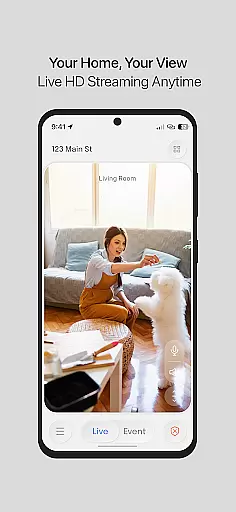
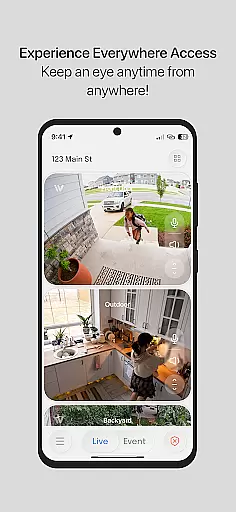
InstaVision is a comprehensive home security application that offers advanced monitoring tools to ensure the safety of your home. The app provides live HD video streaming, allowing users to view their property in real-time with exceptional clarity. Additionally, its two-way audio feature enables communication through connected devices, reinforcing your home's protective layer.
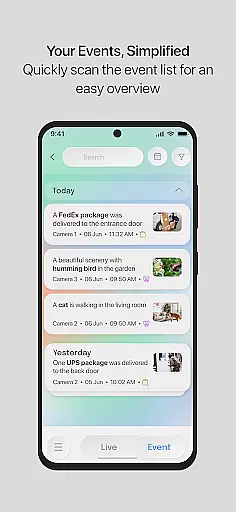
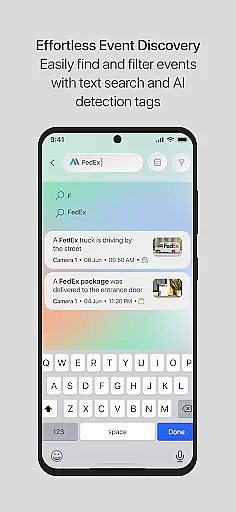
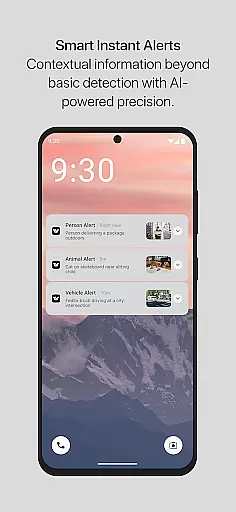
For those seeking enhanced security, InstaVision offers a Smart Security plan. This subscription unlocks AI-powered features such as event tagging, which categorizes movements and sends alerts with relevant video clips. With secure cloud storage for event videos and customizable user permissions, it ensures you have control over who accesses your cameras and data.
This solution is ideal for American households looking for innovative security measures developed by experts within the USA. By choosing InstaVision, users gain peace of mind knowing they are using a system designed with top standards in privacy and protection.
InstaVision stands out with its robust feature set tailored for home security enthusiasts. The live HD video streaming delivers crystal-clear images, ensuring no detail goes unnoticed when monitoring your premises. Coupled with two-way audio capabilities, users can communicate effectively through their devices, adding an interactive dimension to home surveillance.
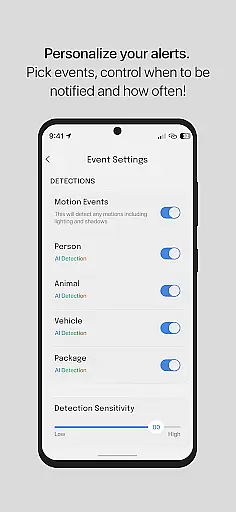
The Smart Security plan elevates the experience by introducing AI-driven functionalities like event tagging. This feature intelligently identifies movement types—people, vehicles, or animals—and categorizes them accordingly. Users receive notifications enriched with specific information and video evidence, enhancing situational awareness.
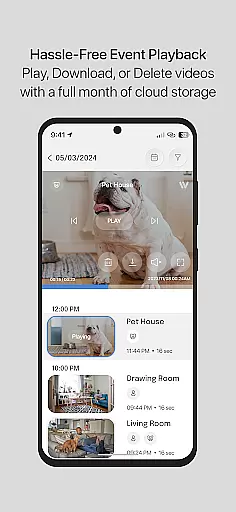
Moreover, InstaVision emphasizes user collaboration and data security. It allows multiple users to access camera feeds with customized permissions while securely storing event footage in the cloud for 30 days. These aspects make it not only a tool for monitoring but also a comprehensive platform for managing your home's safety collaboratively.
In the realm of home security, the authenticity of property listings is paramount. InstaVision ensures that every feature and capability listed is not only present but optimized for real-world application. This commitment to transparency means users can trust in the comprehensive nature of their security setup.
InstaVision provides detailed descriptions and specifications for its suite of security tools, ensuring users understand exactly what they are getting. From HD live video streaming to two-way audio communication, each feature is accurately represented, giving homeowners peace of mind about their security choices.
The app's dedication to authentic representation extends to its InstaVision Smart Security plan. Subscribers gain access to advanced AI-powered features like event tagging and enhanced user sharing, all accurately described to ensure informed decision-making. This level of detail empowers users to tailor their home security with precision.
By prioritizing clear, factual information about its offerings, InstaVision builds a foundation of trust with its users. The assurance that comes from verified property listings enables homeowners to fortify their spaces confidently, knowing their security measures are both reliable and effective.
Effective home management features are crucial for maintaining a secure household, and InstaVision excels in this area. By integrating smart monitoring tools with intuitive controls, the app allows users to manage their home security effortlessly, enhancing overall safety and convenience.
Central to InstaVision's home management capabilities is its live HD video streaming. This feature offers real-time surveillance, allowing homeowners to monitor their property with clarity and immediacy. Coupled with two-way audio functionality, users can actively engage with their environment, reinforcing their protective measures through direct communication.
For those seeking advanced options, the InstaVision Smart Security plan introduces sophisticated AI-driven functionalities. Event tagging categorizes movements into people, vehicles, or animals, providing targeted alerts. Enhanced user sharing further simplifies collaborative security management by enabling custom permissions for multiple users, streamlining team-based oversight.
Additionally, secure cloud storage ensures event videos are safely archived for 30 days. This extended access allows homeowners to review and download critical footage at their convenience, solidifying InstaVision's role as a comprehensive solution for modern home security needs.
Advanced AI features
Secure cloud storage
Customizable user permissions
HD live streaming
Two-way audio communication
Premium features require subscription
Limited free storage options
AI accuracy may vary
Internet connectivity required
Higher cost than basic apps

Use Home by ShowingTime to easily manage showings, tours, feedback and more
 3.60
3.60
PRO Version of GLB AR Viewer
4.5
The official app for Home Assistant. Control your home anywhere in the world.
4.30
Resident Center, powered by Buildium, is designed with simplicity in mind.
4.50
IP camera view and playback, for your WiFi cam or home security cctv system.
3.70
Floor Plan Creator Home Design with 2D interior design and 3d view.
3.90
Find contractors for all home renovation projects. Remodeling, repair, and more.
4.20
Find your next home, house, apartment, condo, casa, flat, rental, studio, or bed
4.70
An easier way to make payments and maintenance requests from anywhere.
3.50
Night Owl Protect helps you secure, protect, and connect your world!
4.60
Tailored Care Guides For Houseplants, Indoor Plants, Garden Plants & Flowers.
4.60
The only mappable smart lights for custom decoration.
4.50
Fire & Power Safety
4.50
Make Renting Easy
4.40
Wobble Fix Tool
4.40
Fully control your Philips TV with this all-in-one remote control app.
4.20
Schlage Lock Company LLC
4.00
Technology powering many in-home services for residents across the United States
3.80
Design house plans in 2D & 3D, style furniture, and preview renovation layouts
3.70


User Reviews