
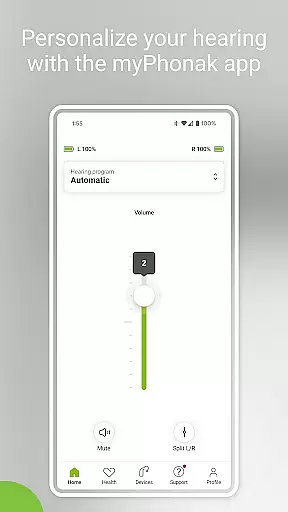
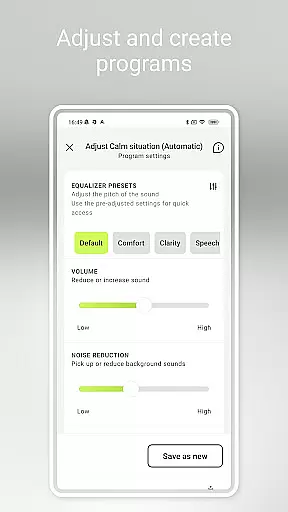
myPhonak is a comprehensive hearing aid management application designed for users of Phonak hearing aids. The app offers advanced remote control features, allowing users to adjust volume, noise reduction, microphone directionality, and equalizer settings to suit different listening environments. With personalized presets and detailed sliders for sound customization, users can tailor their hearing experience with precision.
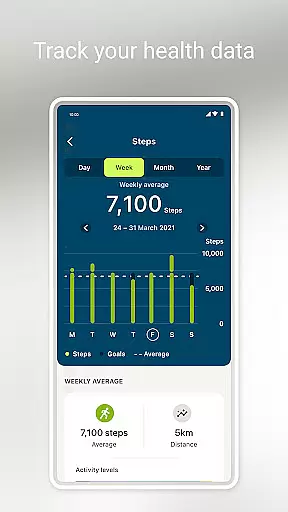
In addition to its core functionality, myPhonak provides remote support through live video consultations with hearing care professionals, enabling remote adjustments to hearing aids. The app also includes health tracking features such as step counting, activity levels, heart rate monitoring, and more, offering a holistic approach to personal health management. These features make myPhonak an essential tool for enhancing both hearing and overall wellness.
One of the standout features of myPhonak is its Remote Control functionality. This allows users to effortlessly modify their hearing aid settings, including volume adjustments, noise reduction, and microphone directionality. The app provides intuitive equalizer controls with presets like default, comfort, clarity, and softer, as well as customizable bass, middle, and treble sliders for precise sound personalization.
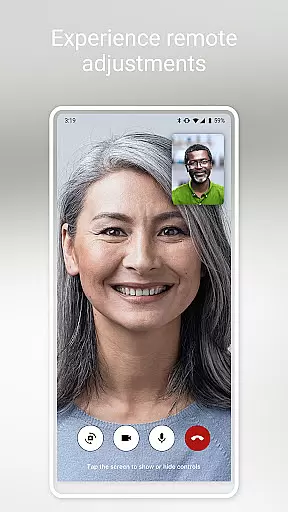
Another key feature is the Remote Support option, which facilitates virtual appointments with hearing care professionals. Through live video calls, users can receive professional guidance and have their hearing aids fine-tuned remotely. Additionally, the Health section tracks various metrics such as steps, wearing time, activity levels, heart rate, and distance walked or ran, promoting an active lifestyle while managing hearing health.
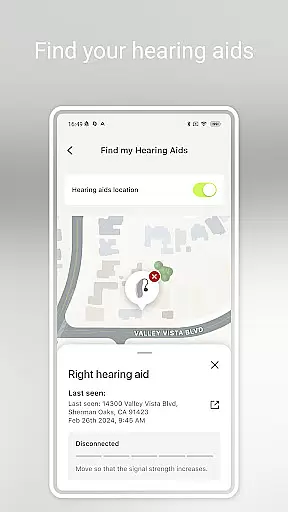
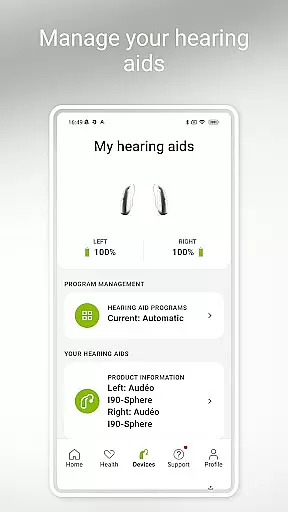
The app also supports device management functions like configuring Tap Control, setting up cleaning reminders, and monitoring battery levels and connection statuses of hearing aids and accessories. Compatible with a wide range of Phonak devices and iOS smartphones, myPhonak ensures seamless integration into users' daily routines, enhancing accessibility and convenience.
In the realm of medical applications, content credibility is paramount. myPhonak excels in this area by providing users with access to enhanced hearing controls and personalization options for Phonak hearing aids, all reviewed and approved by audiological experts. This ensures that every feature, from noise reduction to microphone directionality, meets high medical standards.
The app's Remote Support function allows users to connect with their hearing care professionals via live video calls for remote adjustments. This feature not only enhances convenience but also guarantees that any changes made to the hearing aids are performed under professional supervision, reinforcing the reliability of the app's content.
Furthermore, myPhonak offers health tracking features such as step counting, activity levels, and heart rate monitoring on select devices. These health metrics are gathered using advanced sensor technology integrated into compatible hearing aids, ensuring accurate and credible data collection that users can trust.
By combining expert-reviewed functionalities with trusted health data tracking, myPhonak establishes itself as a credible medical application that prioritizes user safety and effectiveness in managing hearing health.
Teleconsultation has become an essential service in modern healthcare, and myPhonak delivers exceptional quality in this domain. Through its Remote Support feature, users can engage in live video consultations with their hearing care professionals. This capability ensures that users receive timely and expert advice without the need for physical appointments, enhancing both convenience and continuity of care.
The quality of these teleconsultations is bolstered by the app's compatibility with a wide range of Phonak hearing aids equipped with Bluetooth connectivity. This compatibility ensures stable and clear communication between the user and the healthcare provider, which is crucial for effective remote adjustments and consultations.
Additionally, myPhonak supports integration with Apple Health when connected to compatible hearing aids like Phonak Audu00e9o Fit. This integration enriches the teleconsultation experience by providing comprehensive health data that can be discussed during consultations, leading to more informed medical decisions.
Overall, myPhonak sets a high standard for teleconsultation quality, offering reliable, professional, and data-enriched remote healthcare services that enhance the management of hearing health.
User-friendly interface
Comprehensive hearing controls
Remote professional support
Health tracking integration
Wide device compatibility
Limited Android support
Advanced features require specific models
Dependent on Bluetooth connectivity
Health data may not be real-time
Requires professional setup

Modivcare members can book and manage trips.
 4.50
4.50
Secure video visits with your VA care team from anywhere
4.50
Perform pure-tone audiometry and a speech intelligibility test on your phone.
4.50
The Better Pharmacy Experience
4.90
Assess and treat left neglect more effectively in stroke and brain injury rehab.
4.30
700 questions, 2 full exams, Predictive Scoring—your key to NREMT success!
3.90
Pelvic Floor Muscle Exercises
4.80
A rapid reference for healthcare professionals caring for pediatric patients.
4.30
Donating plasma just got easier with the BioLife Plasma Services mobile app.
3.90
Access health information and communicate with your care team anytime, anywhere.
4.80
Enables quick access to medical data and contacts in case of emergency (ICE)
4.70
Save up to 80% on your pharmacy prescriptions & medications with free Rx coupons
4.70
Your donation experience just got smoother; Donor Hub is your go-to place.
4.70
ASCCP Management Guidelines- There’s an app for that!
4.60
Anthem/Wellpoint and other health insurance plans
4.60
The Omada app enhances your program experience and helps you stay engaged.
4.50
Voice pitch monitor for speech therapy, LSVT, Parkinson's, singing & trans
4.30
Master AEMT with 1,400+ study items, TEIs, practice tests, and scoring.
4.10
An easy way to earn money donating plasma. Book a visit, sit back, and get paid.
3.80


User Reviews