
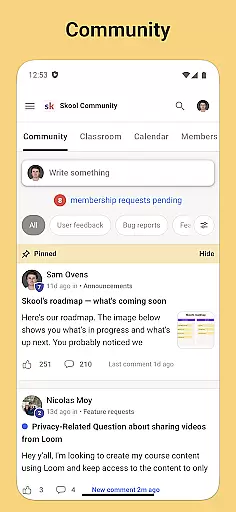
Skool is a dynamic social platform designed to keep users engaged with their online communities while on the move. This app serves as a one-stop solution for community interaction, offering features such as group discussions through posts and comments, which foster vibrant exchanges among members.
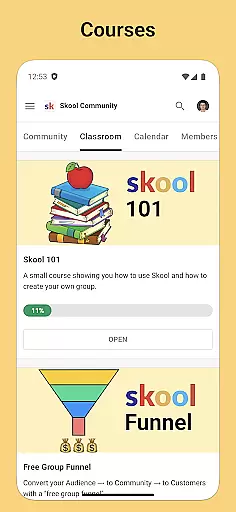
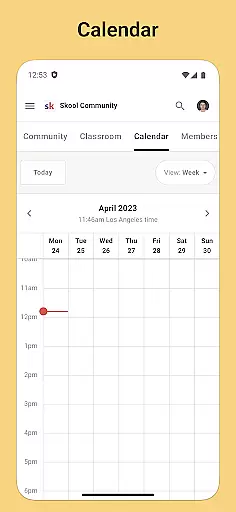
In addition to its community-building tools, Skool also provides educational resources via courses that include both video and text-based lessons, allowing users to learn new skills or deepen their knowledge in various subjects. The inclusion of a calendar feature ensures that users never miss out on important community events, further enhancing their interactive experience.
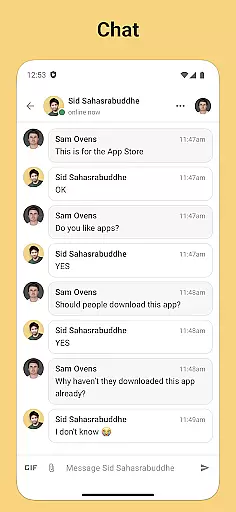
With real-time chat functionality, Skool enables direct messaging between community members, making it easy to maintain personal connections within professional or interest-based groups. Whether you're looking to expand your network, share insights, or simply stay updated with your favorite communities, Skool offers an accessible and efficient way to do so.
Skool stands out with its comprehensive set of features tailored for community engagement. One of its key offerings is the Community section, where users can participate in group discussions using posts and comments, creating a lively forum for idea exchange and collaboration.
The app's Courses feature is another highlight, providing users access to a wealth of educational content presented through video and text-based lessons. This allows individuals to engage in self-paced learning across a wide range of topics, directly from their mobile devices.
Furthermore, Skool's Calendar and Chat functionalities add layers of convenience and connectivity. The Calendar helps users keep track of upcoming community events, ensuring they can plan their participation accordingly. Meanwhile, the Chat option facilitates private conversations, enabling users to communicate directly with others in their communities, thus strengthening personal and professional relationships.
User profile customization is a crucial aspect of any social platform, allowing individuals to express their identity and establish trust within the community. Skool provides users with robust tools to personalize their profiles while ensuring authenticity through verification processes.
The app enables members to create detailed profiles that showcase their interests, expertise, and contributions across various communities. Users can upload profile pictures, write bios, and highlight their involvement in different groups or courses. This level of customization helps foster meaningful connections and enhances engagement within the platform.
Skool places significant emphasis on authenticity verification to maintain a trustworthy environment. The platform employs multi-layered verification methods, including email confirmation, social account linking, and optional identity checks. These measures help prevent fake accounts and ensure that users are interacting with genuine community members.
By combining comprehensive customization options with stringent verification protocols, Skool creates a secure space where users can confidently connect, learn, and collaborate with others who share similar interests and professional backgrounds.
Connection discovery represents a vital feature in social applications, enabling users to find and engage with like-minded individuals and relevant communities. Skool excels in this area by offering sophisticated algorithms and intuitive tools for discovering valuable connections.
The app's intelligent recommendation system analyzes user behavior, interests, and participation patterns to suggest relevant communities, courses, and potential connections. Whether you're looking for professional networking opportunities or seeking to join specific interest groups, Skool's discovery engine provides personalized suggestions that enhance your social experience.
Skool's connection discovery extends beyond simple recommendations. The platform allows users to search for communities based on topics, locations, or specific keywords. Additionally, the app facilitates finding peers within courses and events, making it easier to establish meaningful relationships around shared learning experiences.
Through its comprehensive approach to connection discovery, Skool ensures that users can efficiently build their networks, participate in valuable discussions, and access relevant educational content, ultimately creating a more engaging and productive social learning environment.
User-friendly interface
Comprehensive community tools
Educational content variety
Event tracking system
Direct messaging capability
Limited customization options
Occasional notification delays
Advanced features require subscription
Interface can be cluttered
Some courses are not free

Watch, Edit, Upload and Share Gaming Clips
 4.00
4.00
A gathering place for 300 million people's life interests and hobbies
4.30
Follow the Truth! Join America's leading free-speech social platform.
3.10
Dating for singles. Meet lonely people nearby online. Find your match here!
4.20
Social App Used By Millions
4.40
Unlimited messages, WiFi Calling, Texting app. Text now with Second Phone Number
4.10
Watch 24/7 great live stream, or go live to boost your social followers!
4.50
Connect and share ideas
4.10
TikTok Lite - Designed for speed, simplicity, and saving your phone’s space!
4.40
Date single & make friend
4.60
Live pics from your friends - Only the photos you want to see
4.60
Dating & make friend to chat, meet, flirt, and make real connections!
4.60
live inside your fandom
4.60
Reddit is where you’ll find your people and feel at home in every conversation.
4.60
Live video chat to connect with people around the world. Video chatting on Olive
4.40
Discover an open-minded dating experience when you download today
4.10
Sell unwanted items and buy preloved stuff in your local community.
4.10
The world's leading social networking app for gay, bi, trans, and queer people.
4.10
Dive into diverse fandoms. Connect, create, reblog.
3.90


User Reviews