
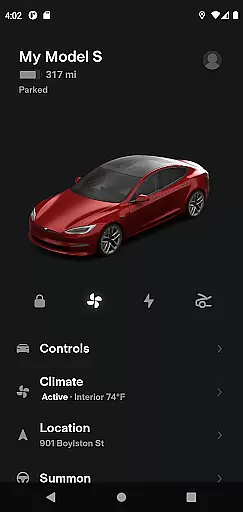
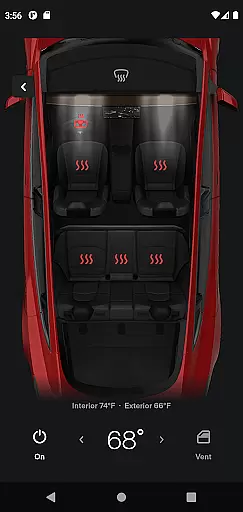
Tesla is more than just a car; it's a lifestyle companion that seamlessly integrates with your digital life. This app allows Tesla owners to maintain constant communication with their vehicles and Powerwalls, providing unprecedented control over their driving experience. With features ranging from real-time charging updates to remote climate control, the Tesla app ensures you're always connected to your vehicle.
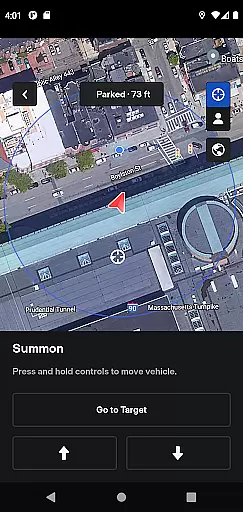
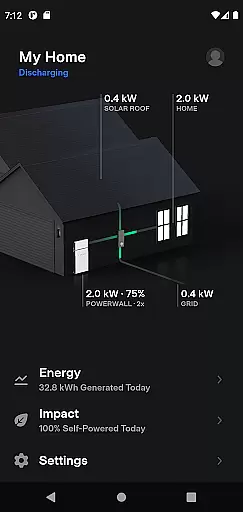
Whether you're checking your car's location, summoning it from a tight parking spot, or monitoring solar energy storage in your Powerwall, this app offers a comprehensive suite of tools designed to enhance convenience and efficiency. The ability to manage both your vehicle and home energy system from one platform represents a significant leap forward in smart living technology.
The Tesla app boasts an impressive array of features that cater to every aspect of vehicle management. Owners can remotely start or stop charging, adjust cabin temperature, lock or unlock doors, and even flash lights or honk the horn to locate their parked vehicle. For those with Autopilot capabilities, the Summon feature allows you to navigate tight spaces with ease.
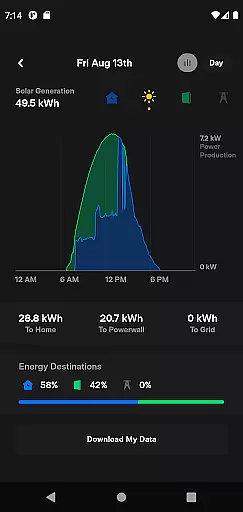
Beyond vehicle control, the app provides advanced navigation options by enabling address sharing from other apps directly to your car. It also supports media control for passengers and offers software update notifications. Powerwall integration takes this further by allowing users to monitor solar energy production, home consumption, and grid export - all within a single interface.
The Tesla app offers an extensive range of features that cater to various aspects of a user's lifestyle, ensuring comprehensive coverage of needs for both vehicle and home energy management.
With functionalities ranging from real-time vehicle charging monitoring to climate control and Powerwall energy storage oversight, the app provides users with unparalleled convenience and control over their Tesla products.
This broad spectrum of services enables Tesla owners to maintain optimal performance and efficiency in their vehicles and homes, making daily tasks easier and more streamlined.
By integrating advanced technology with everyday usability, the Tesla app stands out as a versatile tool that enhances modern living.
Authenticity and credibility are at the core of the Tesla app's offerings, with all content and features developed based on expert engineering and technological innovation.
Each feature, from remote vehicle locking to solar energy data tracking, is designed and implemented by Tesla's team of experts, ensuring accurate and reliable performance.
Users can trust that the information provided by the app, such as energy usage statistics and vehicle status updates, is precise and backed by Tesla's renowned expertise in sustainable technology.
This commitment to authenticity and expert-driven content makes the Tesla app a dependable companion for managing Tesla products efficiently and effectively.
Seamless vehicle integration
Comprehensive energy management
Remote access convenience
Advanced security features
Innovative Summon functionality
Requires compatible Tesla model
Powerwall 2 necessary for full features
Dependent on stable internet connection
Limited functionality for older vehicles
Potential privacy concerns

Fly your Solo like a boss.
 4.10
4.10
What is my face shape? Find out your face shape from picture, see fitting frames
3.90
Duo Watch Face (animated)
4.4
Paranormal EVP, Ghost Box, Spirit box, ITC, Haunted, Spirit communication device
3.70
See wait times and check into a hair salon ahead of time with Online Check-In.
4.80
Crochet made easy: step-by-step tutorials, beginner patterns & projects
4.60
The cutest Autumn watchface featuring the adorable Mr. Squirrel
4.4
An Eerie Musical Trigger Toy for Spirits to Play with!
3.50
Subwoofer school’s in session! You’ve now enrolled into KICKER U.
3.80
My Diary - Daily Journal with lock: Diary journal app and secret diary with lock
4.80
Countdown to Christmas 2025 with festive games & activities in a virtual village
4.80
A unique and customizable watch face which rotates its layout every minute.
4.80
Digital smart watch face made for Wear OS.
4.70
Stay connected with your loved ones & vehicles | Share live GPS location updates
4.60
Unique "Isometric" style digital watch face for Wear OS
4.50
Paranormal Spirit Bell Trigger Device
4.30
Falling Fruit is a massive collaborative map of food in our cities.
3.20
Big bold digital watch face with 30 colors, 6 complications and AOD.
4.5
Immerse yourself in the serenity of lavender fields and white butterflies
4.2


User Reviews