
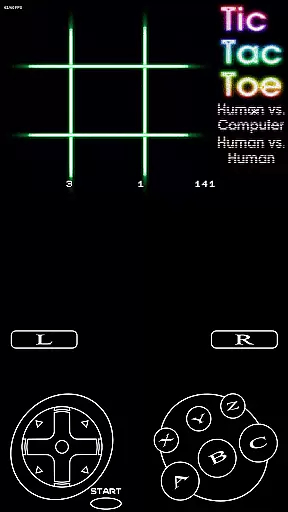
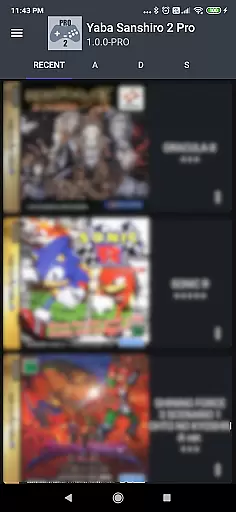
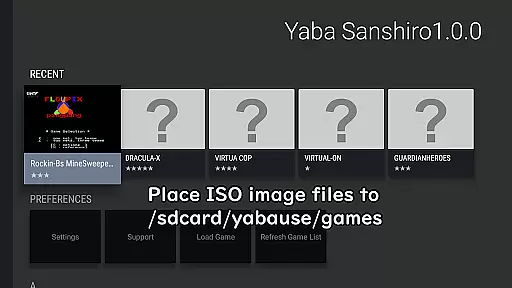
YabaSanshiro 2 Pro is an advanced Sega Saturn emulator designed for Android devices, allowing users to relive classic gaming experiences. The app meticulously replicates the hardware of the original Sega Saturn console through sophisticated software engineering. This enables gamers to play their favorite Sega Saturn games on modern mobile devices with enhanced features.
A key highlight of YabaSanshiro 2 Pro is its support for high-resolution polygon rendering using OpenGL ES 3.0, delivering improved graphics quality compared to the original console. Additionally, the emulator extends the internal backup memory from 32KB to 8MB, providing more space for saving game progress and other data. These enhancements ensure a smoother and visually superior emulation experience while maintaining compatibility with a wide range of Sega Saturn titles.
The emulator is particularly suited for retro gaming enthusiasts who own a collection of Sega Saturn game discs. By creating ISO image files from these discs and transferring them to the appropriate directory on their Android device, users can enjoy their classic games on the go. With added cloud integration for backing up save data, YabaSanshiro 2 Pro offers both convenience and reliability for preserving cherished gaming memories.
YabaSanshiro 2 Pro stands out with its robust feature set tailored for Sega Saturn emulation. One of its primary capabilities is the ability to emulate Sega Saturn games with remarkable accuracy, despite the inherent challenges of hardware emulation. The app supports higher resolution polygons via OpenGL ES 3.0, significantly enhancing the visual fidelity of emulated games compared to the original console output.
In addition to graphical improvements, YabaSanshiro 2 Pro offers practical features such as extended internal backup memory, increasing the storage capacity from 32KB to 8MB. This allows users to save more game progress and data without worrying about running out of space. The emulator also integrates with cloud services, enabling users to back up their save data and state information securely. This ensures that gaming progress is preserved and can be shared across multiple devices if needed.
Another notable feature is the app's adaptability to modern Android specifications, including Scoped Storage compliance. This ensures seamless functionality on newer Android versions while addressing potential file management issues. Users can easily load games through the intuitive interface, and the in-app reporting tool allows them to communicate compatibility issues directly to developers. These comprehensive features make YabaSanshiro 2 Pro a top choice for Sega Saturn enthusiasts seeking a reliable and feature-rich emulation solution.
Arcade authenticity is a crucial aspect of any emulation app, and YabaSanshiro 2 Pro excels in this area. The application emulates the Sega Saturn hardware through sophisticated software, allowing users to relive the classic arcade experience on modern Android devices. This dedication to preserving the original gaming experience ensures that players can enjoy their favorite titles as they were meant to be played.
The app goes beyond simple emulation by incorporating advanced features while maintaining the nostalgic feel of the original console. With support for higher resolution polygons using OpenGL ES 3.0, games look better than ever while still retaining their classic charm. Additionally, the extended internal backup memory from 32KB to 8MB allows for more extensive save states, enhancing gameplay without compromising the nostalgic value.
Users benefit from the meticulous attention to detail in replicating the Sega Saturn environment. By creating an ISO image file from game CDs and transferring it to a specific directory on their device, players can seamlessly access their game library. This process respects copyright laws while enabling gamers to enjoy a wide array of titles that defined an era of arcade gaming.
Control responsiveness is vital for an immersive gaming experience, and YabaSanshiro 2 Pro delivers with precision. The app ensures that every input from the user is registered and executed promptly, providing a seamless interaction between the player and the game. This immediacy in control feedback is essential for maintaining the fast-paced nature of arcade games.
The emulator supports various control schemes, allowing users to customize their setup for optimal performance. Whether using touchscreen controls or external controllers, YabaSanshiro 2 Pro guarantees low latency and high responsiveness. This adaptability caters to different preferences and play styles, ensuring that all gamers can find a comfortable configuration.
Furthermore, the app's compatibility with Android 10 and above introduces additional considerations such as Scoped Storage, which may affect file access speeds. Despite these challenges, YabaSanshiro 2 Pro maintains its commitment to responsive controls, offering a fluid gaming experience that honors the spirit of arcade classics.
High-quality emulation
Enhanced graphics
Cloud backup support
Extended memory capacity
User-friendly interface
No BIOS included
Complex setup
Game compatibility
Storage limitations
Requires technical knowledge

R-TYPE game
 4.60
4.60
Dig yourself a way to gold, diamonds and success with this addictive mining game
3.90
Motorcycle racing games! Prove your paperboy can win in the bike race 3D!
4.50
Play, Craft and Share your Endless Runner Levels on Kooply Run: Subway Craft
4.50
Meet Snake Run Race! Slither through an obstacle course in our fun running game!
4.70
Save the Galaxy from galaxiga alien - Classic arcade shooter game
4.60
Shoot the web, jump and teleport! Be a stickman hero and destroy your enemies!
4.50
Genesis/Mega Drive/CD & Master System/Mark III Emulator
4.30
Full featured version of Pizza Boy A (GBA emulator)
4.80
Create your restaurant story & make food on a crazy kitchen in this cooking game
4.70
Challenge your friends across the world to see who can jump the farthest!
4.50
Relax and catch fish for your aquarium while earning rewards in these tank games
4.40
Three awesome new levels for The Impossible Game.
4.30
Enter Double Dragon Trilogy, a compilation of the beloved arcade series
4.10
Frenetic party game, pass the bomb to the other players!
3.80
John GBA is GBA emulator. This emulator is easy to use.
3.10
Play retro games with ease – NES, SNES, PSX, PSP & more supported
4.0
Machine Gun Fire Rumbles in the Jungle
4.0
Reach high, and shine in the neon world in 3D!
4.0


User Reviews