
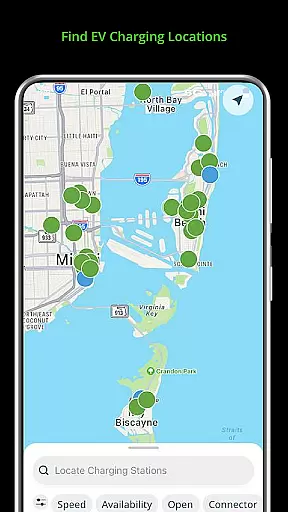
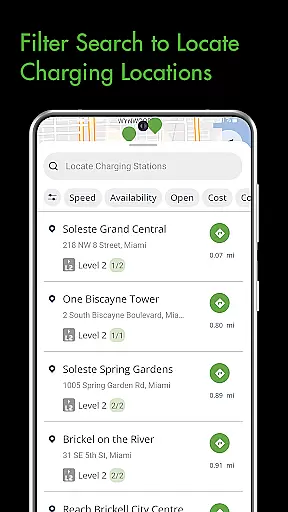
Blink Charging Mobile App is a comprehensive solution for electric vehicle (EV) owners, designed to simplify and enhance the charging experience. The app allows users to locate public EV charging stations with ease, using various search criteria such as zip code or business name. It also provides real-time monitoring of charge sessions, including energy delivered and costs, ensuring transparency and control over the charging process.
One of the standout features is the ability to manage home charging stations like the HQ 200 directly from the app. Users can configure settings, track charging history, and receive status notifications. With an expanding network that now includes SemaConnect stations, Blink continues to grow its infrastructure, offering drivers more options and greater convenience wherever they need to charge their vehicles.
The Blink Charging Mobile App offers a robust set of features tailored for EV drivers. Its station locator tool helps users find nearby charging points by multiple search parameters, making it easier than ever to plan trips and daily commutes. The app's detailed session management allows users to monitor real-time data on energy usage, costs, and charging speeds, providing complete visibility into each charging session.
Additionally, the app supports setup and management of home charging stations, specifically the HQ 200 model. This feature lets users customize settings, view historical data, and receive timely notifications about their charging status. The inclusion of SemaConnect stations within the Blink Network further enhances accessibility and usability, allowing cross-platform functionality for managing payments, locating chargers, and overseeing active sessions seamlessly.
When it comes to electric vehicles (EVs), having access to detailed vehicle information is crucial for an optimal charging experience. The Blink Charging mobile app provides EV owners with comprehensive details about their charging sessions.
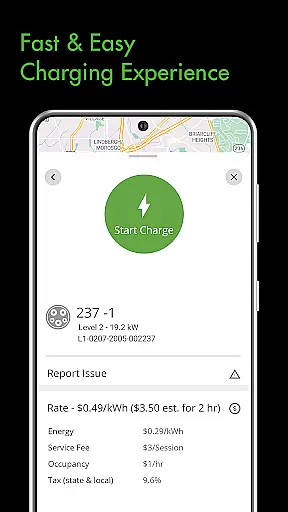
Through the app, users can monitor real-time data during a charging session, including occupancy time, estimated costs, and energy delivered. This level of detail ensures that EV drivers are well-informed about the charging process and can plan accordingly.
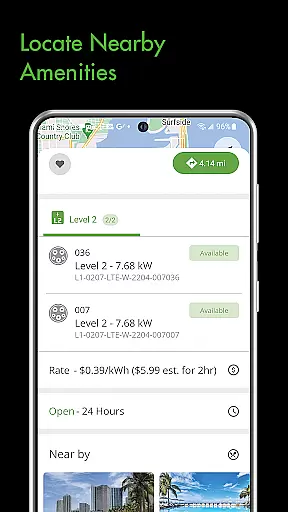
In addition to session specifics, the app also displays information about the charging stations themselves. Users will know the current vehicle charging speed and other station-related information, which helps in understanding the charging dynamics and making informed decisions on the go.
Price transparency is a significant factor for EV owners who regularly use public charging stations. The Blink Charging mobile app addresses this by providing clear information on charging session costs.
Users of the app can view estimated charge session costs before they begin charging, allowing them to anticipate expenses and manage their budgets effectively. This feature eliminates surprises and builds trust between service providers and consumers.
Moreover, the app's ability to display costs across an expanded network that includes SemaConnect stations ensures that pricing is consistently transparent, regardless of the station brand. This empowers drivers to choose the most cost-effective charging options available to them.
User-friendly interface
Comprehensive charge monitoring
Home charger management
Expanded network coverage
Real-time updates and alerts
Limited to specific charger models
Occasional connectivity issues
Higher energy costs at peak times
Subscription fees for premium features
Not all locations have fast chargers

Theme for Car Launcher
 4.2
4.2
Monitor specific TOYOTA parameters by adding this plugin to Torque Pro.
2.00
DMV Test Pro offers all the updated FREE DMV tests online.
4.60
Oil change service & coupons for car maintenance at Valvoline Instant Oil Change
4.70
Car Values, Research and More
4.80
Car Sounds Engine Sounds app welcomes Auto Lovers to feel Car Simulator Sound
4.20
Monitor your behind-the-wheel behavior to become a safer driver and save.
4.10
Available in select states.
4.00
Autotrader is your online solution for buying and selling new and used cars.
4.40
Get more out of your AAWireless adapter with this companion app | aawireless.io
4.80
View your car’s service records and find out when maintenance is due.
4.70
MySubaru: Download. Connect. Love.
4.70
Easy connect & control your cars from afar. Remote Lock & unlock car and carplay
4.60
On the CarShield app, you can view contracts, make payments, & request roadside.
4.40
Ultimate OBD2 Car Scanner: Diagnostics, Service and Modification Tool
4.30
Discover new and used cars in Syria easily! Browse ads and connect with sellers.
3.70
Mobile Phone Parking - So easy to park
3.70
O'Reilly Pro will streamline your parts lookup and ordering process!
3.20
Easily notify car owners in urgent situations, safe, fast, multilingual.
4.1


User Reviews