
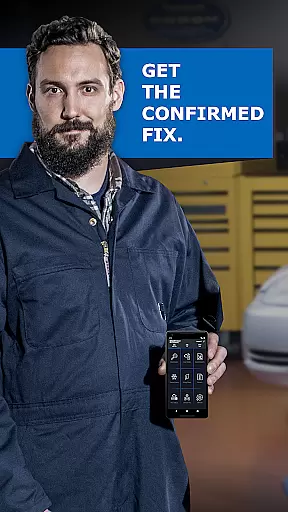
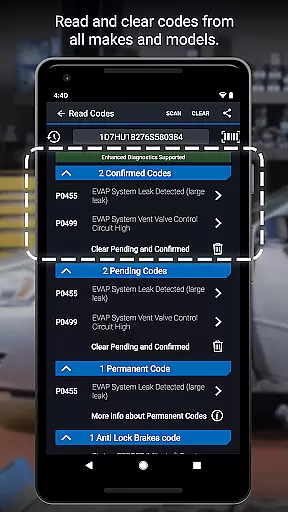
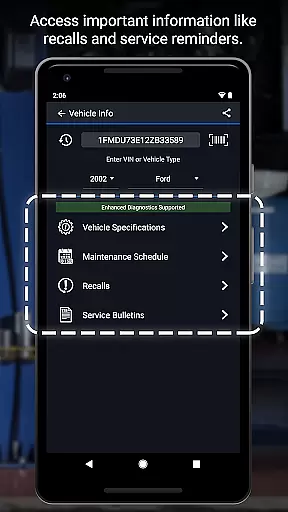
BlueDriver OBD2 Scan Tool is a professional-grade automotive diagnostic application that transforms your smartphone or tablet into an advanced scan tool. Designed for both professional mechanics and DIY enthusiasts, the app pairs with the BlueDriver Bluetooth Sensor to provide comprehensive vehicle diagnostics. The core functionality includes reading and clearing trouble codes across multiple systems such as engine, ABS, airbag, and transmission modules.
Beyond basic code reading, BlueDriver stands out with its enhanced diagnostic capabilities including Mode 6 testing, smog readiness checks, and live data graphing. Users can generate detailed Repair Reports specific to their vehicle's make, model, and year, while accessing a database of millions of real-world fixes. The wireless Bluetooth connectivity ensures convenient operation without cumbersome cables, making it suitable for both quick checks and in-depth diagnostic sessions.
This application proves particularly valuable when addressing check engine lights, preparing for emissions tests, or conducting pre-purchase vehicle inspections. By providing clear, actionable information and professional-grade reporting tools, BlueDriver empowers users to make informed repair decisions and potentially save significant costs on automotive maintenance.
The BlueDriver app distinguishes itself through several key features that enhance the diagnostic experience. Its wireless Bluetooth connectivity enables seamless communication with the vehicle's onboard systems without the need for physical cables, providing greater mobility during diagnostic procedures. The app's multi-system scanning capability covers not only standard powertrain codes but also extends to ABS, airbag, transmission, and other critical vehicle systems.
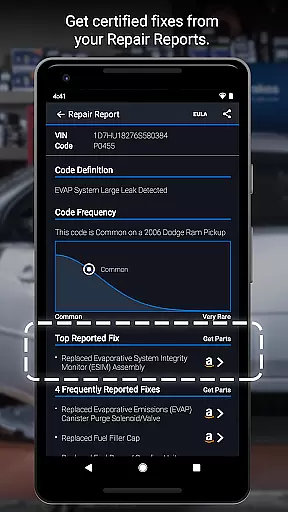
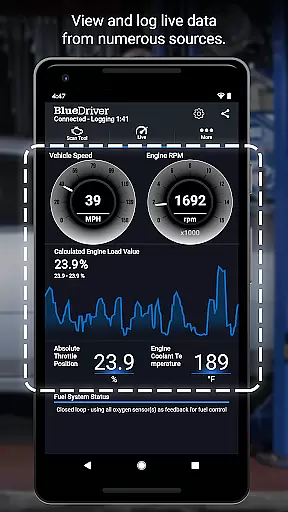
One of the most valuable features is the ability to generate professional-grade Repair Reports that are specific to each vehicle's VIN and detected trouble codes. These reports draw from a vast database of real-world fixes, offering practical solutions rather than just technical descriptions. The live data monitoring with multi-PID graphing allows technicians to visualize multiple parameters simultaneously, facilitating more accurate diagnosis of intermittent issues.
Additional notable features include metric/imperial unit selection, freeze frame data capture, and Mode 6 test result interpretation. The app's compatibility with a wide range of vehicle manufacturers and models (2005 and newer) makes it versatile for various diagnostic scenarios. Furthermore, the ability to preview Repair Reports without a connected sensor by entering a VIN and trouble code demonstrates the app's flexibility and user-centric design.
Accessing detailed vehicle information is crucial for effective diagnostics and maintenance. BlueDriver OBD2 Scan Tool provides comprehensive data about your vehicle's health, including trouble codes from various systems like ABS, airbag, and transmission.
The app generates professional-grade Repair Reports tailored to your specific vehicle's year, make, and model. These reports not only list the issues but also suggest likely fixes in plain language, making it easier for both professional mechanics and DIY enthusiasts to understand and address problems.
With features like Mode 6 on-board monitoring test results and freeze frame data, users can dive deep into their vehicle's performance metrics. This level of detail ensures that you have all the necessary information at your fingertips to make informed repair decisions.
Price transparency is essential when selecting diagnostic tools, as it allows users to understand the true cost of using such services. BlueDriver stands out by offering its powerful diagnostic capabilities without requiring a subscription fee.
The BlueDriver app is free to install, and users can pair it with the BlueDriver Sensor to start scanning their vehicles immediately. The sensor itself is sold separately, either through the app or directly from the BlueDriver website, ensuring there are no hidden costs involved.
This transparent pricing model empowers users globally to access high-quality diagnostics without worrying about recurring fees. Additionally, the ability to preview Repair Reports without needing a sensor adds further value, allowing potential customers to evaluate the tool's usefulness before purchasing the hardware component.
User-friendly interface
Comprehensive system coverage
Wireless convenience
Detailed repair reports
No subscription fees
Sensor sold separately
Limited older vehicle support
Bluetooth dependency
Device compatibility issues
Internet required for full features

Theme for Car Launcher
 4.3
4.3
Buy and sell your boat
4.70
myAudi offers users services and Audi connect services for Audi drivers
4.10
Boost profits and hit your goals faster with GigU's amazing tools for gigworkers
4.00
Instant diesel savings. No credit checks or fees. Nationwide growing network.
4.40
Secure mobile payments & fuel savings at Phillips 66®, Conoco® and 76® stations
4.40
7-Day Returns on All Cars
4.80
Quick and easy car diagnostics to get you the right fix.
4.70
Browse millions of cars, track vehicle listings or sell your car today
4.70
Marathon ARCO Rewards members earn rewards & apply the rewards for fuel savings!
4.80
Car Values, Research and More
4.80
View your car’s service records and find out when maintenance is due.
4.70
Get price alerts, vehicle history details and more for cars near you!
4.50
OBD2 car scanner and diagnostics: read Check Engine, DTC, economy....
4.30
A full featured, real-time transit locator system
4.30
Control maps, media and messaging, with the Google Assistant while you drive
4.10
Take state-specific DMV permit tests and ace the exam.
3.90
Mobile Phone Parking - So easy to park
3.70
App Mirroring for Tesla Car's Browser
2.80


User Reviews