
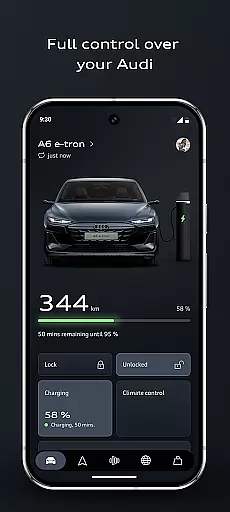
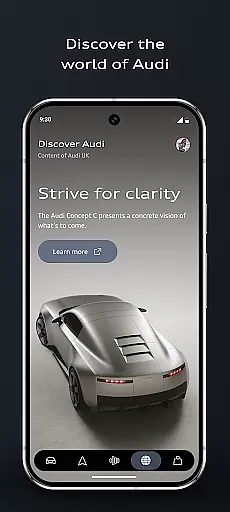
myAudi is an advanced mobile application designed specifically for Audi vehicle owners, enabling them to seamlessly interact with their cars through smart technology. The app provides a comprehensive suite of features that enhance the driving experience by offering remote vehicle control, intelligent route planning, and AI-supported assistance. With its latest version, myAudi has been thoroughly revised to include an improved user interface, optimized routines for vehicle preconditioning, and seamless charging process management. Whether you drive a fully electric, combustion, or e-hybrid Audi, this app makes your driving experience smarter, more connected, and more convenient.
The app's standout feature is its ability to control important vehicle functions remotely, such as locking/unlocking, starting the engine, and preconditioning the car's interior climate. Additionally, the intelligent route planner considers real-time traffic data and current vehicle range, ensuring efficient journeys. The AI-supported Audi assistant provides instant answers about your vehicle, eliminating the need to consult the owner's manual. These capabilities make myAudi an essential tool for modern Audi drivers who value convenience, connectivity, and cutting-edge technology.
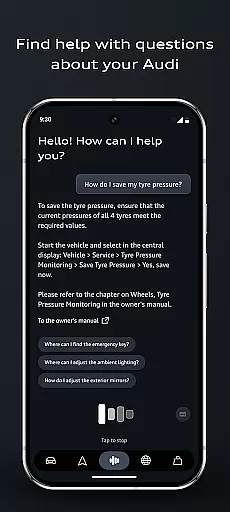
myAudi offers a rich set of features that cater to various aspects of vehicle ownership and driving experience enhancement. One of the key highlights is the AI-supported Audi assistant, which allows users to ask questions about their vehicle and receive clear, real-time information without needing to refer to the owner's manual. This feature exemplifies how artificial intelligence can simplify complex tasks and provide immediate value to users.
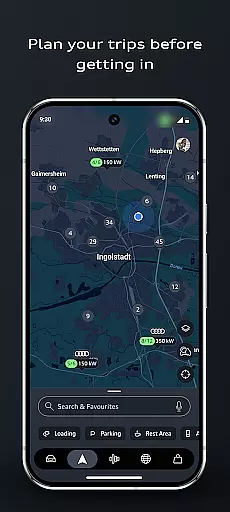
Another significant feature is the improved route planner, which takes into account real-time traffic data, current vehicle range, and charge scheduling for electric vehicles. It sends the planned route directly to the car's MMI system, making every journey smoother and more efficient. The app also includes digital key functionality, enabling users to lock, unlock, or start their Audi using just their smartphone. Furthermore, app routines allow users to automate everyday tasks based on time, location, or vehicle status, such as charging during off-peak hours or preconditioning the vehicle's interior climate. These features collectively demonstrate myAudi's commitment to innovation and user-centric design.
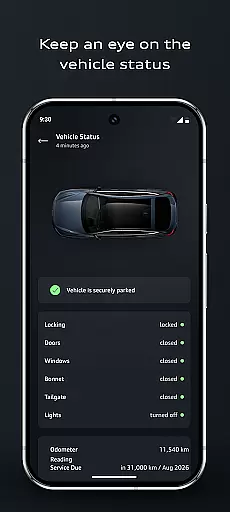
Detailed vehicle information is a cornerstone of the myAudi app, providing users with comprehensive data about their Audi. This feature encompasses everything from basic specifications to advanced performance metrics and maintenance records. The app displays real-time vehicle status, including fuel level, battery charge, tire pressure, and service alerts, ensuring owners are always informed about their car's condition.
The myAudi app takes vehicle information a step further by integrating smart technologies that enhance user experience. Through AI-powered assistance, users can inquire about specific vehicle functions without needing to consult the owner's manual. This intelligent support system delivers clear, real-time answers about vehicle capabilities and features, making complex technical information accessible to all users regardless of their automotive expertise.
For Audi owners, this level of detailed information translates into significant practical benefits. They can make informed decisions about maintenance, understand their vehicle's capabilities better, and even discover new features through the app's intuitive interface. The ability to remotely check vehicle status and receive timely service notifications helps prevent potential issues and optimizes vehicle performance, ultimately saving time and maintenance costs while enhancing overall ownership experience.
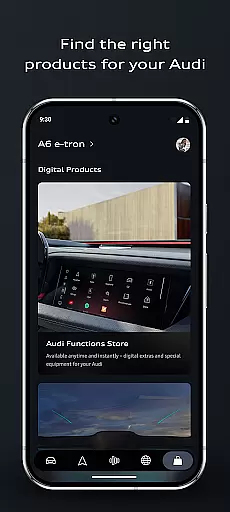
Price transparency in the myAudi app manifests through its innovative approach to vehicle upgrades and services. The application features a dedicated shopping area where users can explore various enhancements for their vehicles. Each available upgrade, whether it's a new Audi connect service or an on-demand feature, comes with clear pricing information, enabling owners to make well-informed decisions about their vehicle's evolution.
The app goes beyond simple price display by offering personalized recommendations based on individual vehicle configurations. This tailored approach ensures that owners only see relevant upgrade options with straightforward pricing structures. Additionally, the myAudi app provides detailed breakdowns of charging costs for electric and hybrid vehicles, helping users understand and manage their energy expenses more effectively.
This transparent pricing strategy benefits Audi owners by eliminating hidden costs and unexpected charges. Users can plan their vehicle enhancements and maintenance budget accurately, knowing exactly what they will pay for additional features or services. The app's clear presentation of costs, combined with its ability to schedule charging during off-peak hours, empowers owners to optimize their expenses while enjoying the full range of their Audi's capabilities.
User-friendly interface
Comprehensive vehicle control
AI-powered assistance
Efficient route planning
Seamless integration with Audi models
Limited to Audi vehicles
Requires stable internet connection
Potential privacy concerns
Subscription fees for some services
Compatibility issues with older models

Take Control of Your Car
 4.80
4.80
Theme for Car Launcher
4.0
Play what you want through Android Auto
4.90
Blink Charging Mobile app makes finding an EV charger an intuitive experience.
3.80
Get more out of your AAWireless adapter with this companion app | aawireless.io
4.80
Mobile Phone Parking - So easy to park
3.70
Your go-to app for car, truck & SUV parts, DIY tools, and expert repair help.
4.70
Browse millions of cars, track vehicle listings or sell your car today
4.70
Shop, finance, or sell today.
4.80
DMV practice test 2025: Driver License permit test & written test for all states
4.70
Shop cars & see your financing
4.60
Easy connect & control your cars from afar. Remote Lock & unlock car and carplay
4.60
Autolist - The Largest Selection of Local Used Cars and Trucks
4.50
Get price alerts, vehicle history details and more for cars near you!
4.50
Launcher for use in the car
4.40
Ultimate OBD2 Car Scanner: Diagnostics, Service and Modification Tool
4.30
* This app needs an adapter cable and a certain OBD2 adapter to work *
4.20
Read and delete OBD codes with any ELM327 OBD scanner. Coding functions included
3.40
Theme for Car Launcher
4.0


User Reviews