
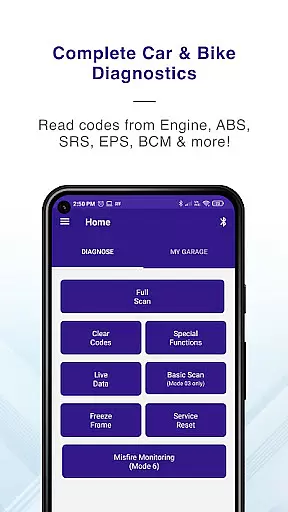
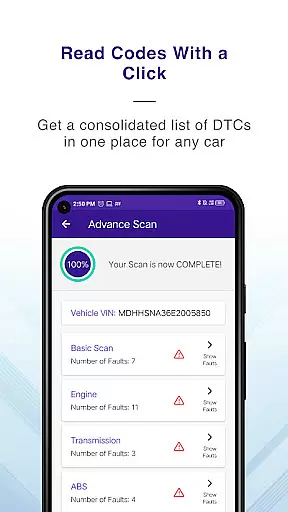
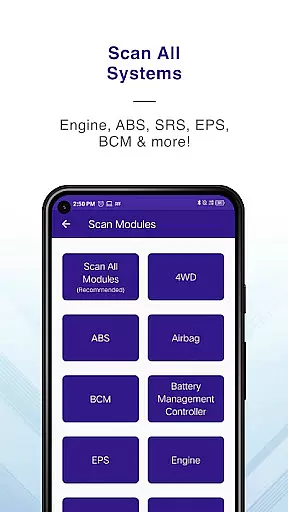
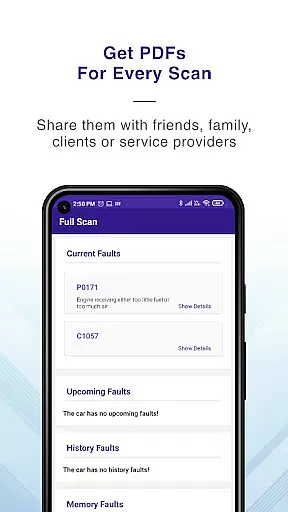
GaragePro is a comprehensive OBD2 scanning application designed for vehicle owners, repair shops, and DIY enthusiasts. The app provides access to over 200 diagnostic functions across cars, bikes, and heavy vehicles, supporting multiple systems such as Engine, ABS, SRS, and more. With advanced features like Injector coding, DPF regeneration, and live data monitoring, GaragePro empowers users to maintain their vehicles efficiently.
The app stands out with its wireless Bluetooth connectivity, compatibility with most ELM327 scanners, and detailed PDF reports of vehicle diagnostics. Whether you need to clear engine codes post-repair or monitor real-time sensor data, GaragePro offers an all-in-one solution for vehicle diagnostics and maintenance.
GaragePro distinguishes itself through its extensive feature set tailored for automotive diagnostics. The app supports advanced OBD scanning across multiple ECUs, including Engine, Airbag, ABS, and BCM. Users can retrieve real-time data, monitor over 100 crucial sensor datapoints, and perform specialized functions like Throttle Reset and Steering Angle Reset.
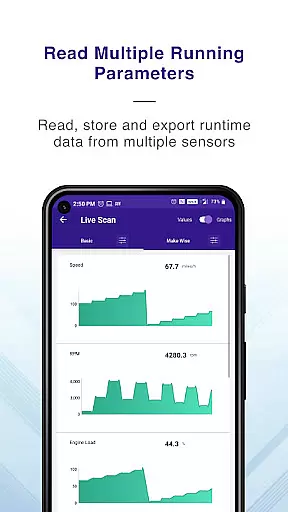
One of the key highlights is the intuitive live data monitoring, which presents information through customizable graphs and allows exporting data for further analysis. Additionally, the app's support for special functions such as Injector Coding and DPF Regeneration makes it an invaluable tool for both professional mechanics and car enthusiasts looking to optimize their vehicle's performance.
Accessing detailed vehicle information is crucial for effective diagnostics and maintenance. GaragePro provides comprehensive OBD coverage, enabling users to scan and retrieve real-time data from multiple systems such as Engine, ABS, SRS, EPS, BCM, Transmission, HVAC, and more.
The app goes beyond basic diagnostics by offering advanced features like Injector coding, DPF regeneration, Throttle Reset, ABS bleeding, and Steering angle reset. With over 200 diagnostic functions, it supports cars, bikes, and heavy vehicles, making it a versatile tool for vehicle owners, repair shops, and DIYers.
Users benefit from the app's ability to monitor over 100 crucial sensor data points in real-time. This includes essential metrics like RPM, speed, coolant temperature, and fuel trim. The intuitive graphs and customizable displays allow users to track vehicle performance and make informed decisions based on accurate data.
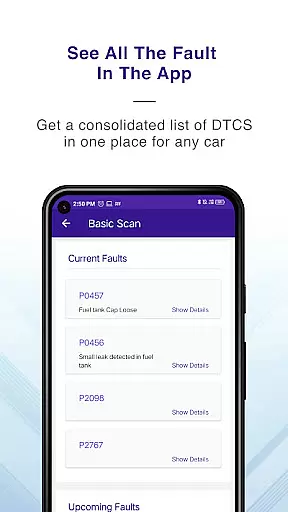
By providing detailed explanations for trouble codes and supporting PDF reports with code descriptions, GaragePro empowers users to troubleshoot issues efficiently. This level of detail ensures that both professional mechanics and car enthusiasts can maintain their vehicles with confidence.
Price transparency is essential for users to understand the value they receive from an application. GaragePro offers a clear pricing structure, ensuring users know exactly what they are paying for. Basic scanning and live data functionalities are available for free, allowing users to access essential vehicle diagnostics without any cost.
For users requiring advanced features, GaragePro provides paid plans starting at just $10. These plans include higher-level functions such as Injector coding, DPF regeneration, and special resets, which are crucial for comprehensive vehicle maintenance.
The app's pricing model is designed to be accessible while still offering premium features. Users can choose a plan that fits their needs, whether they are professional mechanics or DIY enthusiasts. This flexibility ensures that everyone can benefit from GaragePro's extensive diagnostic capabilities.
By clearly outlining its pricing tiers and the features included in each, GaragePro builds trust with its users. This transparent approach allows users to select a plan that aligns with their budget and requirements, enhancing overall satisfaction with the service provided.
User-friendly interface
Comprehensive diagnostic coverage
Wireless convenience
Detailed PDF reports
Affordable pricing plans
Limited free features
Bluetooth connectivity issues
Device compatibility concerns
Occasional app crashes
Subscription required for advanced tools

Take Control of Your Car
 4.80
4.80
OBD diagnostics, Live Data, DPF regeneration for BMW
4.00
Attention! This is the theme for the Car Launcher app
4.1
Wonder how much horsepower and torque your car/truck makes? Look no further.
3.40
App Mirroring for Tesla Car's Browser
2.80
Autolist - The Largest Selection of Local Used Cars and Trucks
4.50
Discover new and used cars in Syria easily! Browse ads and connect with sellers.
3.70
Control maps, media and messaging, with the Google Assistant while you drive
4.10
Shop, finance, or sell today.
4.80
Get more out of your AAWireless adapter with this companion app | aawireless.io
4.80
DMV Test Pro offers all the updated FREE DMV tests online.
4.60
Easy connect & control your cars from afar. Remote Lock & unlock car and carplay
4.60
Get price alerts, vehicle history details and more for cars near you!
4.50
CVT diagnostics with ELM327 for Nissan-based vehicles
4.40
Digital Car Key/Launcher, Screen Mirror, Android Dashboard, Remote Wireless Link
4.40
Car Sounds Engine Sounds app welcomes Auto Lovers to feel Car Simulator Sound
4.20
By enthusiasts, for enthusiasts
4.00
Simplify your drive
3.90
BlueDriver® is a Premium Diagnostic OBD2 Scan Tool. www.BlueDriver.com
3.90


User Reviews