
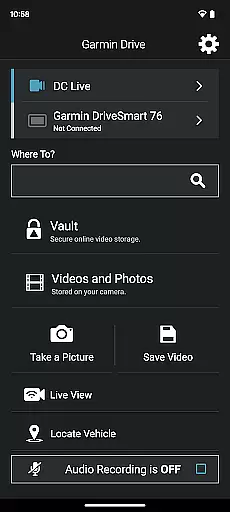
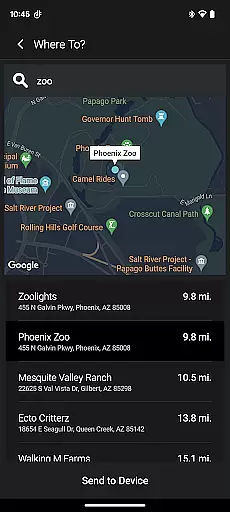
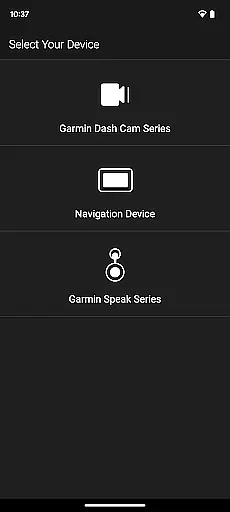
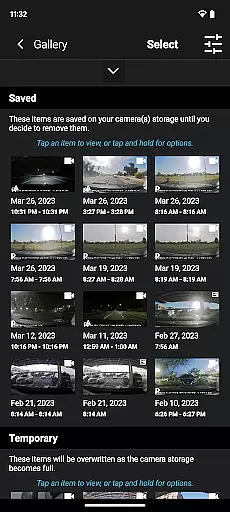
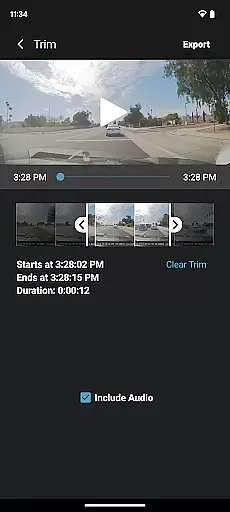
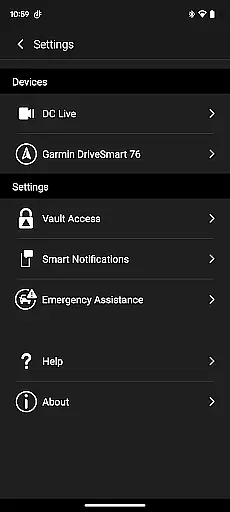
Garmin Drive is an innovative application designed specifically for Garmin automotive navigators and dash cams. This app serves as a comprehensive solution providing users with essential driving-related information and seamless device management capabilities. With its user-friendly interface Garmin Drive ensures that drivers can focus on the road while accessing critical data.
The application's core functionality revolves around delivering real-time information including traffic updates parking availability advanced weather reports and live traffic camera feeds. These features are particularly beneficial for modern drivers who require up-to-date information to make informed decisions during their journeys. Additionally the app facilitates communication by allowing users to send and receive calls texts and notifications from their Bluetooth-enabled mobile devices directly through their Garmin navigator.
For those utilizing Garmin dash cams the app offers extensive control over camera settings and recorded footage. It supports wireless connection of up to four dash cams simultaneously through the Dash Cam Auto Sync feature. This capability enables drivers to capture comprehensive coverage around their vehicles from multiple angles. The app's picture-in-picture functionality allows users to review footage from any two perspectives simultaneously enhancing convenience and safety documentation.
One of the standout features of Garmin Drive is its integration capabilities with various Garmin devices. The app seamlessly connects with compatible navigators and dash cams transforming them into sophisticated driving assistants. For navigators the app provides real-time traffic information parking availability and advanced weather updates which are crucial for planning efficient routes and avoiding potential hazards.
The app's support for photoLive traffic cameras represents a significant advancement in traffic monitoring technology. Users can access live camera feeds from various locations helping them make informed decisions about route adjustments. Furthermore the inclusion of Amazon Alexa through Garmin Speak enhances the driving experience by enabling voice-controlled entertainment and navigation functions. Drivers can request music news updates and navigation instructions without taking their hands off the wheel.
For dash cam users Garmin Drive offers professional-grade video management tools. The app enables wireless connection of multiple cameras creating a comprehensive surveillance system around the vehicle. The picture-in-picture feature allows simultaneous viewing of footage from different angles which is invaluable for accident documentation and insurance claims. Additionally users can easily share recorded videos with relevant parties including insurance agencies and legal authorities through the app's intuitive sharing functionality.
The Garmin Drive app provides comprehensive details about your vehicle's surroundings through its advanced integration with compatible navigators and dash cams. This includes real-time traffic updates, parking availability, and weather conditions that are crucial for planning your journey efficiently.
For users with compatible dash cams, the app allows access to camera controls and settings, enabling detailed recording management. The Dash Cam Auto Sync feature supports up to four cameras, providing a complete view around the vehicle, which is essential for safety and security monitoring.
With the ability to create 'picture-in-picture' video from any two perspectives, the app enhances the user's capability to review incidents or share important footage with relevant parties such as insurance agencies or legal authorities.
While the Garmin Drive app itself is free to download and use, it offers insights into costs associated with travel, such as parking fees and potential tolls, thanks to its real-time information system. This feature helps users anticipate expenses before embarking on their trips.
Additionally, by integrating with Amazon Alexa via Garmin Speak, users can enjoy hands-free control over their entertainment and navigation without worrying about hidden charges. All features provided through this integration are clearly outlined within the app, ensuring there are no surprises regarding costs.
For those looking to manage their journeys more economically, having these transparent insights into possible expenditures can significantly aid in budgeting and financial planning related to automotive travel.
User-friendly interface
Real-time traffic updates
Multi-camera support
Voice control integration
Comprehensive device management
Limited device compatibility
Requires stable internet
Premium feature costs
Occasional syncing issues
Steep learning curve

myAudi offers users services and Audi connect services for Audi drivers
 4.10
4.10
Get your personalized financing options and shop for used cars today!
4.20
Instant diesel savings. No credit checks or fees. Nationwide growing network.
4.40
View your car’s service records and find out when maintenance is due.
4.70
1M+ high-quality auto parts at your fingertips. Fitment guaranteed.
4.70
Take state-specific DMV permit tests and ace the exam.
3.90
Available in select states.
4.00
O'Reilly Pro will streamline your parts lookup and ordering process!
3.20
Find Your Local Store or Shop Online for the Car, Truck, or SUV Parts You Need
4.70
Listings of Tesla's with FSD - Included package
4.60
Instantly redesign your car with AI. From sporty to futuristic, try it all.
4.50
Autotrader is your online solution for buying and selling new and used cars.
4.40
Realtime Charts is a plugin for the Torque Pro App (OBD 2 & Car)
4.20
OBD diagnostics, Live Data, DPF regeneration for BMW
4.00
The Smarter Way Forward
3.30
Club Car Wash Mobile App—the fast lane to managing your wash membership.
3.30
Easily notify car owners in urgent situations, safe, fast, multilingual.
4.0
Attention! This is the theme for the Car Launcher app
4.0
DIY Vehicle Wheel Alignment
4.3


User Reviews