
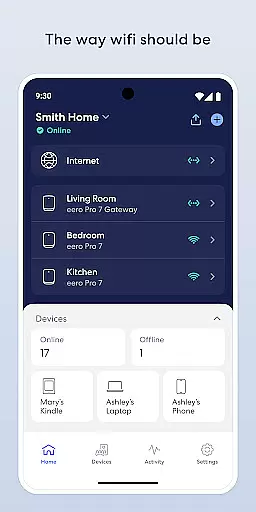
eero WiFi System is a comprehensive home networking solution that provides fast and reliable internet coverage throughout your entire living space. The app allows users to easily set up and manage their eero devices, ensuring optimal performance and security.
With features like automatic updates, remote network management, and advanced parental controls through eero Plus subscription, this app caters to both casual users and tech-savvy individuals. Whether you're streaming content, working from home, or managing your children's screen time, eero ensures seamless connectivity in every corner of your house.
The true value of eero lies in its ability to adapt and improve over time. Regular software updates not only enhance performance but also introduce new functionalities, making it a future-proof investment for your smart home ecosystem.
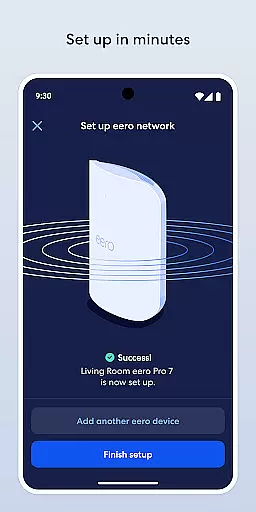
The eero app offers an impressive array of features designed to simplify WiFi management. Setting up your network takes just minutes, thanks to the intuitive installation process. Once operational, the system automatically updates itself with performance improvements, security patches, and new features.
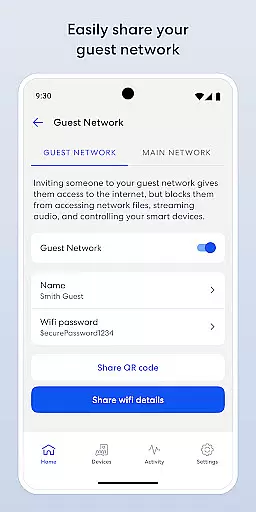
Users can remotely view and control their network from anywhere using their mobile device. The app enables secure guest network sharing, customizable internet access schedules, and device blocking capabilities. These features help maintain network security while providing flexibility in managing household internet usage.
For enhanced protection, the optional eero Plus subscription offers advanced security tools, including a password manager, antivirus software, and a VPN powered by Guardian. This comprehensive approach to network management sets eero apart from traditional WiFi solutions.
The eero app extends its functionality beyond just a basic Wi-Fi management tool, positioning itself as an essential component of modern living. It covers various aspects of a connected lifestyle by offering features that cater to both convenience and security.
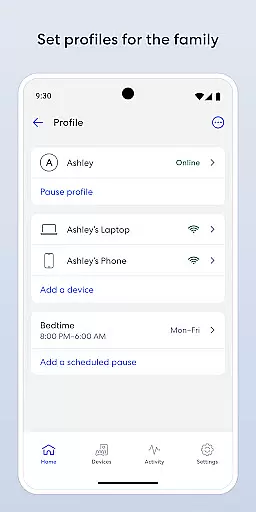
With the ability to manage your network remotely, share access securely with guests, and even control internet usage through scheduling or pausing, the app ensures that users can tailor their home networks to fit their daily routines. This level of customization is crucial for households that demand flexibility and ease of use in their smart home devices.
In addition to these practical features, eero Plus offers advanced security measures and parental controls, enhancing the safety of your connected lifestyle. These premium features ensure that families not only enjoy seamless connectivity but also maintain peace of mind regarding online threats and content appropriateness.
When it comes to managing your home's Wi-Fi system, the authenticity and reliability of the information provided by the eero app are paramount. The app delivers genuine content directly from eero, ensuring that all data and instructions come from verified sources within the company.
This commitment to authenticity is further reinforced by regular automatic updates that bring new features, performance improvements, and the latest security standards. Such practices guarantee that users always have access to up-to-date and credible information about their network's status and potential enhancements.
Moreover, eero's dedication to expert credibility is evident in its subscription service, eero Plus, which includes VIP access to a team of Wi-Fi experts. This service provides users with professional guidance and support, ensuring that any issues or questions are addressed by knowledgeable professionals who understand the intricacies of network management.
Easy setup process
Automatic security updates
Remote network management
Comprehensive parental controls
Future-proof technology
Premium features require subscription
Physical hardware sold separately
Limited advanced settings for power users
Occasional connectivity issues reported
Higher price point than basic routers

Turn your watch into a key fob for your Tesla
 2.90
2.90
Cute Adorable Animals now on your wrist with our Wear OS watch face!
4.40
Unique Dark Analog style for Wear OS watches.
4.3
Play. Earn. Repeat. Get rewarded for playing mobile games. Welcome to Mobius!
4.80
Smart home security protection
3.20
Creativity and savings for kids, beginners and experts in arts and crafts
3.50
The cutest Autumn watchface featuring the adorable Mr. Squirrel
4.4
Wear your favorite memories, loved ones, pets or travel photos on your watch
4.5
A unique and customizable watch face which rotates its layout every minute.
4.80
Discover the "To Be a Christian" App: Your Guide to Deepening Faith!
5.00
Get roadside help, discounts, travel tools & more — AAA is with you everywhere.
4.80
Made To Order Faves
4.70
A smart Siddur with halachic times
4.60
Crochet made easy: step-by-step tutorials, beginner patterns & projects
4.60
Vehicle ownership simplified. Get the myChevrolet® app today.
4.60
Unique "Isometric" style digital watch face for Wear OS
4.50
SmartHQ: Your Connected Home Command Center
4.10
BILT interactive 3D instructions help you get the job done right
3.50
A watch face with transparency and fluid visuals inspired by liquid glass design
4.2


User Reviews