
Lithium Pro is an advanced upgrade package designed specifically for the free Lithium app, focusing on enhancing eBook reading and management. This application serves as a Pro license that unlocks exclusive features when used in conjunction with the free version. Key functionalities include seamless data synchronization across multiple devices through Google Drive, allowing users to maintain continuity in their reading experience. Additionally, the app offers extensive customization options for visual settings, giving readers control over background colors, text colors, and link styles.
Another notable feature is the expanded selection of highlight colors, enabling more personalized annotation choices while reading eBooks. These premium capabilities are particularly beneficial for avid readers who value both functionality and aesthetics in their digital reading experience. By upgrading to Lithium Pro, users can enjoy a more versatile and visually appealing way to manage and interact with their eBook collection.
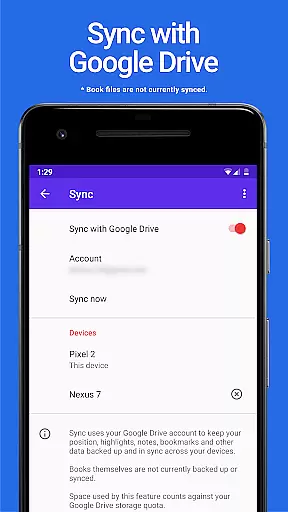
The Lithium Pro app delivers several distinctive features that significantly enhance the eBook reading experience. First and foremost is the robust Sync functionality, which uses Google Drive to keep user data synchronized across all devices. This ensures that reading progress, bookmarks, and other important information remain consistent regardless of which device is being used. Although book files themselves aren't currently included in this backup system, the synchronization of metadata provides substantial convenience for users managing multiple devices.
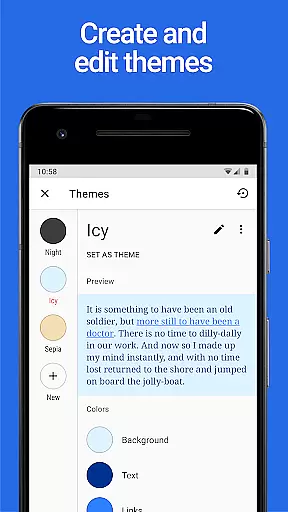
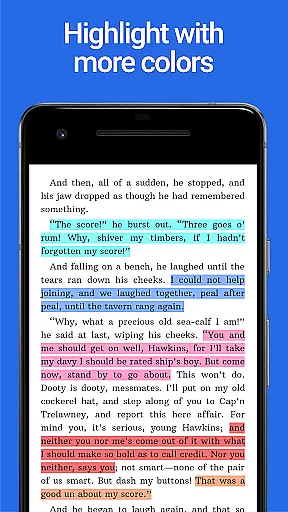
Customization is another major strength of Lithium Pro. The app includes a comprehensive custom themes feature that allows users to personalize their reading interface. Through display settings, readers can modify page background color, text color, and link colors according to their preferences. The ability to create, delete, and edit these themes gives users complete control over their visual experience. Furthermore, the app expands the available highlight colors for annotations, providing more options for organizing and categorizing important passages within eBooks.
These features collectively contribute to a more engaging and personalized reading experience. The combination of synchronization capabilities and extensive customization options makes Lithium Pro particularly valuable for users who want to maintain consistency across devices while enjoying the flexibility to tailor their reading environment to their specific needs and preferences.
When it comes to e-books, the size of the library and the authenticity of copyrights are crucial factors for readers. Lithium Pro, paired with the free Lithium app, ensures that users have access to a vast array of books while maintaining copyright integrity. Although this app itself does not store the books, it enables advanced features when used in conjunction with the main application.
The synchronization feature powered by Google Drive keeps your reading data safely backed up and consistent across all devices. This means you can start reading on one device and pick up where you left off on another, without worrying about losing your place or personal settings. While book files themselves aren't synced, the seamless integration ensures an uninterrupted reading experience.
By purchasing Lithium Pro, you're supporting authors and publishers who rely on legitimate sales to continue producing quality content. The app verifies purchases and unlocks Pro features within the free version, ensuring that your library consists of legally obtained materials. This commitment to copyright compliance provides peace of mind while expanding your digital book collection.
Format compatibility is essential for any serious e-reader application, and Lithium Pro excels in this area. By upgrading to the Pro version, users gain access to enhanced formatting options that cater to diverse reading preferences. The app supports various file types, allowing readers to import and enjoy their existing collections without worrying about conversion issues.
One of the standout features unlocked by Lithium Pro is the custom themes functionality. Readers can personalize their reading experience by adjusting page background colors, text colors, and link colors. This level of customization ensures optimal readability regardless of lighting conditions or personal preferences, making long reading sessions more comfortable.
The Pro version also introduces additional highlight colors, giving students and researchers more tools for annotation and analysis. These extra features demonstrate the app's commitment to supporting various document formats while enhancing the reading experience. Whether you're studying complex texts or simply enjoying leisure reading, Lithium Pro's format flexibility adapts to your needs.
Seamless sync
Extensive themes
Highlight options
Google Drive
Custom colors
No book backup
Separate install
Basic limits
Paid upgrade
Feature lock

Bible, Catechism, Study, Saints, Mass Readings, Rosary, Prayer, Bible in a Year
 4.80
4.80
Plan of Life that Saint Josemaría recommended
4.80
Mirror Bible - eye-opening paraphrase translation of the NT by Francois du Toit
4.30
Knots 360 Pro ( 3D ) shows you animated 192 knots in 3D perspective
4.10
Offline translator from english to spanish, and from spanish to english.
4.50
Translate into 100+ languages with the world’s most accurate AI translator.
4.70
Scan. Price. Grade.
4.60
Read Trending Romance Stories
4.00
Calculate, Knowledge, Homework
4.40
The Original Tropical Freshwater Aquarium Fish And Plant Care Guide
4.80
Liturgy of the Hours totally off-line
4.80
A lightweight reader for comics and mangas files (.cbr, .cbz, .cbt, .pdf, ...)
4.80
"Do you like green eggs and ham?"
4.70
Discover, track, and share your reading with friends & our community of readers
4.60
Read the Quran in Arabic alongside its translation, with color coded Tajweed.
4.50
Learn Electricians' Handbook PRO complete guide beginners to advance.
4.40
Provides location information of vehicle Shift Interlock releases.
4.30
A wonderful reader for good time spend.
4.20
A companion for prayer, with Azan alarm, Quibla direction, and Holy Quran book
4.10


User Reviews