
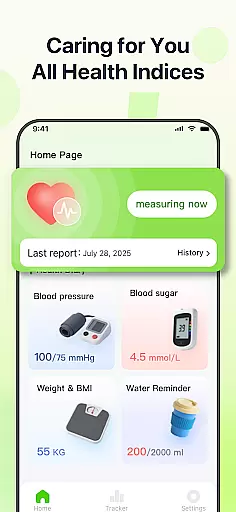
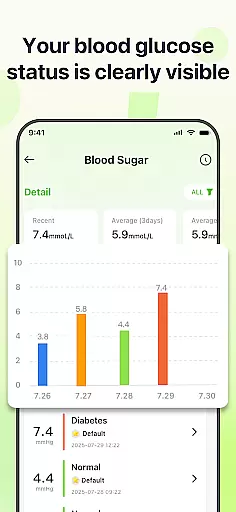
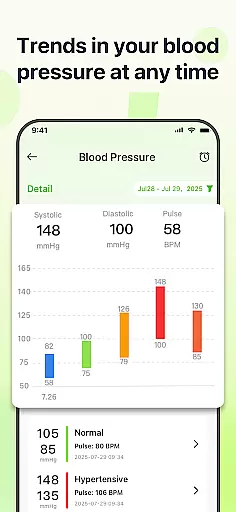
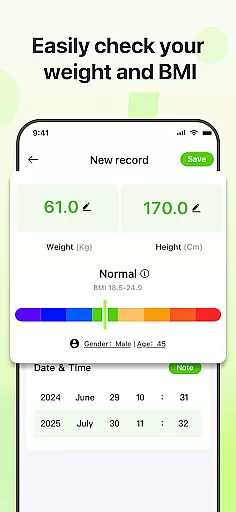
PulseSense is a comprehensive health tracking application designed to simplify wellness management. It allows users to effortlessly log key metrics such as blood pressure, glucose levels, and heart rate while offering intelligent reports tailored to personal data. With sleek trend visualizations spanning days to years, the app helps uncover patterns and track progress over time.
Designed for individuals managing chronic conditions, building healthy routines, or assisting loved ones, PulseSense consolidates all health metrics into one secure platform. The app prioritizes privacy with end-to-end encryption, ensuring no data leaves the device—making it ideal for those who value security alongside functionality.
PulseSense stands out with its effortless logging system, enabling users to input health metrics like blood pressure, glucose, and heart rate quickly. Its intelligent reporting feature provides personalized lifestyle recommendations based on logged data, helping users make informed decisions about their wellness journey.
The app offers advanced visualization tools that display trends across days, weeks, months, and years, making it easy to spot patterns and measure progress. Users can attach custom notes and tags to entries for added context. Additionally, PulseSense ensures complete privacy by keeping all data encrypted on the device without requiring cloud storage or account creation.
With features like reminders for consistent tracking and actionable insights beyond raw numbers, PulseSense empowers users to take control of their health effectively.
Personalized planning in health applications refers to the ability to tailor wellness strategies based on individual health data. PulseSense excels in this area by offering intelligent health reports and personalized lifestyle recommendations.
The app analyzes logged metrics such as blood pressure, glucose levels, and heart rate to generate insights unique to each user's health journey. This ensures that users receive advice that is not only relevant but also actionable, helping them make informed decisions about their well-being.
Users benefit from features like trend visuals and custom tags, which allow them to add context to their entries and uncover patterns over time. These tools empower individuals to set meaningful health goals and track their progress effectively.
By consolidating all health metrics in one place, PulseSense simplifies the process of managing various aspects of personal health, making it an invaluable tool for anyone looking to take control of their wellness with a personalized approach.
Progress visualization is a critical component of any fitness or health app, providing users with a clear picture of their achievements and areas needing improvement. PulseSense offers sleek trend visuals that span days, weeks, months, and years, enabling comprehensive tracking.
These visualizations are more than just graphs; they transform raw numbers into understandable insights, highlighting patterns and changes in health metrics over time. Users can easily interpret their data through these visuals, gaining motivation from seeing tangible results of their efforts.
With the ability to attach personal notes and custom tags, users can add layers of context to their visual data. This feature enriches the visualization experience, allowing for a deeper understanding of oneu2019s health trends and facilitating better-informed health decisions.
Ultimately, PulseSense's focus on progress visualization helps users stay consistent with their health goals, reinforcing positive habits through reminders and consolidated health metrics, ensuring a holistic view of their wellness journey.
User-friendly interface
Advanced trend analysis
Strong privacy controls
Personalized insights
Comprehensive metric tracking
No direct measurement tools
Limited medical integration
Premium features may cost extra
Requires manual data entry
Not a substitute for professional advice

Build Healthy Habits!
 4.60
4.60
Measure real-time wrist & ambient temperature with your Galaxy Watch (Wear OS)
3.20
Measure your Pupil Distance for Eyeglasses and VR headsets in 3 quick steps.
4.70
Turn your steps into cash, gift cards & rewards with our step counting pedometer
3.80
Your portable blood pressure tracker. Record, monitor, and analyze BP anytime.
4.30
FitCloudPro takes care of your health every minute.
3.70
The most accurate heart rate app to monitor and track your heart rate & pulse.
4.40
Dexcom G7 Continuous Glucose Monitoring
3.70
Point, scan, and unlock truth in every bite.
4.50
Load the bar with this barbell & plate calculator. It's leg day, not brain day!
4.70
When the night comes, we prepare your eyes for deep, sweet dreams
4.70
Effortlessly and naturally release anxiety by harnessing the power of your brain
4.60
See what's really going on inside your head! Real time EEG graphs from your Muse
4.40
Walk, track, and burn calories with step counter & GPS walking tracker
4.20
beat yesterday.
4.00
Your Health Has Met Its App (℠)
3.90
Track sleep cycle, relax with white noise, sleep sounds & smart alarm clock
3.80
Transform your body and soul with DBFFitness, with a 40-day fitness journey.
4.0
Using Recognise™ has been shown to reduce pain and improve performance.
4.3


User Reviews