
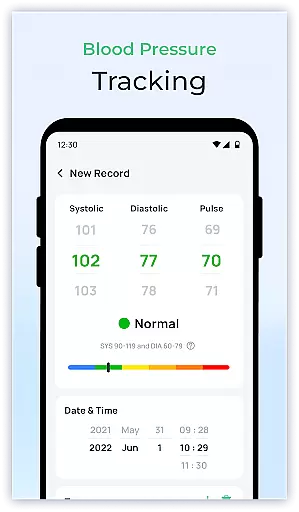
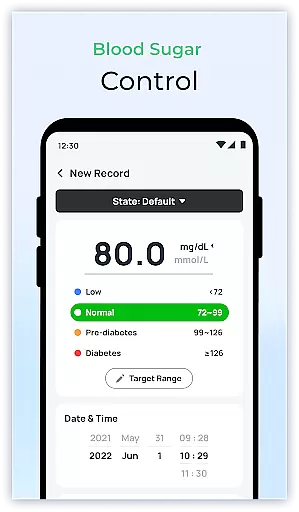
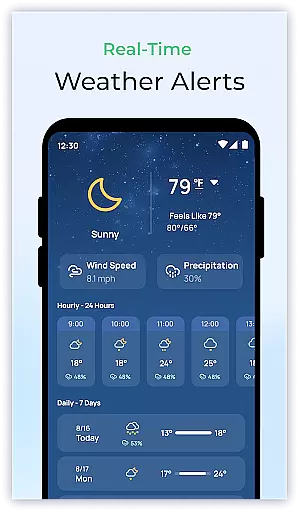
Blood Sugar & Diabetes Tracker is a comprehensive health management app designed specifically for individuals with diabetes. The app's core functionality revolves around accurate blood sugar tracking, allowing users to log their readings effortlessly and monitor trends over time. Its intuitive interface makes it easy to navigate through various features while providing valuable insights into personal health patterns.
One of the standout capabilities is its ability to generate detailed reports that can be shared directly with healthcare providers. This feature facilitates more informed discussions during medical appointments and enables better treatment planning. Additionally, the app offers personalized recommendations based on user data, helping individuals maintain stable blood sugar levels through actionable advice.
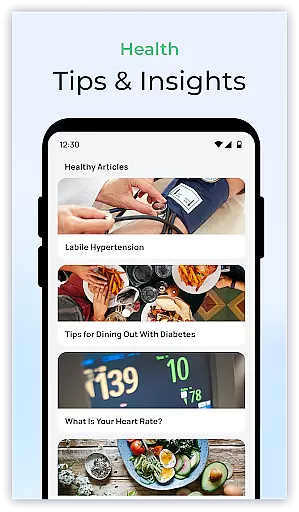
This application is particularly useful for those who need regular reminders about medication or glucose checks. With customizable alerts and an extensive library of educational resources, users can stay informed about best practices in diabetes care while managing their daily routines effectively. By empowering users with knowledge and tools, Blood Sugar & Diabetes Tracker becomes an essential companion in achieving better health outcomes.
The Blood Sugar & Diabetes Tracker stands out due to its robust set of features tailored specifically for diabetes management. One key aspect is the comprehensive tracking system which allows users to log not only their blood sugar levels but also other important metrics such as insulin doses and carbohydrate intake. This holistic approach ensures that all relevant data points are captured, providing a complete picture of one's health status.
Another notable feature is the advanced analytics engine that processes logged data to identify patterns and trends. Users receive personalized insights that help them understand how different factors like diet, exercise, and stress impact their blood sugar levels. These insights enable proactive adjustments in lifestyle choices, leading to improved overall well-being.
In addition to these core functionalities, the app includes several convenience-oriented features. For instance, customizable reminders ensure timely medication adherence, while educational resources keep users updated on the latest developments in diabetes care. The combination of practical tools and informative content makes this app an invaluable asset for anyone looking to take control of their diabetes management journey.
Personalized planning in diabetes management is crucial for maintaining stable blood sugar levels and improving overall health outcomes. Blood Sugar & Diabetes Tracker offers a comprehensive solution to create personalized plans based on individual health data.
The app allows users to log their blood sugar levels effortlessly, providing a clear picture of how different factors affect their readings over time. By analyzing patterns and trends within this data, the app generates tailored insights and recommendations specific to each user's needs.
Users benefit from actionable advice that helps them adjust their lifestyle, diet, and medication to better manage their condition. This personalized approach ensures that each individual receives targeted support that aligns with their unique health profile.
Ultimately, the personalized planning feature empowers users to take proactive steps towards managing their diabetes effectively, leading to improved health and peace of mind.
Visualizing progress is essential for understanding the effectiveness of diabetes management strategies and staying motivated. Blood Sugar & Diabetes Tracker excels in presenting user data through intuitive graphs and charts, making it easier to comprehend complex health information.
The app provides detailed reports that display blood sugar trends over time, highlighting peaks and troughs that may require attention. These visual representations allow users to identify patterns quickly and make informed decisions about their care routines.
Additionally, users can share these visual reports with healthcare providers during consultations, facilitating more productive discussions and enabling collaborative adjustments to treatment plans. The ability to track milestones and achievements also boosts motivation by showcasing tangible improvements in health metrics.
By offering robust progress visualization tools, Blood Sugar & Diabetes Tracker enhances user engagement and supports long-term adherence to diabetes management practices.
User-friendly interface
Comprehensive tracking options
Personalized health insights
Customizable reminders
Educational resources included
Premium version required
Limited offline functionality
Occasional syncing issues
No automatic device integration
Subscription costs may add up

Text notifications, button control, heart monitor & more for your Amazfit.
 2.40
2.40
Using Recognise™ has been shown to reduce pain and improve performance.
4.3
Effortlessly and naturally release anxiety by harnessing the power of your brain
4.60
Histamine intolerance, low FODMAP diet and irritable bowel syndrome (IBS)
4.00
This is an application that serves as a companion app for smart watch.
4.20
GloryFit is a companion app for the smart bracelet.
3.60
Pedometer that gives you sweatcoins for steps. It pays to walk!
4.10
Manage your and your family's health information.
4.60
Comprehensively record and manage your health
4.50
Easy reconstitution calc for mixing peptides and creating protocols
4.70
Drink water reminder app. Track water intake. Smart simple hydration tracker.
4.70
The Crunch Mobile app - Find a gym, manage favorites, reserve & cancel classes.
4.60
Personal Measurements - Track your gains!
4.50
Period Tracker, the easiest way to track your periods!
4.50
Relax. Sleep Better. Feel Better.
4.50
FODMAP, Gluten, Allergy, Vegan
4.50
Pupillary distance PD with camera quick and easy, checking glasses frames on you
3.70
HRV4Training helps you optimize goals and improve performance. No sensors needed
3.30
Transform your body and soul with DBFFitness, with a 40-day fitness journey.
4.1


User Reviews