
Microsoft Family Safety is a comprehensive parenting app designed to help families develop healthy digital habits while ensuring online safety. The app allows parents to set up parental controls, manage screen time, and filter inappropriate content across multiple devices including Android, Xbox, and Windows.
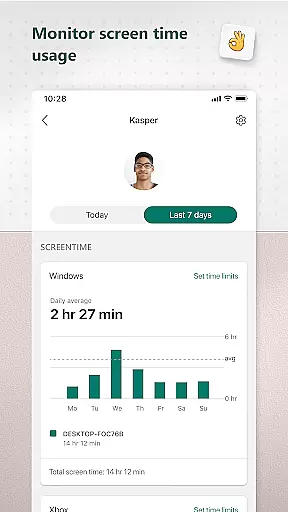
A key feature of the app is its activity reporting system, which provides weekly summaries of children's screen time and online usage. This helps parents stay informed about their kids' digital activities and initiate meaningful conversations about responsible internet use. Additionally, the app offers content filters that block inappropriate apps and games, as well as web filters for kid-friendly browsing on Microsoft Edge.
The app serves both parents and children by creating a safer digital environment while allowing kids to maintain some independence. With features like app-specific time limits, device management tools, and real-time notifications for time extension requests, Microsoft Family Safety strikes a balance between protection and freedom.
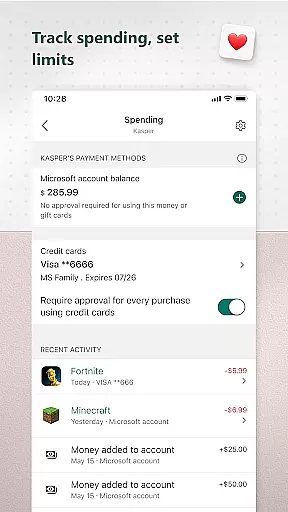
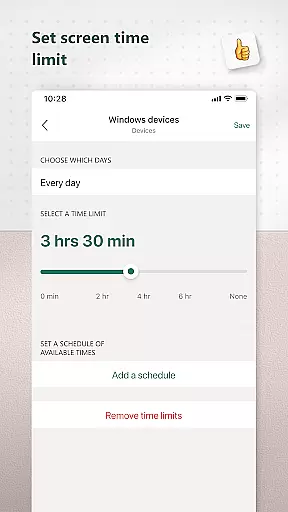
Microsoft Family Safety stands out with its robust set of features designed to create a safe digital space for families. One of its core functionalities is the screen time management system, which lets parents set specific time limits for apps, games, and devices across platforms such as Xbox, Windows, and Android. Parents can also receive notifications when their child requests additional screen time, enabling real-time decision-making.
Another notable feature is the activity reporting tool. This generates detailed logs of children's screen time and app usage, delivered weekly via email. These reports help parents understand their family's digital habits and guide discussions about responsible technology use. The app also includes content filtering capabilities that block inappropriate apps and games while enabling kid-friendly browsing through Microsoft Edge.
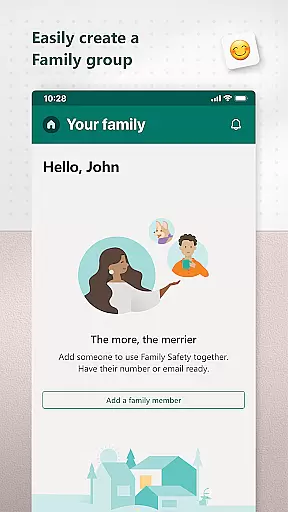
Device management is another key aspect of the app. Parents can remotely monitor and control multiple devices from a single dashboard, making it easier to enforce consistent rules across different platforms. The app emphasizes privacy protection too, ensuring that user data isn't shared with third parties like insurance companies or data brokers.
Microsoft Family Safety provides a reliable and credible parenting solution, developed by Microsoft with input from child safety experts. The app ensures that all features are designed to create a safe digital environment for children while empowering parents with meaningful controls.
The content filtering system is backed by expert-reviewed algorithms that block inappropriate apps and games, ensuring only age-appropriate content is accessible. This expert validation extends to the web filters, which enable kid-friendly browsing on Microsoft Edge, further reinforcing the app's commitment to safety.
Parents can trust the activity reports generated by the app, as they provide accurate insights into their children's screen time and online usage. These reports are not only data-driven but also help foster open conversations about digital habits between parents and children.
By adhering to strict privacy standards, Microsoft ensures that all collected data is handled responsibly, giving families confidence in the app's ability to protect their personal information while promoting healthy digital habits.
Microsoft Family Safety offers precise growth tracking tools that allow parents to monitor their children's digital development accurately. Through detailed activity logs, parents can track screen time across devices, including Xbox, Windows, and Android platforms.
The app's weekly email summaries deliver accurate reports on children's app usage and online activity, helping parents understand their digital habits over time. This consistent tracking enables parents to make informed decisions about adjusting screen time limits or granting additional access as their children grow.
With real-time notifications when children request more screen time, parents can respond promptly and appropriately, ensuring that boundaries remain clear and effective. This feature enhances the accuracy of growth tracking by keeping parents actively involved in their children's digital journey.
By combining device management capabilities with detailed activity reporting, Microsoft Family Safety ensures that growth tracking is both comprehensive and precise, supporting families in maintaining a healthy balance between independence and protection.
User-friendly interface
Cross-platform compatibility
Real-time notifications
Comprehensive activity reports
Strong privacy protections
Limited iOS support
Requires child consent
Premium features locked
Occasional syncing issues
Complex setup process

Comprehensive Parental Control & Child Safety — Hear & Protect Your Child World
 4.30
4.30
Happiest Baby App replaces the SNOO App (the mobile companion to SNOO & SNOObie)
3.20
Fake call application designed for parents and adults to discipline their children through the children's police.
4.20
Cherish every beat - capture your baby's heart sounds with our app
4.30
Real-time family location with consent, check-ins & SOS—private by default.
4.40
Learn according to the age of your child and consult with other moms.
4.20
Affirmations | Stories | Bible
4.10
Save money on diapers. Get the Pampers Rewards app.
3.90
The Most Trusted Co-Parenting App.
4.60
All-In-One Pregnancy Tracker, Your Baby's Milestones, Growth Stages & Parenting.
4.90
Pinardin - Smart Parental Control, Online Safety & GPS Tracking!
4.80
Introduce real food to baby with First Foods® Database, baby led weaning BLW
4.80
Fun Ideas for Parents
4.70
Kids story books for children. Baby reading books with audio for pre-k toddlers
4.70
Track your pregnancy, kick & contraction counter, baby & mom's heartrate monitor
4.60
GPS phone tracker: find kids on map. Location tracking and parental control.
4.50
With BabyCam you can monitor your baby using your mobile phone, tablet, PC or TV
4.40
Join over 1MM parents & professionals who've used OFW to navigate co-parenting
4.40
Parental control: child monitoring app, screen time control, GPS child tracker
4.40


User Reviews