

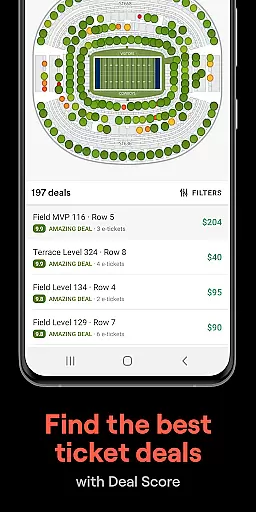
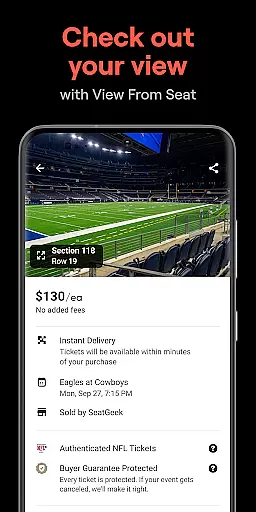
SeatGeek is a premier ticketing platform that provides users with a smart and secure way to purchase and resell tickets for a wide range of live events. With an extensive selection of sporting events including NFL, NBA, NHL, MLB, and MLS games, as well as concerts, festivals, and theater performances, SeatGeek ensures that every ticket is backed by a 100% buyer guarantee. The app's interactive seating charts allow users to explore the best deals with detailed panoramic views from each section, ensuring they know exactly what their seat offers before making a purchase.
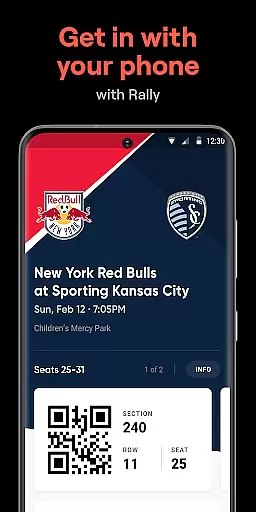
One of the standout features of SeatGeek is its Deal Score technology, which color-codes every deal based on value, helping users avoid overpaying. Additionally, mobile ticketing capabilities enable users to gain venue access directly through the app, eliminating the need for printing. Whether you're looking to buy tickets conveniently via Google Pay or Credit Card, or sell your tickets effortlessly with recommended pricing, SeatGeek delivers a comprehensive and user-friendly experience tailored to modern event-goers.
SeatGeek stands out with its innovative features designed to enhance the ticket-buying experience. The app's interactive seating charts provide users with panoramic photographs from every section, allowing them to see the view from their seats before purchasing. This feature ensures that users can make informed decisions about their seating choices. Furthermore, the Deal Score system helps users identify the best deals available, color-coding each offer from best to worst based on value, thus preventing users from overpaying for tickets.
Another key feature is the ability to send tickets instantly to friends' phones, either for free or for a fee, directly within the app. This functionality eliminates the hassle of meeting in person to hand over tickets. For those who can't attend an event, SeatGeek makes it easy to resell tickets on its marketplace with just one tap, even recommending optimal pricing to facilitate quick sales. Moreover, users can discover nearby events easily by searching across various categories such as teams, artists, venues, genres, or sports, ensuring they never miss out on exciting live entertainment opportunities.
Creating and customizing event tasks within SeatGeek allows users to tailor their event-going experience with precision. This feature is crucial for those who wish to keep track of upcoming events, ensuring they never miss out on their favorite sports games, concerts, or theater shows.
SeatGeek's platform enables users to effortlessly set up reminders for any event by simply selecting the event that interests them. The app provides comprehensive details such as date, time, venue, and even seat view, which can be customized according to user preferences.
The value derived from this functionality is significant; users gain peace of mind knowing they have personalized alerts set for their chosen events. Furthermore, the ability to customize these details ensures that all necessary information is readily available, streamlining the planning process and enhancing overall convenience.
This level of personalization not only improves user engagement but also empowers individuals to manage their leisure time more effectively, making sure each outing is well-planned and enjoyable.
Reminder settings in SeatGeek play a pivotal role in ensuring users stay informed about their planned events. With an intuitive interface, the app makes it simple to configure notifications that suit individual schedules and preferences, thus optimizing the event preparation process.
Upon selecting an event, users can easily adjust reminder settings to receive alerts at desired times before the event. These settings are highly customizable, allowing for multiple reminders for different stages of event planning, such as purchasing tickets, arranging transportation, or meeting friends.
The practical benefits of this feature include reduced stress and improved punctuality, as users are kept aware of their commitments without having to manually keep track of dates and times. This proactive approach to event management enhances the overall user experience.
By offering flexible reminder options, SeatGeek not only keeps users organized but also enriches their event participation through timely updates and notifications, setting a new standard for event-based applications.
User-friendly interface
Secure payment options
Interactive seating charts
Deal Score value indicator
Mobile ticket access
Limited international support
Occasional service fees
Event availability varies
Requires internet connection
Some features US-only

Manages display and transfer of tickets from the Mundo Tickets platform
 3.80
3.80
Here you can choose tickets for films, performances, concerts and other events
4.60
Microsoft Build is an annual developer conference hosted by Microsoft
4.20
The official app of the Carmel Christkindlmarkt!
4.5
Find EDM shows near you! See your favorite artists live, and discover new music.
4.90
ETH Mining provides secure way to mine Ethereum & earn ETH in Cloud mining app
3.50
RAISE-365 makes fundraising easy and fun!
3.20
Buy and Sell Tickets for Concerts, Sports, and Theater.
4.70
Find Live Event Ticket Deals to Sports, Concerts, Festivals, & Comedy For Less!
4.80
TodayTix is the easiest way to get tickets to the best shows in your city.
4.90
The Ultimate Tournament Hub
4.70
Greeting card maker with photos best app| Birthday cards| All wishes eCards FREE
4.50
Track birthdays, habits & goals. Unlimited countdowns and count-ups
4.20
The official app for Sched events! View your event schedule here.
4.20
Microsoft Ignite is an event that showcases latest advancements in technology
4.00
Audio guide companion APP for SEE's Michelangelo's Sistine Chapel
3.50
An App for Bhutanese
4.3
Mobile Event Guide for Greater NY Dental Meeting
4.0
Buy event tickets easily with our user-friendly App. Stay updated on hot events
4.3


User Reviews