
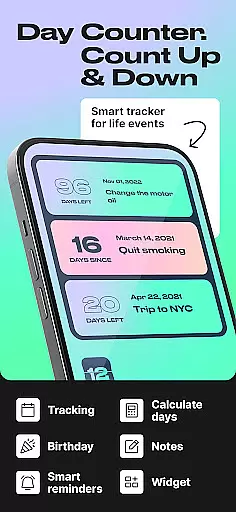
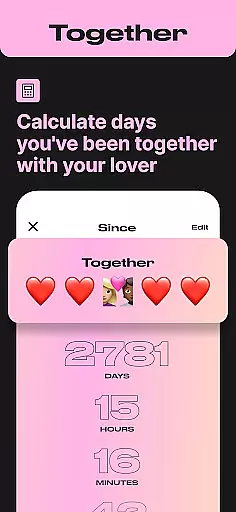
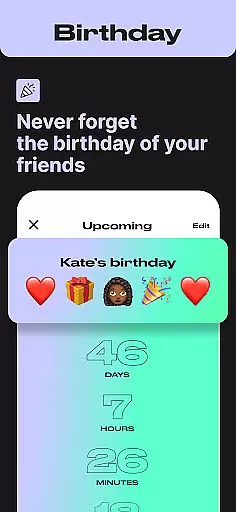
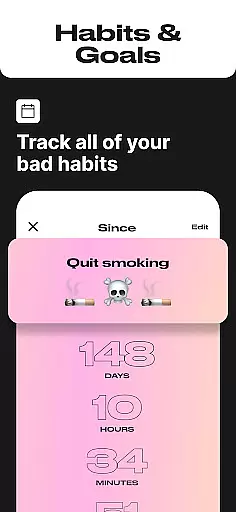
Day Counter is the ultimate time tracking solution for both personal and professional use. This versatile app allows users to effortlessly monitor important dates and milestones through its dual count up and countdown functionality. Whether you're counting down to a major event like Christmas or tracking the number of sober days in your journey, Day Counter has got you covered.
The app's standout feature is its ability to handle unlimited counters, making it easy to manage multiple events simultaneously. With customizable notifications, widgets, and reminders, staying on top of your schedule has never been easier. Its sleek, distraction-free interface ensures that users can focus on what truly matters without unnecessary interruptions.
From remembering birthdays to achieving long-term goals, Day Counter proves invaluable. It helps users maintain better habits, meet deadlines, and celebrate personal achievements, all while keeping them organized and informed every step of the way.
Day Counter stands out with its comprehensive set of features tailored to enhance productivity and personal growth. One of its key functionalities is the dual-mode timer system, which includes both count up and countdown options. This allows users to either anticipate upcoming events or reflect on past milestones, providing a holistic approach to time management.
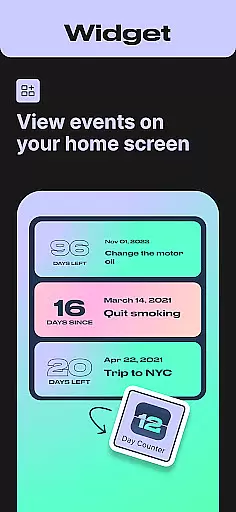
In addition to its timing capabilities, Day Counter offers unlimited counters, enabling users to track everything from work projects to personal aspirations without limitation. The inclusion of widgets and reminders further enhances usability by ensuring that no important date slips through the cracks. Custom notifications add another layer of convenience, alerting users to significant moments well in advance.
Designed with simplicity in mind, the app boasts a clean and minimalistic interface that eliminates distractions. This thoughtful design choice makes it easy for users to navigate and utilize the app's full potential, ultimately leading to improved organization and peace of mind.
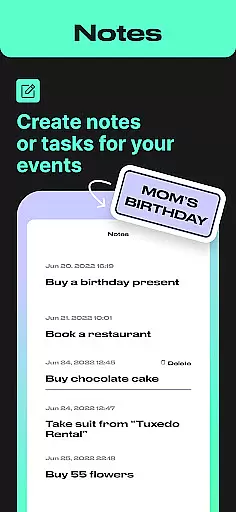
Task creation and detail customization are essential features for any event management app, allowing users to tailor their tracking experience to specific needs. Day Counter excels in this area by offering flexible options for creating countdowns and count-ups for various events.
The app provides intuitive controls for setting up new tasks with customized names, dates, and reminders. Users can easily create countdowns for upcoming events like birthdays or holidays, as well as count-ups for tracking milestones such as sobriety days or habit streaks.
This level of customization ensures that each user can personalize their time-tracking experience. The ability to name counters, set precise dates, and configure notifications makes it simple to stay on top of important events and personal goals.
By offering unlimited counters and detailed customization options, Day Counter empowers users to manage multiple timelines simultaneously. This feature is particularly valuable for those juggling various personal and professional commitments, ensuring no important date or milestone is missed.
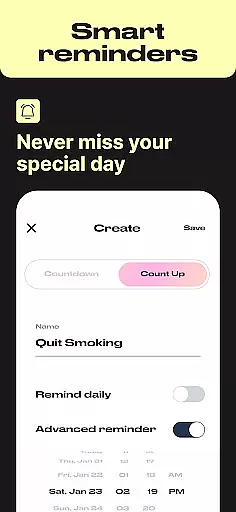
Reminder settings play a crucial role in keeping users informed and prepared for upcoming events or milestones. Day Counter offers robust notification features that help users stay on track with their time-sensitive commitments.
The app allows users to set custom notifications for each counter they create. Whether it's a birthday reminder, an exam deadline, or a personal milestone, users can configure alerts that suit their preferences and schedules.
These reminder settings contribute significantly to the app's overall effectiveness. By providing timely notifications, Day Counter ensures users never miss important dates or deadlines. The flexibility in setting reminders enhances the app's utility across different scenarios, from work deadlines to personal celebrations.
Moreover, the clean and minimal design of the reminder interface makes it easy to manage notifications without feeling overwhelmed. This thoughtful implementation of reminder settings demonstrates Day Counter's commitment to helping users maintain better control over their time and commitments.
User-friendly interface
Unlimited event tracking
Customizable notifications
Clean and minimal design
Versatile usage scenarios
Limited advanced analytics
No built-in social sharing
Premium features require subscription
Occasional widget glitches
Basic free version limitations

An App for Bhutanese
 4.4
4.4
Some connections are better kept private
4.3
Microsoft Build is an annual developer conference hosted by Microsoft
4.20
Find tickets to upcoming concerts, sports events, festivals, shows, attractions
4.70
Listen Full Quran MP3 Offline - Qibla Compass, Salah Timing & 99 Names of Allah
4.60
Find EDM shows near you! See your favorite artists live, and discover new music.
4.90
ETH Mining provides secure way to mine Ethereum & earn ETH in Cloud mining app
3.50
Birthday Greetings provides Birthday Card, Frames, Gifs & Father's day Wishes
4.80
Save money on concert, sport, and theater tickets, and discover upcoming events.
4.80
TodayTix is the easiest way to get tickets to the best shows in your city.
4.90
Find Live Event Ticket Deals to Sports, Concerts, Festivals, & Comedy For Less!
4.80
Buy and Sell Tickets for Concerts, Sports, and Theater.
4.70
Meet people over dinner
4.40
Instant photo sharing for every occasion
3.80
The Official App
3.70
TV.Garden is a video player to play your own TV streams from around the world!
3.40
Create Birthday Cards in Birthday Invitation Maker and Birthday Card Creator App
3.00
Community for Mods, Addons, Melsaves, Melmods for Melon Playground
4.4
TV Garden is a video player to play your own TV streams from around the world!
4.5


User Reviews