
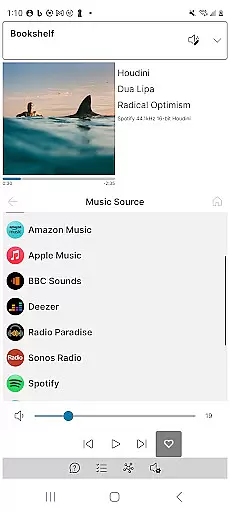
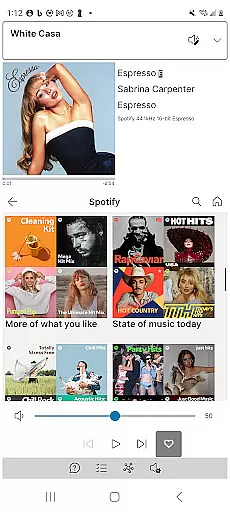
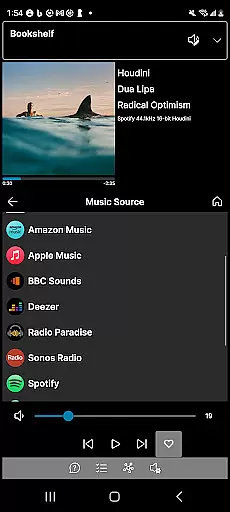
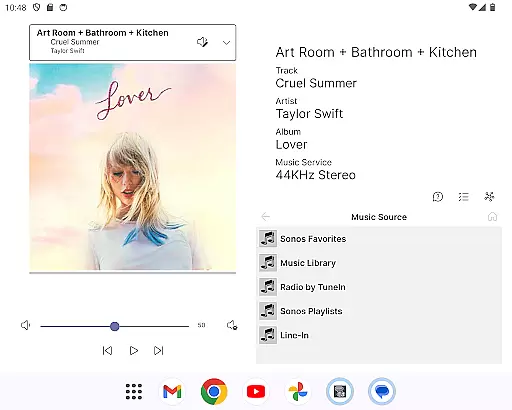
Phonos Ultimate is a powerful music control application designed specifically for managing your whole-home Sonos music system. This app offers all the essential features you need to seamlessly control your Sonos devices, including support for over a hundred music services and local libraries. With its intuitive interface, users can easily manage rooms, groups, playlists, and enjoy advanced volume controls.
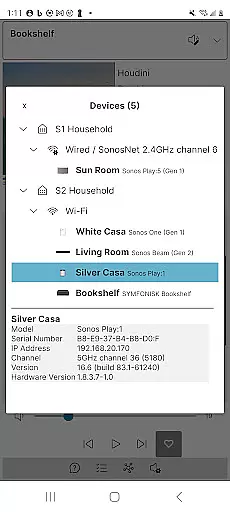
What sets Phonos Ultimate apart are its unique features that enhance user experience. The app provides detailed streaming data, supports multiple systems simultaneously, and includes a unique Devices View showing how your devices are connected. It operates independently of the Sonos cloud API, ensuring speed and reliability. Whether you're controlling music in portrait or landscape mode, or adjusting EQ settings, Phonos Ultimate delivers a comprehensive and reliable solution for all your Sonos music management needs.
Phonos Ultimate stands out with its extensive feature set tailored for Sonos users. The app allows you to see all your devices, rooms, groups, and music sources, providing complete control over your Sonos ecosystem. You can save your music queue as a Sonos Playlist, play, pause, skip tracks, shuffle, repeat, like, and unlike songs effortlessly.
Advanced functionalities include volume control for both groups and individual devices, direct playlist manipulation, and easy group editing. Unique features such as the Devices View and track streaming data—including sample rate and bit depth—offer insights not available in other apps. Supporting S1, S2, and multiple systems simultaneously, Phonos Ultimate ensures compatibility with every Sonos device except Ace headphones, making it an indispensable tool for any Sonos enthusiast.
Phonos Ultimate offers an extensive music library that supports over a hundred music services, similar to what Sonos provides. This vast selection ensures users have access to a wide range of music genres and artists.
In addition to streaming services, the app allows for the integration of local libraries, line-in audio sources, and custom station URLs. This feature not only enriches the music library but also guarantees that all content is legally accessible, respecting copyright laws.
The ability to save queues as playlists and manage tracks within Sonos Playlists adds another layer of personalization and convenience. Users can curate their collections without worrying about copyright infringement.
By supporting direct streaming URLs as custom radio stations and ensuring no usage of the Sonos cloud API, Phonos Ultimate maintains a reliable and legal music streaming experience, offering peace of mind regarding copyright compliance.
One of the standout features of Phonos Ultimate is its commitment to high audio quality. The app displays track streaming data, including sample rate and bit depth, which is crucial for audiophiles who demand the best sound experience.
Users can adjust EQ settings directly through the app, allowing for personalized audio tuning tailored to individual preferences or room acoustics. This level of control ensures optimal sound quality across different environments.
With support for every Sonos device (except Ace headphones), Phonos Ultimate delivers consistent audio performance throughout the home. Whether playing music in a single room or across multiple zones, users can expect clear, rich sound.
Furthermore, by avoiding the Sonos cloud API, the app minimizes latency and maximizes speed, contributing to a seamless and high-fidelity listening experience. This dedication to performance underscores the app's focus on delivering top-notch audio quality.
User-friendly interface
Comprehensive feature set
Reliable performance
Unique Devices View
No ads or cloud dependency
Not endorsed by Sonos
Limited to Sonos systems
No system setup capability
Requires existing Sonos system
Premium pricing model

DJ Music Mixer - DJ Remix: remix songs, make beat music & record mix of DJ.
 4.40
4.40
Permanently backup Now Playing. Maps, filters & listening stats.
4.00
The ultimate media player for Android devices
3.90
Next generation modular control surface
4.10
The original SP-1200 experience on your iPad
4.20
Let your Android device with the sound effects you want
4.50
Turn Every Moment into Music
3.60
Listen to offline music and sounds from all categories
4.70
Customize Your Favorite Songs and Videos with booster.
4.70
More downloads than any other metronome. Includes drum machine & tempo trainer.
4.80
Make songs with AI! Any genre, custom lyric, song generator for music creation!
4.80
Performance-Synthesizer & Multi-Track-Sequencer, polyphonic + multi timbral!
4.70
AI Music Maker: Generate And Compose AI Tunes & AI Songs & AI Music & AI Melody!
4.60
Reverse your voice & songs instantly! Fun singing challenge with cool effects.
4.60
Equalizer, Bass Booster and Volume Booster (Eq & Bass) improve sound quality
4.30
Bass Booster Pro takes auto-equalizing to the next level!
4.30
A High-Precision Audio Spectrum Analysis App
4.20
The official Sonos app
4.10
Simply convert wav to mp3. Clear. Reliable. Safe.
4.1


User Reviews