
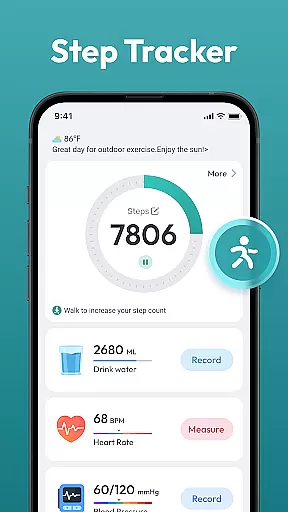
Step Counter - Pedometer App is a comprehensive health and fitness tool designed to help users track their daily physical activity. This app automatically counts steps and measures distance traveled, making it ideal for those looking to monitor their walking or running routines.
In addition to basic step counting, the app offers advanced features such as daily, weekly, and monthly activity charts, training courses, and personalized plans. It is compatible with most Android devices and does not require any external wearable gadgets, providing an accessible solution for users of all ages who wish to maintain an active and healthy lifestyle.
The Step Counter - Pedometer App stands out with its automatic step counting feature, ensuring accurate tracking without the need for manual input. The app supports various health data tracking, including distance covered and calories burned, which helps users gain insights into their overall fitness progress.
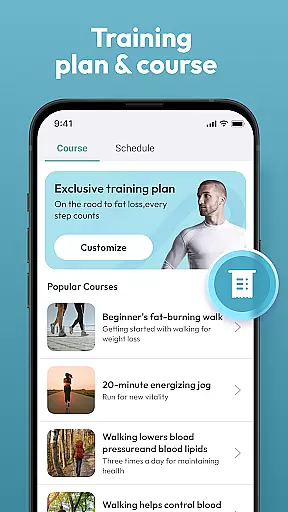
Another notable feature is the availability of training courses and plans tailored to individual goals, whether it's weight loss or achieving a daily target of 10,000 steps. With its user-friendly interface and compatibility with most Android devices, this app provides a seamless experience for anyone aiming to improve their health through consistent physical activity monitoring.
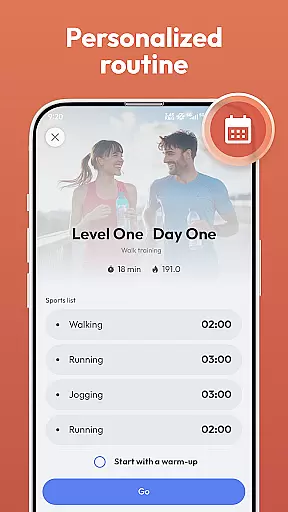
Personalized planning in a health and fitness app refers to the ability to create tailored workout and activity plans that align with individual goals. Step Counter - Pedometer App offers personalized planning by allowing users to choose training programs that suit their fitness objectives.
The app supports automatic step counting, which means it can track your daily movements without any manual input. This feature provides a seamless experience as it works in the background while you go about your day.
Users benefit from this functionality as they can set specific targets, such as reaching a daily goal of 10,000 steps or following particular training courses designed for weight loss and better health. The app's compatibility with most Android devices ensures that a wide range of users can access these personalized features.
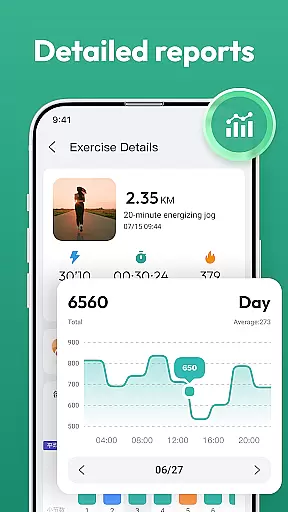
By offering daily, weekly, and monthly charts, Step Counter - Pedometer App allows users to monitor their progress over time. This tracking helps maintain motivation and adjust personal plans according to past performance, ensuring continuous improvement towards a healthier lifestyle.
Progress visualization is an essential aspect of any fitness application, providing users with graphical representations of their achievements. In Step Counter - Pedometer App, progress visualization is achieved through detailed charts and records that display various health data tracked by the app.
This free-to-use pedometer app not only counts steps but also measures distance covered during walks or runs. By presenting this information visually, users can easily understand how much they have accomplished each day.
The inclusion of training courses and plans within the app further enhances progress visualization. Users can see their advancement through different levels or stages of their chosen program, making the journey towards fitness more tangible and rewarding.
With its user-friendly interface, Step Counter - Pedometer App makes it simple for individuals of all ages to interpret their stats at a glance. This encourages consistent use and fosters a sense of achievement as users work towards their personal health goals without needing any additional wearable devices.
User-friendly design
Accurate step tracking
No external device needed
Detailed progress charts
Personalized training plans
Limited to Android
Requires phone in pocket
No live coaching
Basic social features
Ads may appear

Create powerful subliminal audio with custom affirmations and background music.
 4.00
4.00
Build Healthy Habits!
4.60
Wall Pilates at home & Pilates workout for beginners for core and weight loss.
4.80
Medbridge GO gets you moving - get back to doing what you love, faster!
4.90
Track heart rate & HRV in 30s! Get live health insights and anomaly alerts
4.40
Monitor, analyze, track, and convert blood sugar & help you control diabetes.
4.10
Walk, track, and burn calories with step counter & GPS walking tracker
4.20
FODMAP, Gluten, Allergy, Vegan
4.50
Your personal BP tracking companion, focus on helping you achieve wellness goal.
4.10
Power-lifting, weightlifting and Wendler 531 app to track your workout program.
4.90
Mind on steroids - relaxation, productivity, meditation and sleep!
4.60
Raccoon AI Calorie Counter. Intermittent Fasting & Timer. Macro, Carb, Protein
4.50
50 HD sounds to help you relax during the day and sleep great at night!
4.40
Blood Pressure Log, HRV & Heartbeat Tracker. Pulse Checker.
4.40
Looking to take control of your health? Our psychology-based programs can help.
4.10
Your Health Has Met Its App (℠)
3.90
Sync your activities of the most popular sports tracking services
2.70
Insanity blocks of intense physical activity, short breaks of 30 seconds.
4.5
Using Recognise™ has been shown to reduce pain, and improve performance.
4.1


User Reviews