

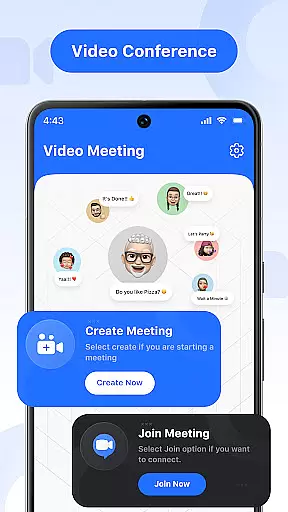

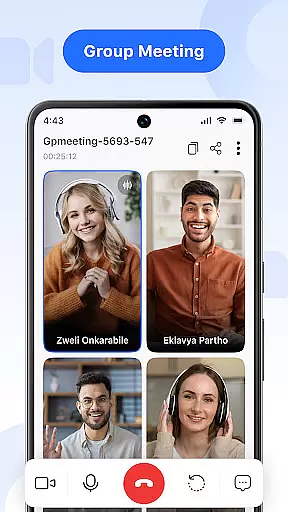

Video Meeting is a cutting-edge video conferencing app designed to enhance virtual communication and collaboration. With crystal-clear HD video calls, real-time interaction, and seamless screen sharing, it caters to both professional and personal needs. The app supports various meeting formats, from one-on-one chats to group hangouts, making it versatile for business meetings, social interactions, or educational purposes.
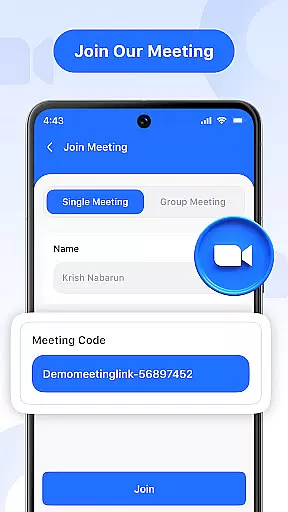
Key features include instant meeting hosting, secure code invitations, real-time chat, and multi-language support. Whether you're leading a team project, teaching an online class, or catching up with friends, Video Meeting ensures every connection is smooth, secure, and productive. Its user-friendly interface and encrypted access via unique codes make it a reliable choice for all your virtual communication needs.
Video Meeting offers a comprehensive suite of features that streamline virtual interactions. Host meetings instantly by launching your own video session and inviting participants effortlessly. Use secure code invitations to ensure safe and quick access for all attendees. The app also provides real-time chat functionality, allowing users to communicate through instant messaging without interrupting the call.
Advanced controls include audio toggling to mute or unmute your microphone during conversations and video toggling to show or hide your camera feed based on comfort and privacy. Screen sharing is made easy with a single tap, enabling users to present documents, slides, or applications live. Additionally, the app supports multi-language options, breaking communication barriers and catering to a global audience.
With its flawless HD video and audio quality, simple yet powerful UI, and flexible use cases for work, study, or social interactions, Video Meeting stands out as an essential tool for modern virtual communication.
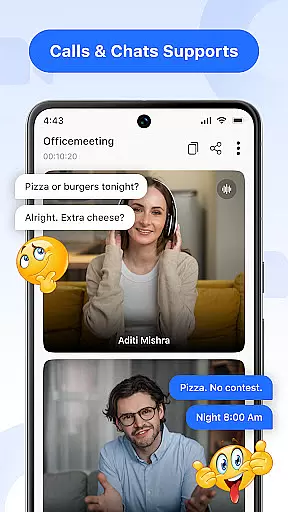
In today's fast-paced digital world, the speed and reliability of real-time messaging are crucial for effective communication. Video Meeting excels in this area by providing instantaneous message delivery across all types of conversations, ensuring that every participant stays informed and engaged without delays.
The app employs cutting-edge technology to maintain a stable connection, even under fluctuating network conditions. This ensures that text-based communication within meetings is as reliable as the high-definition video streams the app is known for, establishing a comprehensive and seamless virtual meeting environment.
Users benefit from the ability to send quick updates, ask questions, or provide feedback during live sessions without interrupting the flow of the meeting. This feature is invaluable for dynamic team collaborations where time-sensitive decisions are often made.
Ultimately, the real-time messaging capability of Video Meeting enhances productivity by keeping all participants on the same page, allowing for swift exchanges of information and ideas, which is essential for successful online connections.
Sharing multimedia content during virtual meetings is an essential feature for collaborative work and interactive presentations. Video Meeting offers robust media sharing support, enabling users to distribute various file types effortlessly within their calls, thus enriching the communication experience.
The application facilitates the sharing of images, documents, and other media formats in real-time, allowing meeting participants to view and discuss shared content without leaving the virtual room. This creates an integrated environment where ideas can be conveyed more effectively through visual aids.
With Video Meeting's media sharing capabilities, teams can collaborate more efficiently, whether they're reviewing design mockups, analyzing reports, or brainstorming creative concepts. The immediacy of sharing and discussing content leads to more productive sessions and faster decision-making processes.
This feature not only streamlines workflows but also bridges the gap between physical and virtual meeting spaces, making remote interactions feel as natural and engaging as face-to-face discussions.
User-friendly interface
HD video quality
Secure access codes
Real-time chat
Multi-language support
Limited free features
Occasional lags
No offline mode
Premium subscription cost
Device compatibility issues

 3.90
3.90
Identify unknown numbers, block spam calls, customize calls with cool themes.
4.60
At select facilities, you now have an easy way to video visit your loved ones!
3.30
Faster version of Messages. Messenger for your contacts.
4.50
Fast, Simple And Secure Application That Provides SMBv3 Server On Your Device
3.30
RemoteHams.com Android RCForb Client Pre-Release
4.30
Use this SMS app standalone or as a TREK: Total Interface companion.
4.30
Threema is the messenger with the most consistent focus on security and privacy.
4.00
A customizable phone number in the cloud
4.20
فیلتر شکن قوی پرسرعت کلید جدید برای اندرویدسریع ترین وی پی ان برای همه اپراتورها
4.70
Use this Dialer app alone or as a TREK: Total Interface companion.
4.70
Useful. Social. Expressive.
4.70
Messenger, an MMS & SMS messages app with Blockers, Driving mode & Private box
4.60
BiP is a fast, secure, free messaging and HD video calling app!
4.10
Messenger app for faster and simpler SMS text messaging, and personalized themes
4.10
WazzapMigrator: transfer your WhatsApp history from iPhone to Android
4.00
Messages is Private SMS Messenger 2023 with text message, instant messaging.
4.00
Auto Reply SMS, Text Messaging, Away SMS Response, Busy SMS messages, Block Text
3.10
Comprehensive and powerful scan tool app with enhanced functions
3.00


User Reviews