
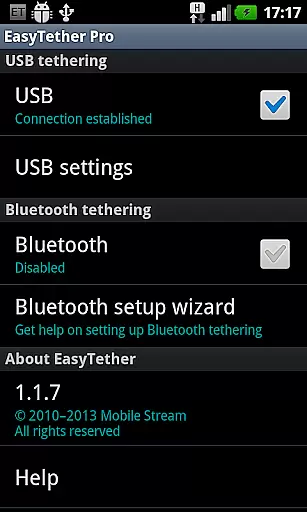
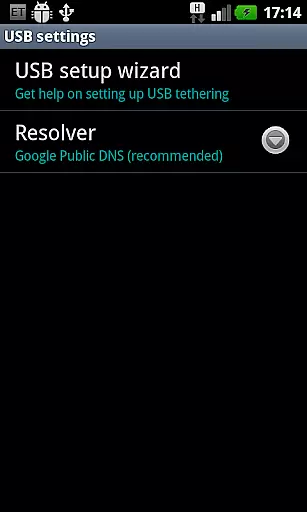
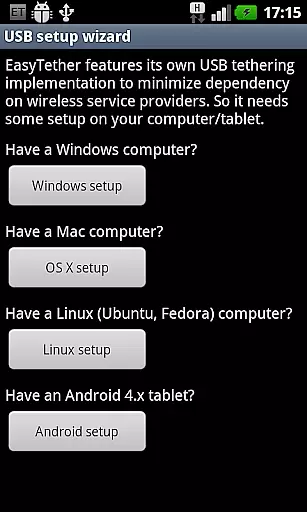
EasyTether Pro is a communication app designed to share your smartphone's Internet connection with other devices. It supports USB tethering for Windows, Mac OS X, Linux computers, and Android tablets, as well as Bluetooth tethering for compatible devices. The app does not require root access or special tethering plans, making it an accessible solution for users who need to connect their gaming consoles like PS3, Xbox, and Wii via Internet connection sharing on Windows or Mac.
This app is ideal for users who are looking for a one-time purchase tethering solution without recurring fees. EasyTether Pro offers seamless connectivity by providing support across multiple platforms and devices, ensuring that you stay connected wherever you go. Whether you're working remotely or need to connect your gaming console, EasyTether Pro provides a reliable and straightforward way to share your Internet connection.
EasyTether Pro stands out with its versatile tethering options. The app supports both USB and Bluetooth tethering, catering to different user preferences and device compatibilities. For USB tethering, it works seamlessly with Windows, Mac OS X, and Linux computers, as well as Android 4.x tablets. Bluetooth tethering is supported for Windows computers and Android 4.0.3+ tablets, offering flexibility in how you choose to connect your devices.
One of the key features of EasyTether Pro is that it doesn't require root access or any special tethering plans, which simplifies the setup process significantly. Additionally, the app supports Internet connection sharing for gaming consoles such as PS3, Xbox, and Wii through Windows or Mac, enhancing its utility beyond just computer and tablet connectivity. With a one-time fee structure, users can enjoy unlimited tethering without worrying about additional costs.
Real-time messaging speed and reliability are crucial for seamless communication. EasyTether Pro excels in this area by providing a stable and fast connection between your smartphone and other devices.
The app uses advanced tethering technology that ensures minimal latency when sharing your phone's internet connection. Whether you're working on your laptop or using a tablet, the connection remains consistently strong.
EasyTether Pro supports multiple tethering methods including USB and Bluetooth. This versatility allows users to choose the most reliable connection method for their specific environment and device compatibility.
With no need for root access or special tethering plans, EasyTether Pro offers a hassle-free experience. Users can trust that their internet connection will be shared efficiently, making remote work and entertainment more accessible.
Media sharing support is an essential feature for users who need to transfer files between devices seamlessly. EasyTether Pro facilitates this by enabling robust internet connection sharing capabilities.
Whether you're looking to share documents, stream media, or play online games, EasyTether Pro ensures that all your devices have the necessary connectivity. The app supports a wide range of file formats, enhancing its utility across different platforms.
By supporting PS3, Xbox, and Wii tethering through Internet connection sharing on Windows or Mac, EasyTether Pro extends its functionality beyond traditional computing devices. Gamers and entertainment enthusiasts can enjoy uninterrupted connectivity.
Overall, EasyTether Pro stands out with its comprehensive media sharing support, ensuring that users can connect and share effortlessly across various devices without worrying about format compatibility or connection stability.
User-friendly interface
No root access required
Supports multiple platforms
One-time purchase fee
Versatile tethering options
Limited carrier visibility
Removal of previous versions needed
Bluetooth tethering limited to specific devices
No free version available
Compatibility issues with certain carriers

Manage your data, talk & text - affordable phone plans & data usage made simple
 4.30
4.30
We’re taking the yada yada out of wireless—now we’ve taken it out of your app.
4.70
WazzapMigrator: transfer your WhatsApp history from iPhone to Android
4.00
Message and video call your family and friends in HD!
3.80
An agentic AI browser for Android, built by Perplexity
4.50
Bringing the functionality of Winlink to your Android device
4.0
Telegram is a messaging app with a focus on speed and security.
4.00
Useful. Social. Expressive.
4.70
Share the moment!
4.10
Connect and browse the internet with a fast VPN proxy server and IP blocker.
4.50
Create a secure hotspot on-the-go with Portable WiFi - Mobile hotspot.
4.40
Use this SMS app standalone or as a TREK: Total Interface companion.
4.30
Enjoy secure messaging & calling. Safe Messenger: group chats, calls, messages.
4.20
SMS Messenger is a lightning-fast messaging app.
4.20
Google's fast and secure browser
4.10
Call Forwarding is easy and simple application to use.
3.80
Official NDI app: turn your phone into a professional live-streaming IP camera.
3.20
Comprehensive and powerful scan tool app with enhanced functions
3.00
Watchgram for Telegram: Experience seamless Telegram messaging on your watch
1.80


User Reviews