
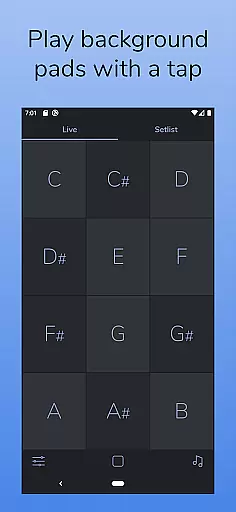
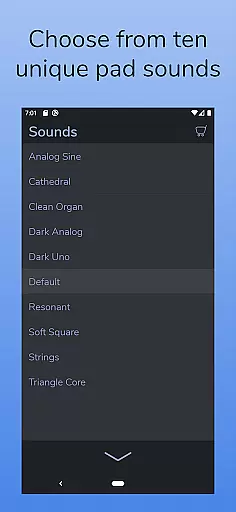
AutoPad is a versatile ambient pad loop application designed to enhance live performances and recordings with seamlessly looped sample-based drones. The app provides users with 10 carefully crafted pad sounds, each offering a unique atmosphere across all 12 musical keys. Its intuitive interface allows musicians to tap a key and instantly generate tasteful soundscapes that can play indefinitely, making it ideal for both live gigs and studio sessions.
One of AutoPad's standout features is its ability to handle natural crossfades between keys automatically, ensuring smooth transitions during performances. Additionally, the app supports in-app purchases for expanding the sound library and allows users to import their own WAV files. With functionalities like a built-in metronome, MIDI compatibility (via physical controllers), and adjustable settings such as crossfade time, filters, reverb, pan, and volume, AutoPad offers a comprehensive toolset for creating immersive ambient backdrops.
This app is particularly suited for worship music and other genres where subtle, continuous soundscapes are desired. By playing softly behind live musicians, AutoPad helps maintain harmonic structure without overpowering the main performance, making it an invaluable asset for bands and solo artists alike.
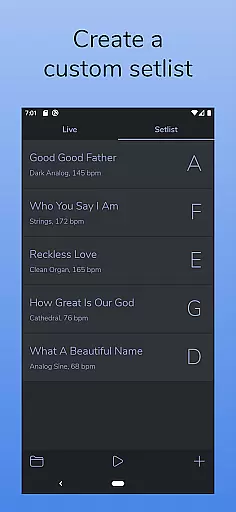
AutoPad boasts an array of features tailored to meet the needs of modern musicians. The app operates in two distinct modes: LIVE mode, which grants instant access to all twelve musical keys, and SETLIST mode, enabling users to create custom playlists for specific performances. This dual-mode functionality ensures flexibility whether you're improvising on stage or following a predetermined setlist.
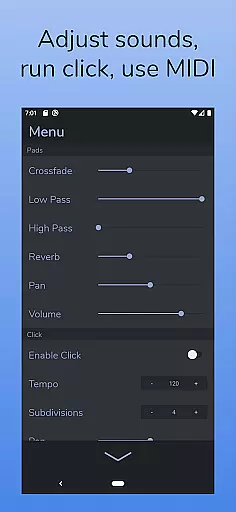
In addition to its core capabilities, AutoPad includes a built-in metronome to keep your band in sync without the need for external equipment. Users also have extensive control over audio parameters through the app's menu, allowing adjustments to crossfade time, two types of filters, reverb amount, pan, and volume. These controls empower musicians to fine-tune their soundscapes precisely as needed.
For those seeking even more variety, AutoPad supports in-app purchases of additional sound packs and allows importing custom WAV files. Furthermore, the app's MIDI compatibility (with physical controllers) opens up possibilities for integrating AutoPad into existing setups. Its dark color scheme not only looks sleek but also enhances visibility under stage lighting conditions, completing a package that prioritizes both aesthetics and functionality.
AutoPad offers a diverse music library that includes 10 carefully designed pad sounds, providing a unique atmosphere in all 12 keys. These sounds are crafted to support live performances and recordings with ease.
In addition to the built-in sounds, AutoPad allows users to expand their sound library through in-app purchases or by importing personal pad files, although currently limited to wav format on Android. This ensures that musicians have access to a wide range of high-quality audio options tailored to their needs.
The app's dedication to copyright authenticity is evident as each sound is either included with proper licensing or can be expanded legally via official channels, giving peace of mind to creators who wish to use these sounds in their work.
AutoPad provides excellent audio quality options, ensuring that every ambient pad loop maintains its clarity and richness during playback. The app supports high-fidelity sound output which is crucial for professional music production.
Users can adjust various parameters such as crossfade time, filters, reverb amount, pan, and volume directly from the menu, allowing precise control over the final audio mix. These features help tailor the soundscapes to fit perfectly within any musical context.
Moreover, AutoPadu2019s compatibility with MIDI controllers enhances the user experience by enabling real-time triggering of pads with external devices, thus offering an intuitive way to integrate hardware setups into digital workflows while maintaining pristine audio fidelity.
User-friendly interface
Versatile sound options
Seamless looping technology
Customizable audio settings
Built-in metronome feature
Limited file format support
No virtual MIDI on Android
Basic free sound library
Requires hardware MIDI
Subscription costs for extras

Equalizer, Bass Booster and Volume Booster (Eq & Bass) improve sound quality
 4.30
4.30
Make music anywhere. Turn your device into an instrument.
4.5
The Music Journey in Your Hands
4.30
The Cubase remote control app
3.60
Time Trainer: accurate metronome w tools to help you develop your internal time!
4.20
A High-Precision Audio Spectrum Analysis App
4.20
Turn your Android phone into a professional audio analyser with up to 120 bands.
4.00
Versatile MP3 recorder with auto-backup to Dropbox and Google Drive
4.10
Travel To The Music Universe
3.40
Walkout Song DJ is the most intuitive app to manage your sports music.
4.70
Listen radio AM / FM Stations. Live AM / FM Radio App Station. Radio Com.
4.70
Super Sound Editor, Song Maker & Mixer, Vocal Remover, Voice Recorder & Changer!
4.60
DJ Music Mixer Pro is a real DJ controllers and DJ Music Studio to remix DJ.
4.40
The original SP-1200 experience on your iPad
4.20
VB-AUDIO Software / VBAN-Receptor allows listening to any VBAN Streams
4.10
Permanently backup Now Playing. Maps, filters & listening stats.
4.00
The iconic iOS metronome app is now on Android.
3.70
Control your MIDI USB or Bluetooth devices in app and avoid some trampling
3.30
Remove ads permanently from Music Visualizer
4.3


User Reviews