
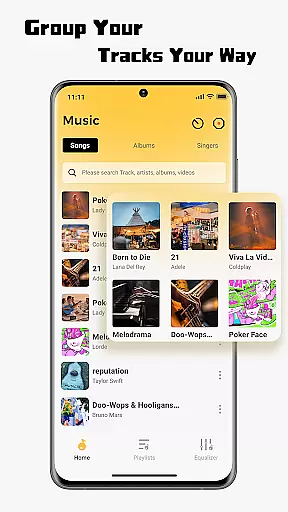
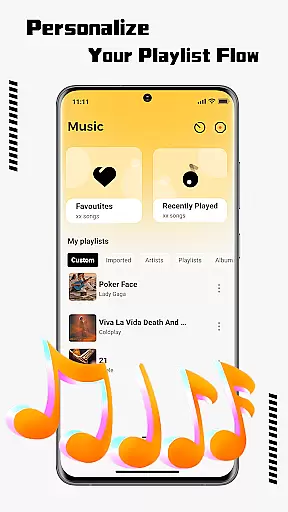
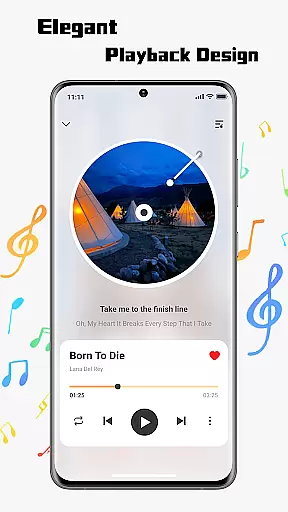
SonicNest is a premium music player app designed to enhance your audio experience through advanced features and intuitive design. The app focuses on seamless local music import, allowing users to effortlessly transfer their personal music libraries into one centralized location. With smart management tools, SonicNest ensures your tracks are well-organized by albums, artists, or custom categories, making it easy to find exactly what you're looking for.
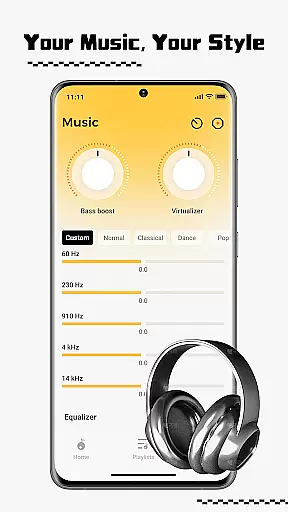
Another standout feature is the built-in equalizer, which offers precision sound customization. Whether you want deeper bass for workouts or clearer vocals for relaxed listening, SonicNest provides both presets and manual controls to suit every preference. This makes the app ideal for audiophiles and casual listeners alike who seek high-quality playback tailored to their unique tastes.
By combining powerful organization capabilities with customizable audio settings, SonicNest transforms how users interact with their music collections. Its sleek interface and cutting-edge functionality ensure an immersive listening experience that feels rich, personal, and engaging.
SonicNest stands out in the music player category due to its innovative approach to local music management. One of its key features is the ability to seamlessly import tracks from your device’s storage directly into the app. This eliminates the need to switch between multiple apps, consolidating all your music into a single, easy-to-navigate library.
The app also excels in organizing your collection with smart tools. Users can edit metadata such as track titles, sort songs by album or artist, and even create custom folders based on mood or activity. These organizational features help streamline access to specific playlists, whether you're gearing up for a workout or winding down after a long day.
Additionally, SonicNest includes a sophisticated equalizer that enhances sound quality. With professionally crafted presets and manual adjustment options, users can fine-tune audio output to match their preferences. From boosting bass levels to highlighting vocal clarity, this feature caters to both casual listeners and dedicated audiophiles seeking optimal playback performance.
When it comes to music applications, the size and authenticity of the music library are crucial factors. SonicNest offers a seamless local music import feature that allows users to effortlessly bring their personal music collection into the app. This ensures that all your tracks are centralized in one location, eliminating the need to switch between multiple apps.
The app supports an extensive range of audio formats, ensuring compatibility with virtually any music file you own. By focusing on local music management, SonicNest sidesteps copyright issues associated with streaming services, giving users peace of mind. The ability to browse device storage and instantly add tracks enhances the overall user experience.
With SonicNest, users can be confident in the authenticity of their music library. The app does not rely on external sources or unauthorized content, making it a trustworthy choice for managing personal audio files. This dedication to genuine, user-owned content adds significant value for those who prioritize legal and ethical music consumption.
Audio quality is paramount for any music enthusiast, and SonicNest excels in this area with its precision sound capabilities. The built-in equalizer allows users to fine-tune every track to perfection, catering to both casual listeners and audiophiles alike. Whether you want to boost bass for workout sessions or enhance vocals for focused listening, SonicNest delivers.
The app provides expertly crafted presets that cover various listening preferences, from high-energy tracks to relaxing acoustic sessions. For advanced users, manual customization options enable the creation of personalized sound profiles. This flexibility ensures that every note sounds exactly as intended by the artist.
SonicNest's commitment to audio quality extends beyond simple playback. The app maintains the integrity of your original files while offering tools to optimize sound output. This combination of pristine audio preservation and customizable enhancement options makes SonicNest a standout choice for discerning music lovers.
Intuitive user interface
Advanced equalizer settings
Effortless music import
Smart library organization
Customizable playback options
Limited streaming integration
No cloud sync support
Heavy on system resources
Few social sharing features
Occasional bugs reported

Over 100 million tracks available for high quality streaming and download
 4.60
4.60
DJ Music Mixer Pro is a real DJ controllers and DJ Music Studio to remix DJ.
4.40
DJ Music Mixer - DJ Remix: remix songs, make beat music & record mix of DJ.
4.40
Most Advanced AI Song Generator and Music Creator. Rap, Pop, Rock, Gospel & more
4.70
Network/Cloud Streaming, Visualization, Graphic Equalizer and Sound Effects.
4.20
USB audio recording and playback finally possible on Android 3.1 or higher!
3.90
The original SP-1200 experience on your iPad
4.20
A complete sound package for the sound engineer or enthusiast
4.60
Master Salsa Rhythm quickly and with a lot of fun!
4.30
Play your hearts out on TouchTunes jukeboxes & connect with fellow music lovers.
4.80
Your song collections with lyrics and chords on Android smartphones and tablets.
4.80
Make songs with AI! Any genre, custom lyric, song generator for music creation!
4.80
AI Music Maker: Generate And Compose AI Tunes & AI Songs & AI Music & AI Melody!
4.60
Full featured mp3 and audio player with Chromecast and Android Auto support.
4.40
Your HD audio recorder on the go for music, meetings, ambience, animal sounds…
4.30
Enjoy singing any song, no matter how high or low it is
4.30
Smart piano keyboard, Classical to Pop, Real-time multiplayer connection!
4.20
The ultimate media player for Android devices
3.90
Music Streaming suite for Ampache, Nextcloud Music and compatible backends.
4.5


User Reviews