
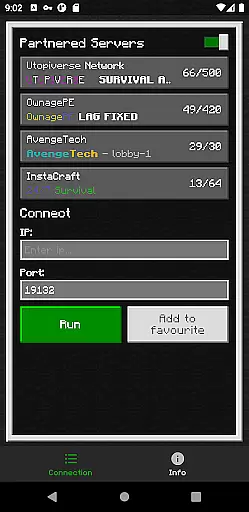
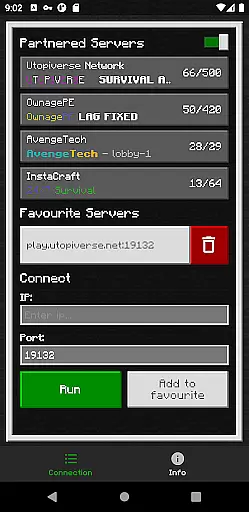
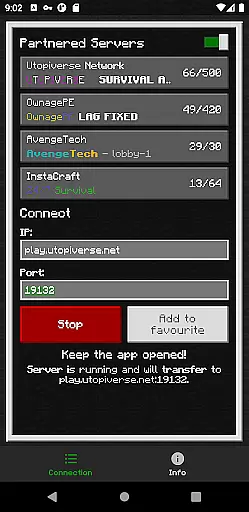
BedrockTogether (Pro) is a specialized networking tool designed for Minecraft Bedrock Edition players. This ad-free version allows any Bedrock server to appear as a LAN server on Xbox or PlayStation clients, enabling seamless connections without DNS rerouting. The app serves as a bridge between different devices on the same local network, making multiplayer gaming more accessible.
The application's core function is to simplify the server connection process. Users can input their desired server IP and port, then use the "Run" feature to make the server visible in the game's "Friends" tab under the LAN section. It's an essential tool for Minecraft enthusiasts who want to play together on local networks without complex network configurations.
This tool is particularly useful for families and friends gathering for gaming sessions. By eliminating the need for advanced network setup, BedrockTogether (Pro) makes it easy to connect multiple devices within the same network. However, users should note that Realms and Nintendo Switch compatibility are not supported, limiting its use to specific platforms.
BedrockTogether (Pro) offers several distinctive features that enhance the Minecraft multiplayer experience. First and foremost is its ability to create a virtual LAN server environment for Bedrock Edition users. This functionality works seamlessly across Xbox and PlayStation consoles, allowing gamers to connect easily through their local network.
The app includes a simple user interface where players can enter server details and activate the connection with a single click. Its streamlined design eliminates technical barriers, making it accessible even for less tech-savvy users. Additionally, the app automatically closes after the client joins the server, ensuring it doesn't consume unnecessary system resources.
Another notable feature is its active community support through Discord and Telegram channels. These platforms provide troubleshooting assistance and bug reporting options, creating a supportive user community. While the app doesn't support all Minecraft features, its focused functionality makes it an invaluable tool for local multiplayer gaming sessions.
BedrockTogether (Pro) delivers exceptional core functionality by enabling Bedrock Edition servers to appear as LAN servers on Xbox or PlayStation Minecraft clients. This allows users to connect seamlessly without relying on DNS rerouting, ensuring a smooth and reliable connection process.
The app's primary feature is its ability to facilitate simple server connections through an intuitive interface. By entering the desired server IP and port, clicking 'Run,' and navigating to the 'Friends' tab in-game, users can effortlessly join their preferred servers via the LAN tab. This streamlined approach eliminates unnecessary technical steps, making it accessible even for less tech-savvy players.
For optimal performance, both the gaming console and mobile device need to be on the same LAN network. This requirement ensures that data transmission remains fast and stable, providing a lag-free experience while playing Minecraft. The app also includes troubleshooting tips to help users resolve common connectivity issues efficiently.
Ultimately, BedrockTogether (Pro) enhances user satisfaction by offering a dependable solution for connecting to multiplayer servers with ease. Its straightforward setup process and effective execution make it an invaluable tool for enhancing your Minecraft gameplay experience.
The interface of BedrockTogether (Pro) is designed with simplicity and intuitiveness in mind, ensuring that users can navigate and utilize its features without any hassle. Upon launching the app, users are greeted with a clean and minimalistic layout that focuses on essential functionalities, such as entering server details and initiating the connection process.
With just a few clicks, users can input their desired server IP and port, then hit the 'Run' button to start the connection. This straightforward design minimizes confusion and reduces the learning curve, allowing both new and experienced users to get started quickly. The clear labeling and logical flow of actions contribute to an overall user-friendly experience.
In addition to its easy-to-use interface, BedrockTogether (Pro) provides helpful instructions within the app itself. These guidelines walk users through each step of the connection process, from opening the game to joining the server via the LAN tab. Such detailed yet concise directions further enhance usability and ensure successful connections every time.
By prioritizing interface simplicity and intuitive navigation, BedrockTogether (Pro) stands out as a practical tool for Minecraft enthusiasts looking to streamline their multiplayer gaming sessions. Its efficient design not only saves time but also enhances the overall enjoyment of playing Minecraft with friends across different platforms.
Seamless LAN connection
User-friendly interface
No ads or interruptions
Efficient resource usage
Active community support
No Nintendo Switch support
Limited to local networks
Realms not supported
Requires manual setup
Third-party application

 4.50
4.50 4.50
4.50
Extremely fast, secure, and protects your privacy
4.80
Amateur Radio app for APRS: Track friends, exchange messages, get tactical info.
3.90
Fast Video Downloader, Movie Downloader, Torrent Downloader & Adblock Browser
4.70
Game Booster, GFX Tool is now compatible with newer game update
4.50
Automate everything from settings to photos, SMS to speech. ADC2 prize winner.
4.10
Screen recorder with audio to record high-quality videos and take screenshots.
4.40
Enjoy a smooth mobile reading experience!
3.60
Small and simple app to Verify Root Access and BusyBox Install!
4.70
The one-and-only remote control for PC, Mac, and Linux
4.70
Connect instantly to a fast, encrypted VPN with one tap
4.60
Canon PRINT is a companion app for your Canon printer.
4.60
Planner and Tracker for Stardew Valley
4.60 4.50
4.50
Quickly switch to an encrypted DNS server on Android TV
4.50
Mirror your screen to Fire TV - Super fast and simple
4.40
View detailed information about your Nissan Leaf the dealer never shows you.
4.10
Smart and comfortable browsing experience.
3.80


User Reviews