
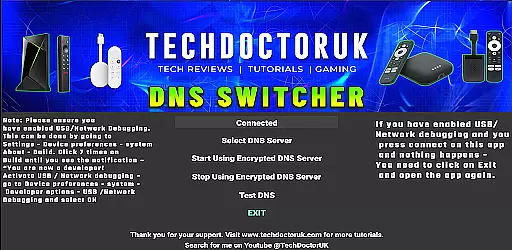
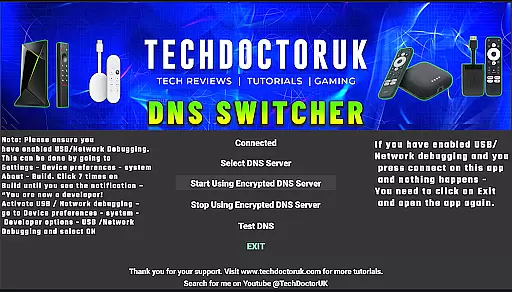
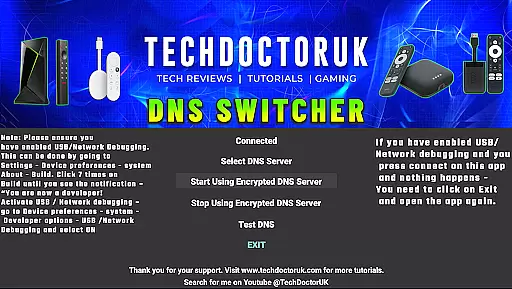
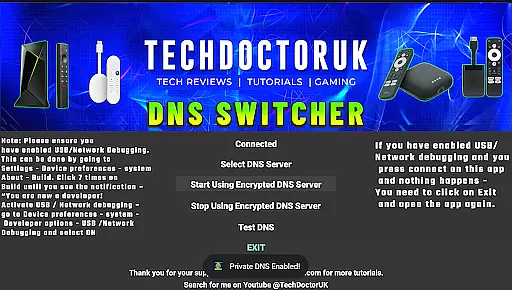
TDUK DNS Switcher is a specialized tool designed to enhance your Android TV's security by enabling encrypted DNS server usage. This application allows users to protect their privacy and secure their DNS requests, ensuring that data transmitted from their devices remains confidential. With the ability to choose from well-known encrypted DNS servers or input custom ones, it offers flexibility in maintaining optimal security standards.
The app is particularly useful for tech-savvy individuals who prioritize online safety and want to prevent potential eavesdropping on their internet activities. By configuring your Android TV with TDUK DNS Switcher, you can enjoy a safer browsing experience while streaming content or accessing online services. Its straightforward setup process makes it accessible even to those with limited technical expertise.
TDUK DNS Switcher stands out with its comprehensive feature set tailored for enhancing DNS security. One of its key features is the support for multiple encrypted DNS providers, giving users the freedom to select trusted services or enter custom server details. This ensures that all DNS queries are encrypted, protecting against unauthorized access and potential data breaches.
Another notable feature is the requirement for USB or Network Debugging to be enabled before using the app. While this might seem like an extra step, it guarantees a secure environment for making critical network changes. Additionally, the app provides clear instructions and guidance throughout the setup process, making it easier for users to configure their devices correctly and maintain a high level of protection against cyber threats.
TDUK DNS Switcher focuses on providing users with a reliable way to enhance their privacy by routing DNS requests through encrypted servers. This functionality is crucial for maintaining security and protecting sensitive information from potential threats.
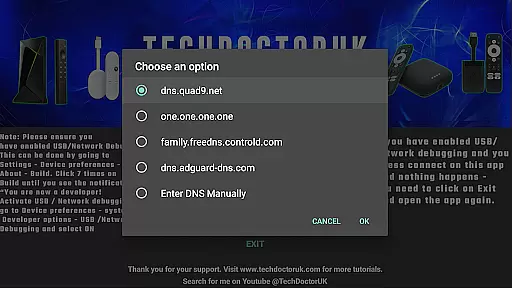
The app allows users to select from a list of well-known encrypted DNS servers or input custom server details. By doing so, it ensures that all DNS requests made from an Android TV are safeguarded against interception or tracking. The ability to choose between different servers adds flexibility and personalization to the user experience.
For those concerned about online privacy, this application offers peace of mind. It effectively prevents ISPs and other third parties from monitoring your browsing activities. With TDUK DNS Switcher, you can be confident that your DNS queries remain confidential and secure.
A straightforward and intuitive interface is essential for any tool designed to manage technical settings like DNS configurations. TDUK DNS Switcher excels in this area by offering a clean layout that makes navigation effortless even for non-technical users.
Upon opening the app, users are greeted with clear instructions and options to enable USB or Network Debugging if not already activated. These steps are necessary for the proper functioning of the app but are presented in such a way that they do not overwhelm the user.
Moreover, adding or switching DNS servers is streamlined through simple input fields and dropdown menus. Users can easily switch between predefined servers or enter custom ones without needing extensive technical knowledge. This ease of use ensures that anyone can protect their privacy without hassle.
Enhances privacy
Supports custom DNS
User-friendly interface
Clear setup instructions
Compatible with Android TV
Requires debugging mode
Limited to Android TV
No automatic updates
Basic UI design
Dependent on third-party DNS

Extremely fast, secure, and protects your privacy
 4.80
4.80
Learn the vast amount of system information about device and monitor it's state
4.70
Head tracking for PC sim games such as MSFS 2024 or Elite:Dangerous. No headset!
4.50
Canon PRINT is a companion app for your Canon printer.
4.60
Amateur Radio app for APRS: Track friends, exchange messages, get tactical info.
3.90
Best leveling tool for your Android device. Hang paintings like a pro.
4.90
Excellent scientific calculator with symbolic algebra, integrals, derivatives
4.80
Navigate with Ease and Style
4.90
Screen recorder with audio to record high-quality videos and take screenshots.
4.40
Remote Play with FSR upscaling, low latency & full controller support
4.80
Easily install aab(Android App Bundle) files on your Android device with our app
4.80
eXtended Permission Manager - a small app to manage permissions and AppOps
4.50
Screen Mirroring for Roku Sticks, Roku TCL TV and Roku Hisense TV
4.50
PC precision for mobile gaming: dominate with keyboard and mouse!
4.30
VESC Tool can monitor and configure VESC-compatible devices over BLE and Wifi
4.20
Introducing Smart Printer, your ultimate destination for printing solutions!
4.00
1-Click close all background apps on Android TV
3.90
This app unlocks the Pro features of the Central for DayZ app
3.60
Unlock your Essential Key. Create custom shortcuts to your favorite apps!
4.5


User Reviews