
Panda Mouse Pro is a powerful keymapper tool that revolutionizes mobile gaming by allowing players to use their keyboard and mouse for enhanced control. Designed for gamers seeking precision and efficiency, this app supports virtually all keyboard and mouse brands, making it versatile for various gaming setups. With features like direct game launch and secure Google Play login, users can dive straight into their favorite games without the hassle of traditional touch controls.
One standout feature of Panda Mouse Pro is its ban-proof technology, which ensures safe gameplay in games that restrict duplication running. Whether you're playing shooters, MOBAs, or sports games, this app provides pinpoint accuracy and lightning-fast reactions, giving users a competitive edge. Its universal compatibility and extensive game support make it an essential tool for elevating your mobile gaming experience.
Panda Mouse Pro offers a range of innovative features tailored to meet the needs of mobile gamers. The app's direct game launch functionality eliminates the need for cloning, allowing users to start playing immediately. Additionally, its secure Google Play login ensures that users can access their accounts safely without worrying about bans or restrictions.
The app also supports hassle-free activation across different Android versions. For devices running Android 11 and above, activation can be done directly on the device. Users with Android 10 or lower can activate the app via PC or Mac, while rooted devices enjoy automatic activation. These features, combined with universal compatibility and extensive game support, ensure that Panda Mouse Pro delivers a seamless and immersive gaming experience for all types of players.
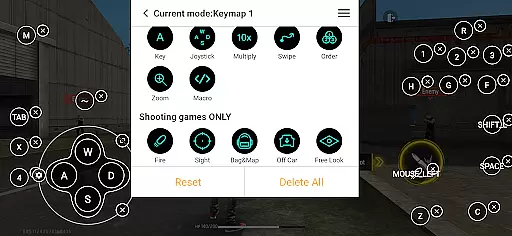
Panda Mouse Pro excels in delivering precise and effective functionality, specifically tailored for mobile gamers who demand superior control. The app's core feature is its ability to map keyboard and mouse inputs directly to touchscreen commands, allowing for unparalleled accuracy in gaming scenarios.
This keymapper technology ensures that every keystroke and mouse movement translates into exact in-game actions. Whether it's executing headshots in first-person shooters or performing complex skill combinations in MOBAs, the application guarantees responsive and reliable input delivery.
Users benefit from a seamless connection process that supports virtually all keyboard and mouse brands. This universal compatibility, combined with features like direct game launch and secure Google Play login, creates an ecosystem where players can focus on their performance without worrying about technical limitations.
The true value lies in the application's ban-proof technology, which enables gamers to enjoy enhanced control without risking account penalties. This combination of precision, security, and versatility makes Panda Mouse Pro an essential tool for competitive mobile gaming.
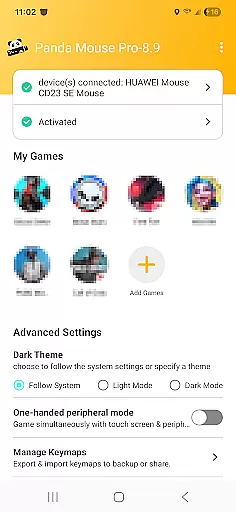
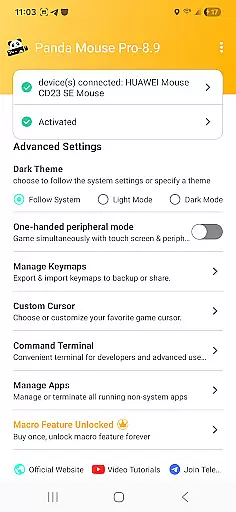
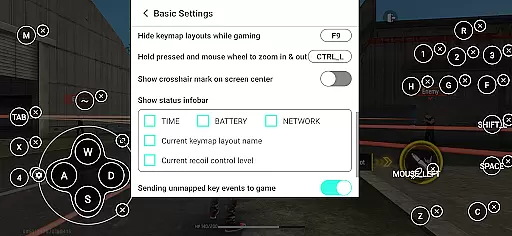
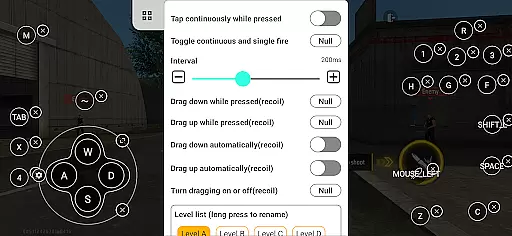
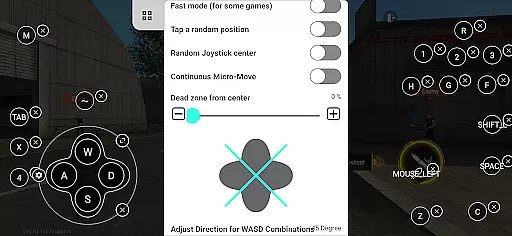
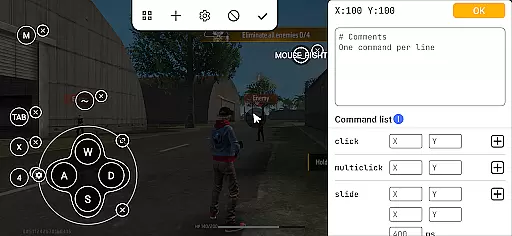
Panda Mouse Pro demonstrates exceptional interface design by maintaining a perfect balance between functionality and user-friendliness. The application's interface has been carefully crafted to ensure that even novice users can quickly grasp its features while still offering advanced options for experienced gamers.
The setup process is remarkably straightforward, with clear instructions guiding users through activation steps that vary based on their Android version. For devices running Android 11 and above, the application offers direct activation, while older versions provide easy PC-based activation methods. Rooted device users enjoy automatic configuration, showcasing the app's adaptability across different system environments.
Keymapping customization is presented through an intuitive visual interface that allows users to create and modify control schemes with minimal effort. This approach eliminates the learning curve typically associated with complex gaming tools while still providing depth for those seeking advanced configurations.
By combining these user-centric design elements with comprehensive video tutorials and support resources, Panda Mouse Pro establishes itself as an accessible yet powerful tool that enhances the overall mobile gaming experience without requiring extensive technical knowledge.
Enhanced precision
Ban-proof technology
Universal compatibility
Direct game launch
Secure Google Play login
Requires activation steps
Limited to compatible devices
No native controller support
Dependent on external hardware
Premium pricing model

Easily install aab(Android App Bundle) files on your Android device with our app
 4.80
4.80
PDF Reader - Document Viewer: Read, Manage & Organize Your Documents
3.10
Complete kernel toolbox with features to manage and tweak your rooted device
4.30
An open-source APK explorer for Android!
4.10
App to pay for FUTO Keyboard
4.60
ADB support Android 4.X-Android 13(Support wireless pair mode).No root required!
4.70
Bedrock Together: Join any bedrock server on Xbox/PS
4.80
Game Booster, GFX Tool is now compatible with newer game update
4.50
Remote Play with FSR upscaling, low latency & full controller support
4.80
The ultimate tool for network analysis, wifi scanning and problem detection.
4.90
Connect instantly to a fast, encrypted VPN with one tap
4.60
Canon PRINT is a companion app for your Canon printer.
4.60
Just swipe the edge to do something!
4.40
Screen Mirroring with sound for Samsung TV, LG TV, Sony TV, Smart TV and Browser
4.20
A simple app to back up and restore SMS & MMS messages and call logs.
4.10
Unleash gamepad precision for ultimate mobile gaming dominance.
3.90
A powerful, easy-to-use flight computer on your phone or tablet!
3.80
Transfer Files, APK from Phone to Watch & Install.
4.0
Unlock your Essential Key. Create custom shortcuts to your favorite apps!
4.5


User Reviews