
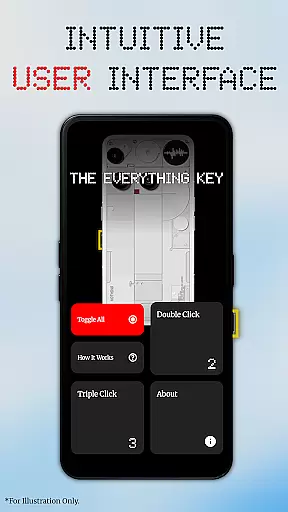
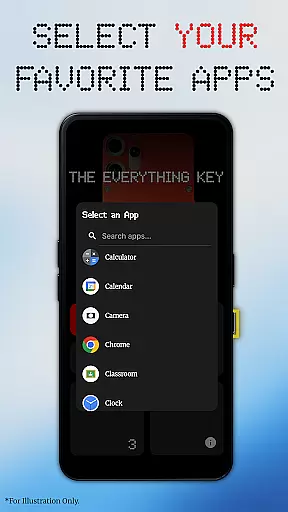
The Everything Key is a powerful tool designed to unlock the full potential of your device's hardware button. This app allows users to remap their device's special button, turning it into an instant productivity tool. With its clean and intuitive interface inspired by the Nothing aesthetic, users can easily assign apps to both double-press and triple-press actions.
Whether you want to launch your camera, favorite messaging app, or most-used utility with a simple press combination, The Everything Key makes it possible. It offers advanced control features like enabling or disabling actions quickly, un-mapping apps permanently, and toggling all mappings at once. No root access is required, ensuring ease of use for everyone.
This app is optimized for specific devices including Nothing Phone models and CMF Phone (2 Pro), providing a personalized experience that integrates beautifully with your device's design.
The Everything Key stands out with its powerful remapping capabilities. Users can assign any app to both double-press and triple-press actions, offering unprecedented customization options. The app's intuitive UI ensures that even beginners can navigate and utilize its features effectively.
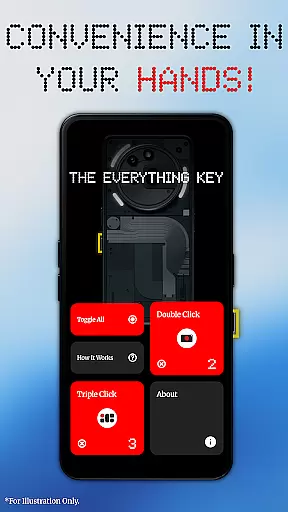
Advanced control features include the ability to tap a mapped card to enable or disable its action instantly. The 'X' icon allows permanent un-mapping of apps, while the 'Toggle All' feature lets users activate or deactivate all mappings simultaneously. These functionalities ensure maximum flexibility and ease of use.
Privacy and security are top priorities for The Everything Key. Using Android's Accessibility Service, the app detects hardware key presses without accessing any on-screen content, passwords, or personal information. This commitment to user privacy ensures a secure and trustworthy experience.
The Everything Key app excels in providing accurate and effective core functionality by enabling users to remap their device's hardware button. This feature allows for the assignment of specific actions, such as launching apps through double or triple presses, which ensures that each press is registered correctly and consistently.
Through an intuitive user interface, users can easily manage their button mappings. The app provides advanced control options, allowing quick enablement or disablement of actions with a simple tap on a mapped card. Additionally, the 'Toggle All' feature offers the convenience of managing all mappings simultaneously, enhancing the overall effectiveness of the remapping function.
No technical expertise is required to use The Everything Key, as it operates without the need for root access or complex commands. It leverages standard Android features to deliver its functionality, making it accessible to a wide range of users who wish to customize their device experience.
Ultimately, the app delivers significant value by transforming a limited-use hardware button into a versatile tool for productivity and personalization. Users gain speed and ease of access to their most-used apps, streamlining their interaction with the device and improving their overall efficiency.
The Everything Key boasts a clean and minimalist user interface inspired by the Nothing aesthetic, ensuring that the app is not only visually appealing but also simple and intuitive to navigate. Upon first launch, users are guided to select their specific device model and color, resulting in a personalized and integrated background that enhances the overall user experience.
Functionality is presented through easily recognizable visual cues, with mapped apps displayed in a way that makes it clear which actions are active. The design eliminates unnecessary complexity, focusing on delivering a seamless experience where users can quickly understand and modify their button mappings without confusion.
Advanced features such as the ability to enable or disable actions, un-map apps, and toggle all mappings at once are incorporated into the interface in a straightforward manner. These controls are designed to be self-explanatory, reducing the learning curve and allowing users to make full use of the app's capabilities from the start.
By prioritizing interface simplicity and intuitiveness, The Everything Key ensures that users of all technical backgrounds can take advantage of its powerful remapping functions. This approach not only makes the app more accessible but also enhances user satisfaction by providing a hassle-free customization experience.
Highly customizable
User-friendly interface
No root required
Advanced control options
Strong privacy protection
Limited device compatibility
Requires initial setup
Dependent on Accessibility Service
Not officially endorsed by device manufacturers
Potential learning curve for new users

 4.50
4.50
Connect instantly to a fast, encrypted VPN with one tap
4.60
A recovery soft,it features photo recovery, video recovery, file recovery.
3.40
App that Recover your pictures, videos or files after you delete them.
4.20
card-reader app
2.20
App to pay for FUTO Keyboard
4.60
PC precision for mobile gaming: dominate with keyboard and mouse!
4.30
Game Booster, GFX Tool is now compatible with newer game update
4.50
Your personal health butler
3.60
Monitor car performance in real time and troubleshoot malfunctions.
4.80
Optimize your WiFi network, turn your phone into Wifi Analyzer
4.70
The Ultimate Flex Drivers Utility App - Convenient Tapping & Block Filters
4.70
Mirror your screen to Chromecast and Android TV - Super fast and simple
4.60 4.50
4.50
Button mapper, mouse toggle, sleep timer and a lot of another features
4.50
Just swipe the edge to do something!
4.40
Making emulation easy for everyone!
4.30
Undelete and recover your lost or deleted files with DiskDigger!
3.40
Save any video in HD - paste the link, download fast and watch offline.
4.3


User Reviews