
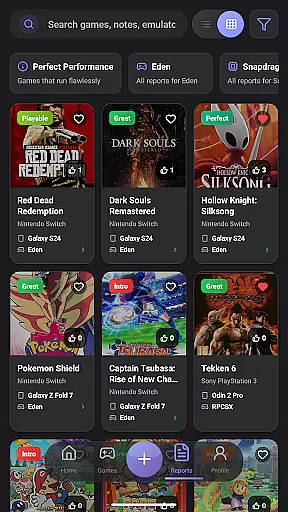
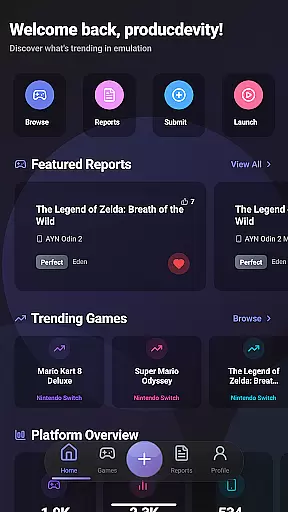
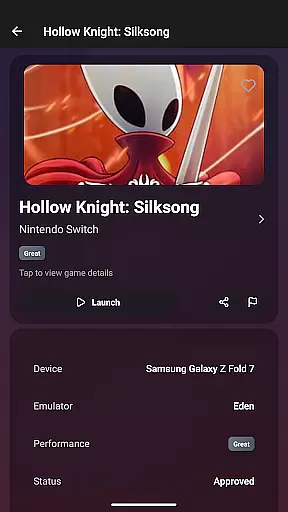
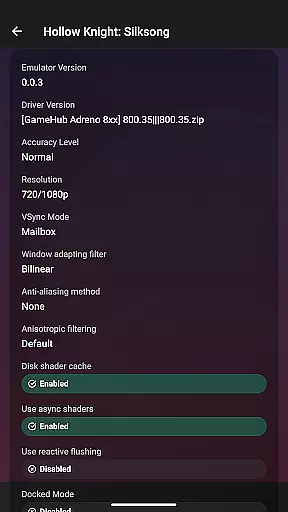
EmuReady Beta is a powerful tool designed to help retro gaming enthusiasts find the best games compatible with their devices. This app provides a comprehensive compatibility database, allowing users to browse thousands of games and see how they perform across different devices and emulators. Whether you're using a flagship phone or a budget tablet, EmuReady tailors reports specifically for your device model.
The app's key features include community-driven reports that offer detailed performance ratings, custom settings, and helpful notes from real users. With support for multiple emulators like Nintendo Switch and 3DS, EmuReady helps you compare and choose the best emulator for each game. The smart filtering system allows quick access to relevant information, while the vote and comment system lets you contribute to the community by sharing your own experiences.
EmuReady is especially useful for gamers who want to avoid wasting time on trial and error configurations. By providing detailed performance metrics including FPS, graphical fidelity, and playability ratings, it ensures you know which games will deliver the best experience before you start playing. Its dark mode feature offers a comfortable viewing experience at any time of day.
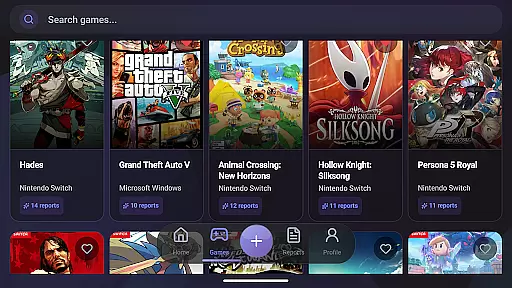
EmuReady Beta stands out with its extensive set of features tailored for retro gaming enthusiasts. One of its core functionalities is the Game Compatibility Database, which contains thousands of games. Users can search by game title, system, or browse through an extensive catalog to instantly see performance metrics on various devices and emulators.
Another significant feature is the Community Reports section, where real users share their experiences. These reports include performance ratings, custom settings, and helpful notes, making it easier for others to configure their setups accurately. Additionally, the app supports multiple emulators, allowing users to compare performance across different systems such as Nintendo Switch and 3DS, ensuring they find the best emulator for each game.
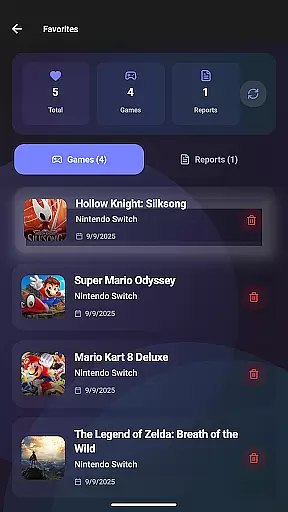
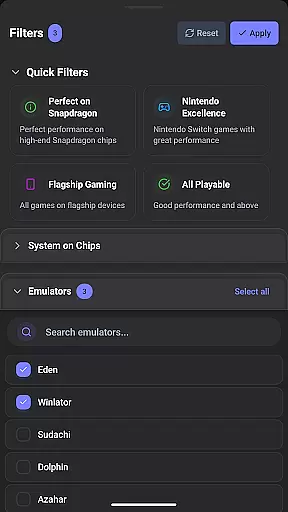
Smart Filtering is another innovative feature, enabling users to filter reports by device, emulator, performance rating, and more. This makes it easy to find exactly what you're looking for quickly. The app also includes a Vote & Comment System, Performance Tracking, and a Save Favorites option, enhancing user engagement and personalization. Lastly, the Dark Mode provides a comfortable viewing experience, automatically switching themes based on the time of day.
EmuReady Beta focuses on providing accurate and effective core functions that are essential for retro gaming enthusiasts. The app's Game Compatibility Database allows users to browse thousands of games and instantly see how they perform across different devices and emulators. This feature ensures that gamers can make informed decisions about which games will work best on their specific hardware.
The app aggregates Community Reports, where real users share detailed compatibility reports. These include performance ratings, custom settings, and helpful notes, contributing to the overall accuracy of the app's recommendations. By comparing these reports, users can identify optimal configurations for their gaming setup, enhancing both game performance and user experience.
Device-Specific Information is another crucial aspect of EmuReady Beta. It provides tailored reports for exact device models, ensuring that whether you're using a flagship phone or a budget tablet, you receive personalized advice. This level of detail supports users in finding the most compatible games and settings for their unique devices, thus maximizing playability.
Furthermore, EmuReady Beta supports multiple emulators, allowing users to compare performance metrics such as FPS, graphical fidelity, and playability ratings. This comprehensive approach empowers users to select the best emulator for each game, optimizing their emulation experience. With these core functions, EmuReady Beta establishes itself as an indispensable tool for anyone engaged in the world of emulation.
EmuReady Beta excels in offering an interface that balances simplicity with intuitiveness, making it accessible for users of all experience levels. Upon launching the app, users are greeted with a clean and organized layout that prioritizes ease of navigation. Key features like the Game Compatibility Database and Community Reports are easily accessible, ensuring that users can quickly find the information they need without any hassle.
The app employs Smart Filtering to enhance user interaction. This feature allows gamers to filter reports by device, emulator, performance rating, and more, streamlining the search process. Such intuitive design choices enable users to swiftly locate specific compatibility details, saving time and effort while maintaining a pleasant user experience.
Additionally, EmuReady Beta includes a Vote & Comment System that encourages community engagement. Users can upvote helpful reports and contribute their insights, fostering a collaborative environment. This system not only simplifies the sharing of experiences but also enriches the database with valuable user-generated content, further aiding newcomers and veterans alike.
Lastly, the inclusion of Dark Mode exemplifies the app's commitment to user comfort. By offering automatic theme switching, EmuReady Beta ensures a comfortable viewing experience at any time of day. This attention to detail highlights the app's dedication to creating an interface that is both simple to use and intuitively designed, catering to the diverse needs of its user base.
User-friendly interface
Comprehensive game database
Community-driven reports
Multiple emulator support
Smart filtering options
Limited to emulation
Beta version bugs
No direct game downloads
Device-specific only
Requires internet

Just swipe the edge to do something!
 4.40
4.40
Save any video in HD - paste the link, download fast and watch offline.
4.4
card-reader app
2.20
Forza Tuning Calculator App for Forza Horizon 5, Motorsport and Earlier Titles
4.40
Monitor car performance in real time and troubleshoot malfunctions.
4.80
The ultimate tool for network analysis, wifi scanning and problem detection.
4.90
Connect wirelessly to your computer to watch movies, browse the web, play games
5.00
Clean up large files and similar photos, fast and easy to use
4.40
Screen recorder with audio to record high-quality videos and take screenshots.
4.40
Unit and currency converter with easy and simple UI.
4.80
App to pay for FUTO Keyboard
4.60
Mirror your screen to Chromecast and Android TV - Super fast and simple
4.60 4.50
4.50
The Ultimate Bluetooth Keyboard & Mouse. Securely control your PC, Mac, and more
4.50
Remote for Roku, Fire TV, Samsung TV, LG TV, Android TV, Chromecast and VIZIO TV
4.20
Signal Strength, Mobile, Wifi, Speed Test, Bad Signals, Cellular, 5G, LTE, 4G
4.20
1-Click close all background apps on Android TV
3.90
A powerful, easy-to-use flight computer on your phone or tablet!
3.80
Safely recover deleted photos, videos, and files with a single easy tap.
3.70


User Reviews