
Network Cell Info & Wifi is a comprehensive mobile network monitoring tool designed for users seeking to optimize their cellular and Wi-Fi connectivity. The app provides almost real-time signal monitoring across various network types including 5G, LTE, CDMA, and GSM, while offering detailed diagnostic tools to troubleshoot reception issues.
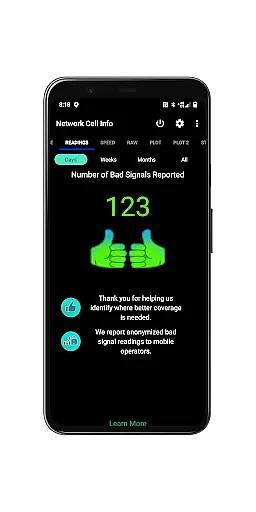
One of the standout features is the Bad Signal Reporter, which automatically collects data on poor signal experiences from users who opt-in, helping mobile network operators improve coverage. Additionally, Network Cell Info offers advanced functionalities such as dual-SIM support, signal plots for multiple cells, and personal best signal finder maps that display historical signal strength by location.
This app is particularly useful for individuals looking to enhance their mobile experience by identifying the strongest available signals in their area. Whether you're troubleshooting connectivity problems or analyzing network performance over time, Network Cell Info equips you with the necessary tools to stay informed about your cellular environment.
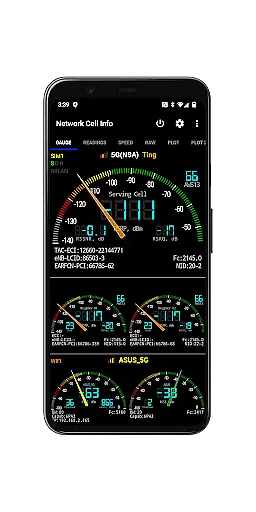
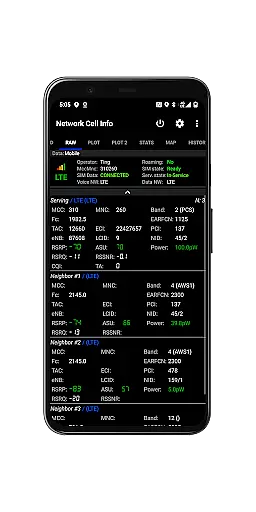
Network Cell Info & Wifi stands out with its extensive range of features tailored for network diagnostics and optimization. The app supports almost real-time monitoring (with a 1-second refresh rate) of both cellular carrier signals and Wi-Fi networks through its Gauge and Raw Tabs. It covers all major network technologies including 5G, LTE+, LTE, CDMA, WCDMA, and GSM, ensuring compatibility with various devices and carriers.
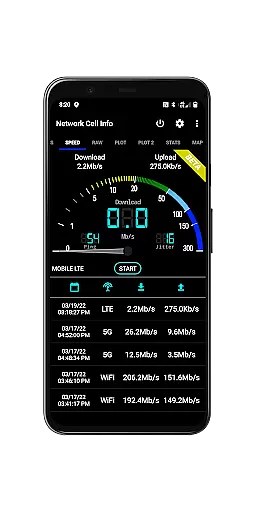
A key highlight is the one-tap speed test feature, which measures download, upload, ping, and jitter performance for both mobile internet and Wi-Fi connections. Users also benefit from specialized tools like the Personal Best Signal Finder, which maps signal strength history by location, and the Crowdsourced Best Signal Finder, showing the nearest best signals from your carrier. These innovative features allow users to make informed decisions about their network usage.
Additional functionalities include detailed connection statistics, SIM and device information, and customizable measurement settings. The app also allows exporting historical data for further analysis, making it an invaluable tool for both casual users and network professionals seeking to understand and improve their mobile connectivity.
Network Cell Info provides an extensive suite of tools designed to monitor and diagnose mobile network and Wi-Fi signals with remarkable precision. The app supports a wide range of network types including 5G, LTE+, LTE, CDMA, WCDMA, and GSM, ensuring comprehensive compatibility across different carriers and devices. With almost real-time monitoring capabilities, users can observe signal changes every second, making it an invaluable tool for troubleshooting connectivity issues.
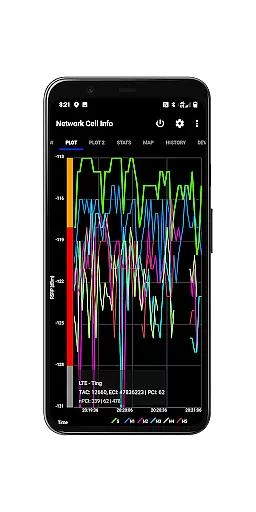
The effectiveness of Network Cell Info is further enhanced by its advanced features such as the one-tap performance speed test, which measures download, upload, ping, and jitter rates for both mobile internet and Wi-Fi connections. This allows users to quickly assess their network's performance and identify potential bottlenecks. Additionally, the dual-SIM support and detailed signal plots for up to six cells provide a granular view of network conditions, empowering users to optimize their connection settings.
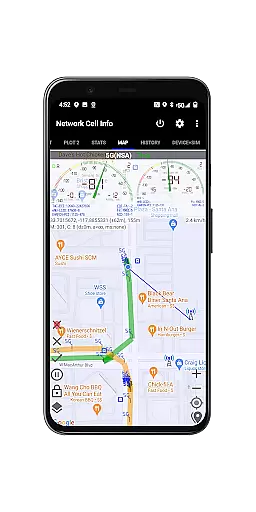
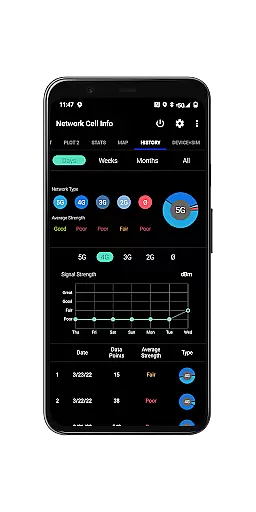
For those seeking to improve their mobile experience, Network Cell Info offers practical benefits through its Personal Best Signal Finder and Crowdsourced Best Signal Finder features. These tools not only display historical signal strength by location but also indicate the nearest best signals from the user's carrier. Such insights enable users to make informed decisions about their network usage, ultimately leading to stronger and more reliable cellular and Wi-Fi connections.
Despite its technical depth, Network Cell Info maintains an intuitive interface that simplifies complex network data into easily digestible information. The app features a clean layout with distinct tabs such as Gauge and Raw, allowing users to switch between simplified signal readings and detailed technical data effortlessly. This thoughtful organization ensures that even non-technical users can navigate the app with ease while still accessing powerful diagnostic tools.
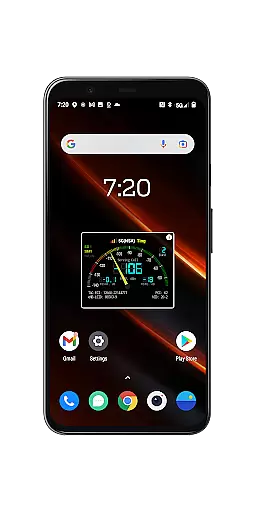
One of the standout aspects of the interface is the visual representation of signal strength through 5-6 signal-meter gauges for both SIM cards and Wi-Fi connections. These graphical indicators provide immediate feedback on network quality without requiring users to interpret raw numbers or technical jargon. Furthermore, the inclusion of maps with overlaid network information and signal-meter gauges adds another layer of context, helping users understand how their location affects signal performance.
Network Cell Info also excels in offering customization options that enhance user experience. Features like SIM preference settings, adjustable measurement parameters, and database export capabilities cater to advanced users who require specific configurations. At the same time, essential functions remain readily accessible, striking a balance between functionality and usability. This combination of powerful features presented through an intuitive interface makes Network Cell Info a valuable tool for anyone looking to optimize their mobile network experience.
Comprehensive network monitoring
Real-time signal tracking
Detailed diagnostic tools
User-friendly interface
Advanced customization options
Complex for beginners
Requires technical knowledge
Some features need opt-in
Large data consumption
Premium version needed

PDF Reader - Document Viewer: Read, Manage & Organize Your Documents
 3.10
3.10
Remote for Roku, Fire TV, Samsung TV, LG TV, Android TV, Chromecast and VIZIO TV
4.20
Unlock your Essential Key. Create custom shortcuts to your favorite apps!
4.1
Forza Tuning Calculator App for Forza Horizon 5, Motorsport and Earlier Titles
4.40
Small and simple app to Verify Root Access and BusyBox Install!
4.70
A non-root local ADB shell client. READ BELOW!
3.40
The Ultimate Bluetooth Keyboard & Mouse. Securely control your PC, Mac, and more
4.50
Powerful collection of electronics tools and reference.A must for any enthusiast
4.90
Connect wirelessly to your computer to watch movies, browse the web, play games
5.00
Easily install aab(Android App Bundle) files on your Android device with our app
4.80
Bedrock Together: Join any bedrock server on Xbox/PS
4.80
Learn the vast amount of system information about device and monitor it's state
4.70
HD Camera captures every special moment.
4.60
Game Booster, GFX Tool is now compatible with newer game update
4.50
Fluid navigation gestures for all of us!
4.30
App that Recover your pictures, videos or files after you delete them.
4.20
Create your own custom widget with endless possibilities
3.90
This app unlocks the Pro features of the Central for DayZ app
3.60
A recovery soft,it features photo recovery, video recovery, file recovery.
3.40


User Reviews