
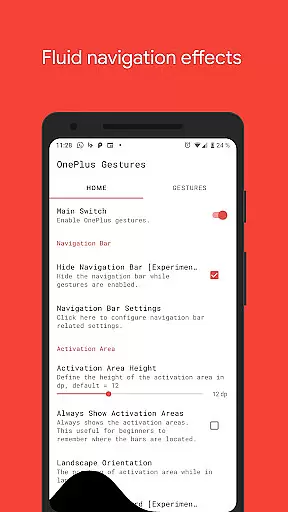
Vivid Navigation Gestures is a powerful tool that revolutionizes the way you interact with your Android device. This app allows users to control their devices through intuitive gestures, eliminating the need for traditional button presses. With compatibility across various Android versions and devices, it offers a futuristic navigation experience without requiring new hardware.
The app stands out with its fluid visual effects during gesture operations and multiple trigger points across the screen. Whether you want to launch Google Assistant, toggle split-screen mode, or take screenshots, Vivid Navigation Gestures provides an extensive range of customizable actions. Its ability to hide the stock navigation bar (with ADB or Root) further enhances the immersive experience, making it ideal for power users seeking a cleaner interface and seamless interaction.
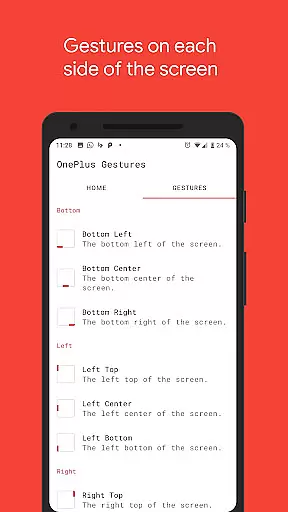
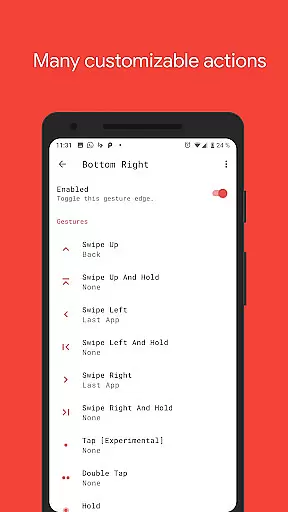
Vivid Navigation Gestures boasts an impressive array of features designed to enhance user convenience and device functionality. One standout feature is its support for multiple gesture triggers located at different screen positions, such as bottom-left, center, right, and more. These gestures include swipe-up, double-tap, hold, and other combinations, each programmable to execute specific actions like launching apps, controlling media playback, or accessing system settings.
Another remarkable aspect is its integration with accessibility services, enabling advanced functions such as Back, Home, and Quick Settings without rooting the device. Additionally, users can customize their experience by assigning unique actions to each gesture, including toggling auto-rotation or showing volume controls. The inclusion of fluid animations ensures smooth transitions while performing these gestures, adding a touch of elegance to every operation.
For tech-savvy individuals, the option to hide the stock navigation bar using ADB commands provides a truly bezel-less experience. While this requires some technical know-how, detailed instructions are available on popular platforms like Reddit and XDA Developers. Overall, Vivid Navigation Gestures combines innovation, customization, and aesthetics to deliver a next-gen navigation solution.
Gestures are revolutionizing the way we interact with our devices, and Vivid Navigation Gestures brings this innovation to your fingertips. The app's core functionality lies in its ability to replace traditional button presses with intuitive gestures, allowing users to execute a variety of actions seamlessly. With multiple gesture triggers spread across different areas of the screen, users can access navigation controls wherever their thumb naturally rests.
The effectiveness of Vivid Navigation Gestures is evident in its comprehensive range of available actions. From launching Google Assistant to toggling split-screen mode, the app provides an extensive toolkit that enhances user interaction. Each gesture is designed to be responsive and precise, ensuring that commands are executed accurately every time. This level of precision not only improves usability but also significantly reduces the learning curve for new users.
Moreover, the app includes fluid visual effects during gesture execution, which adds a layer of polish and feedback that reassures users of successful inputs. These effects contribute to a more engaging and satisfying user experience, making daily device interactions feel smoother and more natural. By combining accurate gesture recognition with visually appealing animations, Vivid Navigation Gestures sets a high standard for functional effectiveness in mobile navigation tools.
Vivid Navigation Gestures excels in providing an interface that is both simple and intuitive, catering to users who seek efficiency without complexity. The app's design philosophy centers around minimizing clutter while maximizing accessibility. By enabling users to hide the stock navigation bar, it creates a cleaner, more immersive screen environment that enhances the overall aesthetic and usability of the device.
Intuitiveness is at the heart of the appu2019s interface design. With nine distinct gesture trigger zones and a wide array of customizable actions, users can tailor the navigation experience to suit their personal preferences. Whether swiping up to go home or double-tapping to take a screenshot, each action feels instinctive and natural. This adaptability ensures that users of all technical backgrounds can quickly adapt to and benefit from gesture-based navigation.
Furthermore, the app offers clear instructions for advanced features like ADB setup, ensuring that even less tech-savvy users can leverage powerful functionalities without frustration. By prioritizing straightforward controls and offering detailed guidance, Vivid Navigation Gestures maintains an optimal balance between simplicity and feature richness, resulting in an interface that is as intuitive as it is powerful.
Intuitive gesture controls
Customizable actions
Fluid visual effects
Wide compatibility
Advanced accessibility options
Requires ADB for full features
Complex setup process
Limited iOS support
No offline help guide
Root needed for certain functions

 4.50
4.50
Unlock your Essential Key. Create custom shortcuts to your favorite apps!
4.2
Family Locator, Share location, StayConnect with your family in real time
3.90
VESC Tool can monitor and configure VESC-compatible devices over BLE and Wifi
4.20
PC precision for mobile gaming: dominate with keyboard and mouse!
4.30
The one-and-only remote control for PC, Mac, and Linux
4.70
A simple app to back up and restore SMS & MMS messages and call logs.
4.10
Your personal health butler
3.60
fast and easy mp3 music downloader
4.80
Bedrock Together: Join any bedrock server on Xbox/PS
4.80
Extremely fast, secure, and protects your privacy
4.80
Planner and Tracker for Stardew Valley
4.60
Quickly switch to an encrypted DNS server on Android TV
4.50
Use your phone as a webcam on your computer over WiFi or USB.
4.40
An easy-to-use calculator designed to save time calculating and bending conduit
4.30
Quickly check the frequency of the Earth
4.30
pdf merge, word to pdf, jpg to pdf, edit pdf, convert to pdf and much more!
4.20 4.10
4.10
Create your own custom widget with endless possibilities
3.90


User Reviews