
Windows 11 represents a significant evolution in personal computing, offering a streamlined interface and enhanced productivity tools. The operating system introduces a centered Start menu, improved multitasking capabilities, and native integration with Microsoft services.
Designed for modern work environments, Windows 11 provides robust security features, including hardware-based isolation and encryption. Its compatibility with a wide range of applications makes it suitable for both professional and personal use, ensuring users can efficiently manage their digital lives.
Windows 11 boasts several innovative features that set it apart from its predecessors. The new Snap Layouts and Desktops allow users to organize their workspace effortlessly, while the redesigned Microsoft Store offers a curated selection of apps.
The operating system also supports Android apps, bringing mobile functionality to the desktop environment. With DirectStorage technology, Windows 11 delivers faster load times and improved gaming experiences, catering to enthusiasts and professionals alike.
When evaluating a tool-based application like Windows 11, the precision and effectiveness of its core functions are paramount. This encompasses how reliably and efficiently the system performs essential tasks such as file management, system updates, and basic operational commands.
Windows 11 ensures that these fundamental operations are executed with high accuracy. The operating system incorporates advanced algorithms to optimize processing speed and resource allocation, ensuring that users experience seamless performance even when multitasking or running demanding applications.
For users, this means increased productivity and reduced downtime. Whether you're launching applications, managing documents, or configuring system settings, you can trust that Windows 11 will deliver consistent and dependable results every time.
The reliability of these core functions establishes Windows 11 as a robust platform for both personal computing and professional environments, where stability and efficiency are non-negotiable requirements.
A simple and intuitive interface is crucial for any tools application, allowing users to navigate and utilize features without unnecessary complexity. Windows 11 has been designed with this principle in mind, focusing on delivering an accessible and user-friendly experience across all functionalities.
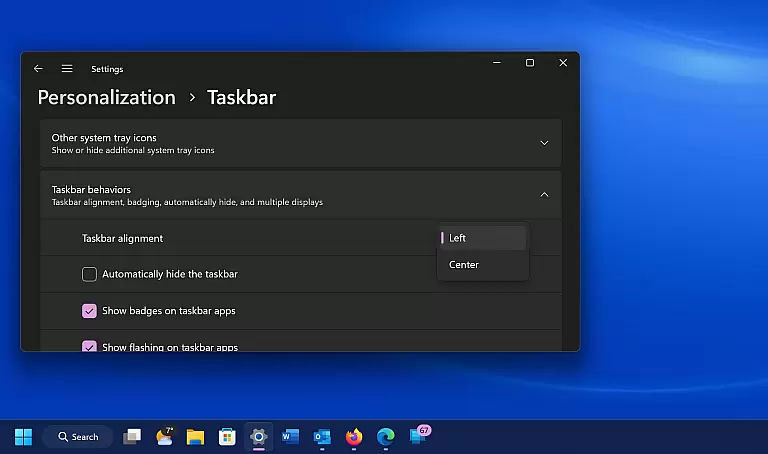
The new Start menu layout, centered taskbar icons, and streamlined settings panels exemplify this commitment to simplification. These design choices make it easier for users to locate and access their most-used apps and files while maintaining a clean desktop environment.
Additionally, Windows 11 introduces Snap Layouts and Desktops, which enhance window management by providing flexible options for organizing workspaces. Such features empower users to customize their workflow efficiently without compromising ease of use.
By prioritizing interface simplicity and intuitive navigation, Windows 11 ensures that users of varying technical backgrounds can operate the system confidently, ultimately improving overall satisfaction and usability.
Enhanced security
Modern UI design
Better multitasking
Android app support
Improved performance
High system requirements
Limited upgrade path
Fewer legacy apps
Learning curve
Driver compatibility

VESC Tool can monitor and configure VESC-compatible devices over BLE and Wifi
 4.20
4.20
Small and simple app to Verify Root Access and BusyBox Install!
4.70
Detect hidden spy camera with advanced scanning {{ Premium version }}
4.00
Unleash gamepad precision for ultimate mobile gaming dominance.
3.90
Bedrock Together: Join any bedrock server on Xbox/PS
4.80
Powerful collection of electronics tools and reference.A must for any enthusiast
4.90
Creation, Learning, Entertainment & More — The All-in-One AI Search Engine
4.70
Mobile Security with Scam Protection | Malware & Virus Cleaner | Safe Browser
4.70
A clean app.
4.50
Change your GPS location instantly. Simulate routes anywhere in the world.
4.90
The ultimate tool for network analysis, wifi scanning and problem detection.
4.90
Excellent scientific calculator with symbolic algebra, integrals, derivatives
4.80
The one-and-only remote control for PC, Mac, and Linux
4.70 4.50
4.50
Quickly switch to an encrypted DNS server on Android TV
4.50
Head tracking for PC sim games such as MSFS 2024 or Elite:Dangerous. No headset!
4.50
eXtended Permission Manager - a small app to manage permissions and AppOps
4.50
With videos, electrical calculators, and built-in ebook, Ugly’s has your answer.
4.50
Safely recover deleted photos, videos, and files with a single easy tap.
3.70


User Reviews