
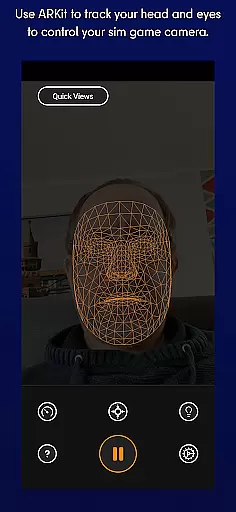
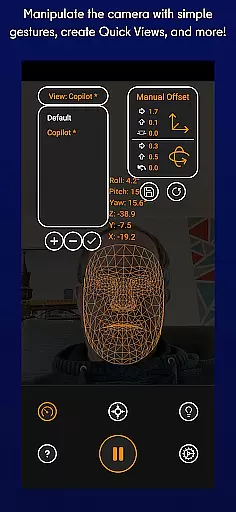
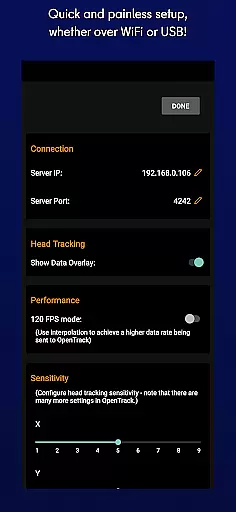
SmoothTrack is an innovative tool that revolutionizes the way you interact with simulation games by providing precise 3D head tracking. This app leverages the AR capabilities of your device to intuitively control your game's camera, offering a near-magical experience where slight head movements translate into immediate in-game perspective changes. Compatible with any game supporting TrackIR, FreeTrack, or similar protocols, SmoothTrack enhances immersion in titles ranging from Microsoft Flight Simulator to Euro Truck Simulator 2.
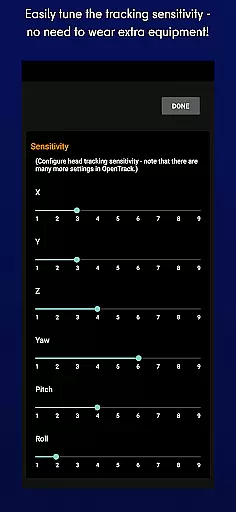
The application requires no additional equipment like headsets, relying solely on your device’s camera to track facial movements. It features adjustable sensitivity settings that slightly exaggerate head motions, allowing for more natural and expansive viewpoint adjustments. Whether you're leaning forward to inspect a cockpit or tilting your head to view an overhead panel, SmoothTrack delivers seamless interaction.
Designed for convenience and performance, SmoothTrack includes both dark and bright modes to optimize battery usage and screen longevity. Its versatility makes it an essential tool for gamers seeking enhanced realism and intuitive controls in their favorite simulation environments.
SmoothTrack stands out with its advanced AR-based head tracking technology, enabling users to control game cameras through natural head movements. The app supports a wide range of simulation games including Microsoft Flight Simulator, Elite: Dangerous, and IL2: Sturmovik, making it a versatile choice for gaming enthusiasts. With compatibility for both FreeTrack and TrackIR protocols, it ensures broad integration across various platforms.
A key feature is the adjustable sensitivity settings which amplify small head motions, allowing users to achieve significant in-game perspective shifts effortlessly. This creates an immersive experience where players can peek around corners or examine intricate details without needing physical controllers. Additionally, SmoothTrack offers two display modes—dark mode to conserve battery life and protect OLED screens, and bright mode for optimal visibility in low-light conditions.
SmoothTrack also provides robust customer support via Discord and email, ensuring users receive timely assistance and updates. This commitment to user satisfaction, combined with its cutting-edge tracking capabilities, positions SmoothTrack as a premier solution for enhancing interactive gaming experiences.
SmoothTrack's core functionality lies in its ability to provide precise 3D head tracking for controlling simulation game cameras. This is achieved through the device's AR capabilities, ensuring that even the slightest head movements are accurately captured and translated into in-game camera perspectives.
The app supports any game compatible with TrackIR, FreeTrack, or similar protocols, making it versatile for flight simulators like Microsoft Flight Simulator, combat games such as Elite: Dangerous, and trucking simulations like Euro Truck Simulator 2. The slight exaggeration of head movements allows users to peek out of cockpit windows or view overhead panels with minimal physical effort.
Users benefit from this precision by experiencing an intuitive and immersive control system without needing additional equipment. Whether flying a plane, driving a truck, or exploring space, SmoothTrack ensures your perspective shifts seamlessly, enhancing realism and engagement.
A standout feature of SmoothTrack is its simple and intuitive interface, which eliminates the need for complex setups or extra hardware. By merely positioning your device to see your face, you can start using head gestures to control in-game perspectives effortlessly.
The app includes thoughtful features like dark mode to conserve battery life and protect OLED screens, alongside a bright mode for optimal visibility in darker environments. These options ensure usability across various lighting conditions while maintaining ease of use.
With dedicated support available via Discord and email, users receive timely assistance for troubleshooting or feature suggestions. This commitment to user experience underscores SmoothTracku2019s dedication to providing both functional accuracy and straightforward operability.
Intuitive head tracking
No extra equipment needed
Wide game compatibility
Adjustable sensitivity
Battery-saving modes
Requires AR support
Limited to compatible games
Dependent on device camera
Potential learning curve
May drain battery faster

Change your GPS location instantly. Simulate routes anywhere in the world.
 4.90
4.90
Easily install aab(Android App Bundle) files on your Android device with our app
4.80
Just swipe the edge to do something!
4.40
Carry a FTP server in your pocket and avoid USB cables for file transfer
4.20
A non-root local ADB shell client. READ BELOW!
3.40
The one-and-only remote control for PC, Mac, and Linux
4.70
WiFi Signal Strength Meter help you detect WiFi Signal Strength in real time.
4.80
Screen Mirroring with sound for Samsung TV, LG TV, Sony TV, Smart TV and Browser
4.20
Pro Emulator is an easy to use game console emulator for a range of consoles.
4.40
Bedrock Together: Join any bedrock server on Xbox/PS
4.80 4.50
4.50
Mirror your screen to Fire TV - Super fast and simple
4.40
Fluid navigation gestures for all of us!
4.30
Quickly check the frequency of the Earth
4.30
App that Recover your pictures, videos or files after you delete them.
4.20
An open-source APK explorer for Android!
4.10
Introducing Smart Printer, your ultimate destination for printing solutions!
4.00
Create your own live wallpaper or check out thousands already made presets
3.90
Smart and comfortable browsing experience.
3.80


User Reviews