
Leaf Spy Pro is a specialized diagnostic tool designed for Nissan Leaf electric vehicle owners. This application enables users to monitor crucial battery information and other vehicle data through an Android device with Bluetooth, paired with a supported ELM327 OBDII Bluetooth adapter. With the introduction of Bluetooth 4.x LE support in version 0.39.97, the app now works seamlessly with low-energy adapters like LELink, offering efficient connectivity without excessive power consumption.
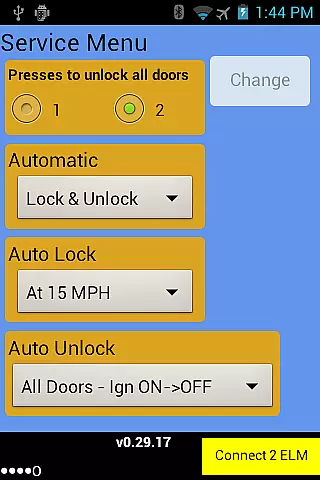
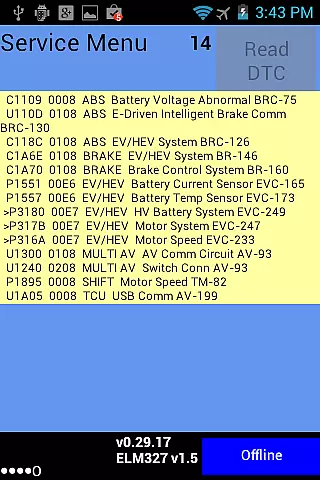
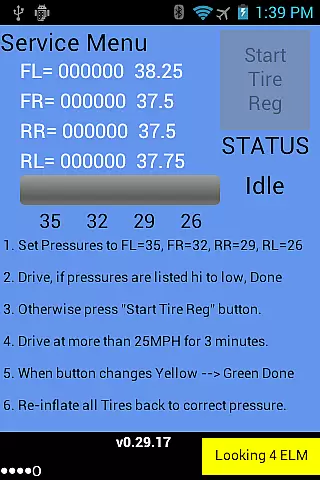
The app provides detailed insights into battery health, including voltage readings of 96 cell pairs, temperature sensors, and battery capacity indicators. It goes beyond standard monitoring by offering advanced features exclusive to the Pro version. These include the ability to change door lock settings, read diagnostic trouble codes, register tire positions after rotations, and even control Vehicle Sound for Pedestrians (VSP) on certain models. Leaf Spy Pro bridges the gap between dealership-level diagnostics and the vehicle owner, making professional-grade tools accessible to all.
Whether you're tracking battery degradation over time or troubleshooting specific vehicle issues, Leaf Spy Pro offers valuable data that enhances your understanding of your Nissan Leaf's performance. Its logging functionality allows users to export detailed reports, while its tire pressure monitoring ensures optimal driving safety. This makes it an essential tool for any tech-savvy Nissan Leaf owner looking to maintain their vehicle proactively.
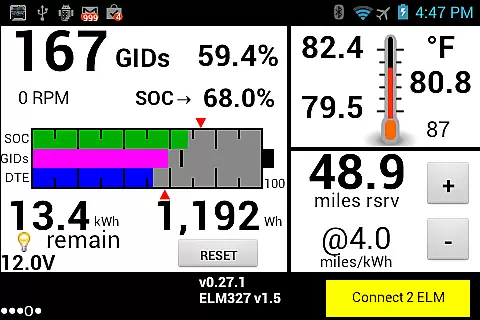
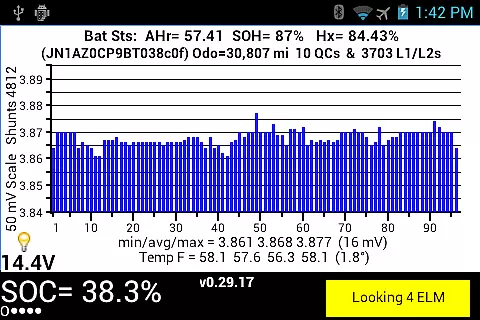
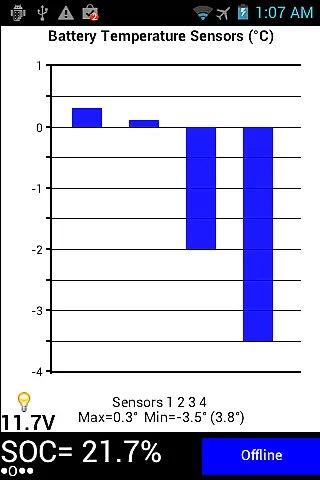
Leaf Spy Pro stands out with its comprehensive feature set tailored specifically for Nissan Leaf owners. The app displays critical battery metrics such as individual cell pair voltages, minimum, average, and maximum voltages, and histograms for easy analysis. Additionally, it provides real-time temperature readings from multiple sensors, giving users a complete picture of their battery's thermal state. For those interested in energy efficiency, the app calculates battery levels in GIDs and kWh, along with resettable energy usage meters.
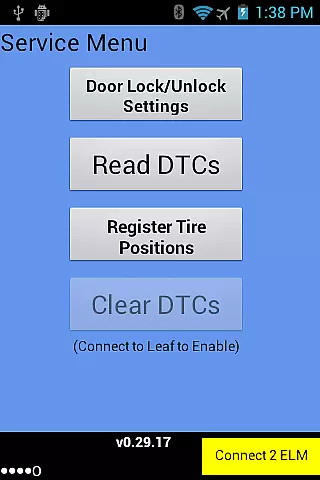
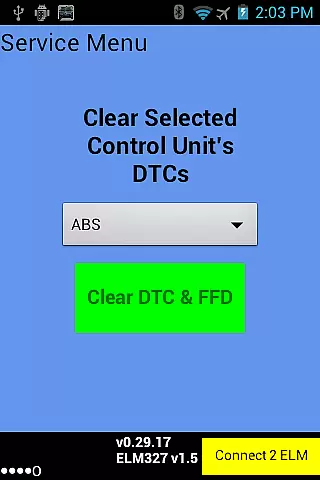
One of the most innovative aspects of Leaf Spy Pro is its advanced diagnostic capabilities. The Pro version allows users to perform functions typically reserved for dealerships, such as reading and resetting Diagnostic Trouble Codes (DTCs), adjusting automatic door lock settings, and registering new tire positions post-rotation. Another standout feature is the built-in logging function, which records most displayed parameters and optionally includes GPS location data in CSV format. This makes it easy to track vehicle performance trends over time using spreadsheet software like Excel.
Additional highlights include graphic displays of State of Charge (SOC), GIDs, Distance to Empty (DTE), and battery temperature profiles. The app also monitors tire pressure for each wheel, alerting users to potential issues before they become serious problems. With support for both older and newer Nissan Leaf models, Leaf Spy Pro delivers unparalleled value for EV enthusiasts seeking deeper insights into their vehicle's operation.
Leaf Spy Pro exemplifies core function accuracy by providing precise monitoring of a Nissan Leaf's battery and vehicle information. This includes detailed data such as the voltage of each cell pair, battery temperature readings, and the battery's AHr rating, which indicates remaining capacity.
The application employs advanced algorithms to ensure that the information displayed is both accurate and actionable. For instance, it highlights cell pairs with active shunts and provides histograms for voltage distribution, allowing users to understand their battery health comprehensively.
Users benefit from real-time insights into their vehicle's performance without needing dealership visits. The app supports functions like changing automatic door lock settings and reading diagnostic trouble codes, which are typically dealer-exclusive services.
This level of detail and control empowers electric vehicle owners to make informed decisions about maintenance and usage, enhancing both convenience and vehicle longevity.
Despite its technical depth, Leaf Spy Pro maintains an interface that balances simplicity with intuitiveness. The design ensures that even those new to electric vehicles can navigate the app with ease, thanks to clear menus and well-organized data displays.
Key features such as the graphic display of SOC (State of Charge), GIDs (Battery energy level), and DTE (Distance to Empty) are presented in an accessible manner. Users can quickly interpret critical information like remaining distance to specific battery events based on selectable energy efficiency.
Additional tools, including logging functions and diagnostic trouble code resets, are integrated seamlessly within the interface. This allows users to record data and manage vehicle diagnostics without feeling overwhelmed by complexity.
By prioritizing user experience alongside functionality, Leaf Spy Pro ensures that all drivers, regardless of technical expertise, can utilize its full potential effectively.
User-friendly interface
Comprehensive battery data
Advanced diagnostic tools
Efficient Bluetooth LE support
Exportable data logs
Requires compatible adapter
Limited iOS functionality
Complex for beginners
No automatic updates
Premium pricing

A powerful, easy-to-use flight computer on your phone or tablet!
 3.80
3.80
Learn the vast amount of system information about device and monitor it's state
4.70
Support Fossify apps with a warm thank you!
5.00
Mirror your screen to Fire TV - Super fast and simple
4.40
Fast Video Downloader, Movie Downloader, Torrent Downloader & Adblock Browser
4.70
Connect wirelessly to your computer to watch movies, browse the web, play games
5.00
The Ultimate Flex Drivers Utility App - Convenient Tapping & Block Filters
4.70
Download any file easily and quickly with Downloader
4.2
Enjoy a smooth mobile reading experience!
3.60
The one-and-only remote control for PC, Mac, and Linux
4.70
ADB support Android 4.X-Android 13(Support wireless pair mode).No root required!
4.70
App to pay for FUTO Keyboard
4.60
Planner and Tracker for Stardew Valley
4.60
Play your X-Box games remotely in 1080p with any controller and zero latency
4.60
The Ultimate Bluetooth Keyboard & Mouse. Securely control your PC, Mac, and more
4.50
An easy-to-use calculator designed to save time calculating and bending conduit
4.30
pdf merge, word to pdf, jpg to pdf, edit pdf, convert to pdf and much more!
4.20
Detect hidden spy camera with advanced scanning {{ Premium version }}
4.00
This app unlocks the Pro features of the Central for DayZ app
3.60


User Reviews