
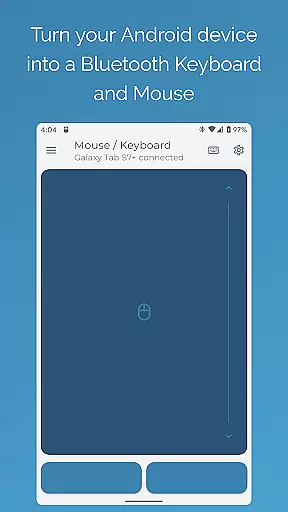
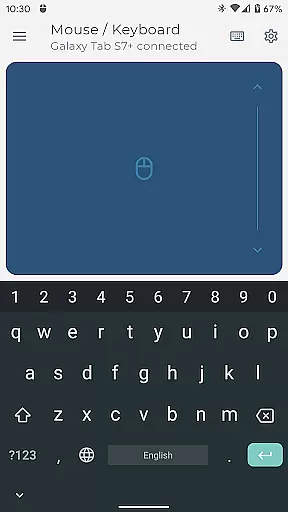
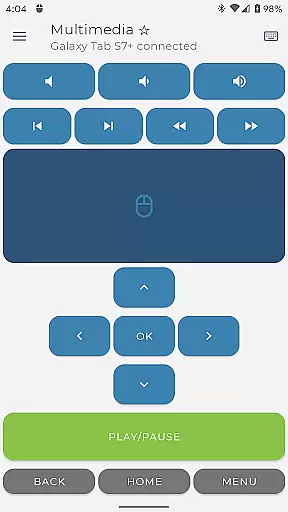
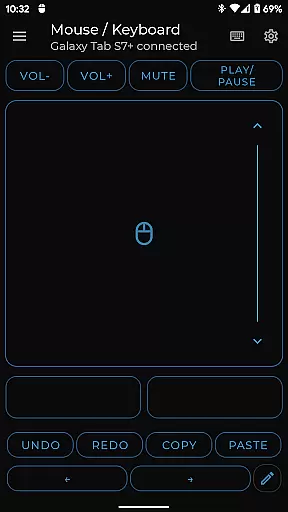
Bluetooth Keyboard & Mouse Pro revolutionizes the way you interact with your devices by turning your Android phone into a versatile remote control tool. This powerful app allows you to seamlessly operate computers, tablets, and media centers without requiring additional software or server connections. With its direct Bluetooth connectivity, users experience instant response times while maintaining a secure and private connection.
The app offers an extensive professional toolkit including precision mouse control, keyboard functionality with over 100 international layouts, presentation mode, multimedia controls, and more. These features cater to both productivity and convenience, making it ideal for professionals who need reliable remote access during presentations or extended work sessions.
Whether you're managing business presentations, controlling media playback, or streamlining inventory tasks through barcode scanning, this app provides a comprehensive solution that enhances workflow efficiency across multiple platforms.
Bluetooth Keyboard & Mouse Pro stands out with its diverse feature set designed to meet various professional needs. The app's Precision Control offers a highly responsive virtual mouse, keyboard, and multi-touch trackpad, ensuring smooth navigation and typing experiences. Its Keep-Alive/Jiggler Mode is particularly beneficial for preventing computers from sleeping during critical tasks.
For those needing advanced functionality, the app includes Pro Features like Presenter Mode for confident slide navigation, Full PC Keyboard support with international layout switching, Multimedia Control for managing playback, and an Integrated Scanner for QR codes and barcodes. Additionally, users can create Custom Layouts tailored to specific applications or games, enhancing their control capabilities.
Universal Compatibility ensures the app works seamlessly across multiple operating systems including Windows, iOS, Android, Chrome OS, and even Steam Deck. This versatility makes it an indispensable tool for professionals working in varied technological environments.
Bluetooth Keyboard & Mouse Pro delivers exceptional precision and reliability in its core functions, making it an indispensable tool for professionals. The app transforms your Android device into a versatile Bluetooth keyboard, mouse, and presentation controller without requiring additional software or server connections.
The application's direct Bluetooth connection ensures instant response times while maintaining privacy and security. With features like Precision Control, users can enjoy a highly responsive keyboard, mouse, and multi-touch trackpad with intuitive scrolling capabilities. This seamless integration allows you to control computers, tablets, or media centers effortlessly.
Moreover, the Keep-Alive / Jiggler Mode prevents devices from sleeping or locking during critical tasks, ensuring uninterrupted workflow. Whether typing efficiently with a full PC keyboard layout or commanding presentations with confidence, this app provides accurate and effective solutions tailored to enhance productivity.
Simplicity and intuitiveness are at the heart of Bluetooth Keyboard & Mouse Pro's interface design. The app offers a straightforward setup process that eliminates the need for complex configurations or additional software installations. Its user-friendly approach ensures that even those new to remote control applications can quickly adapt and utilize its powerful features.
Upon launching the app, users are greeted with an organized layout featuring clearly labeled options such as Precision Control, Presenter Mode, and Multimedia Control. Each function is designed to be easily accessible, allowing users to switch between different modes like keyboard input, presentation navigation, or media management effortlessly.
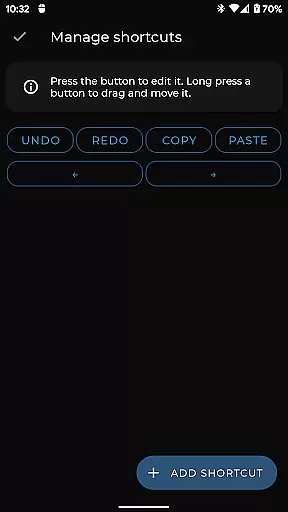
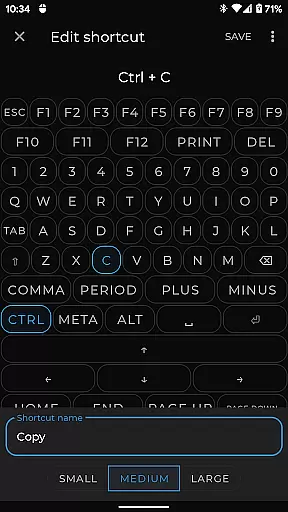
Furthermore, custom layouts enable users to engineer personalized interfaces tailored specifically to their needs. By providing both standard tools and advanced customization options within a clean, intuitive framework, Bluetooth Keyboard & Mouse Pro guarantees a smooth operational experience for all types of users.
Instant Bluetooth connection
Extensive feature set
Secure private connection
Wide OS compatibility
Customizable interface
Paid pro features
Complex setup required
Limited free options
Occasional connectivity issues
High resource usage

HD Camera captures every special moment.
 4.60
4.60
Family Locator, Share location, StayConnect with your family in real time
3.90
Universal TV remote control all TVs, Roku, LG, Samsung, Fire, Vizio, Sony, TCL.
4.40
An easy-to-use calculator designed to save time calculating and bending conduit
4.30
Best leveling tool for your Android device. Hang paintings like a pro.
4.90
Quickly check the frequency of the Earth
4.30
Clean up large files and similar photos, fast and easy to use
4.40
Protect your device with antivirus, storage cleanup, and system monitoring
4.70
Fast VPN USA for any country. Super secure VPN for calls, streaming, games, TV.
4.40
WiFi Signal Strength Meter help you detect WiFi Signal Strength in real time.
4.80
Remote Play with FSR upscaling, low latency & full controller support
4.80
HD Video player and downloader for all formats, fast & smooth 4K video playback.
4.60
Quickly switch to an encrypted DNS server on Android TV
4.50
eXtended Permission Manager - a small app to manage permissions and AppOps
4.50
Just one-tap to easy translate in any language after calls within seconds.
4.20
VESC Tool can monitor and configure VESC-compatible devices over BLE and Wifi
4.20
An open-source APK explorer for Android!
4.10
Detect hidden spy camera with advanced scanning {{ Premium version }}
4.00
Create your own live wallpaper or check out thousands already made presets
3.90


User Reviews