
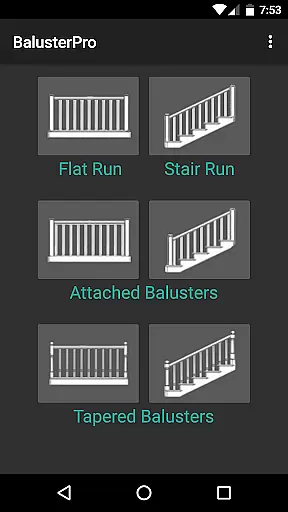
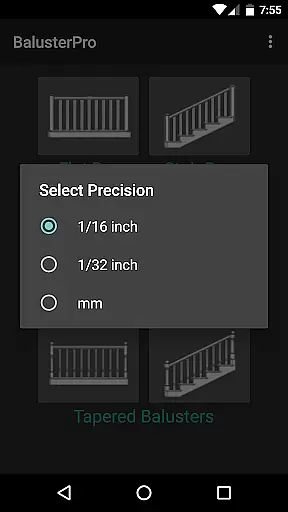
BalusterPro is a specialized tool designed for carpenters, woodworkers, and DIY enthusiasts. This app simplifies the task of calculating spacing between handrail balusters, making it an essential companion for both professionals and homeowners. With its ability to handle flat and stair runs, tapered balusters, and support both inch and metric measurements, BalusterPro offers versatile solutions for various woodworking projects.
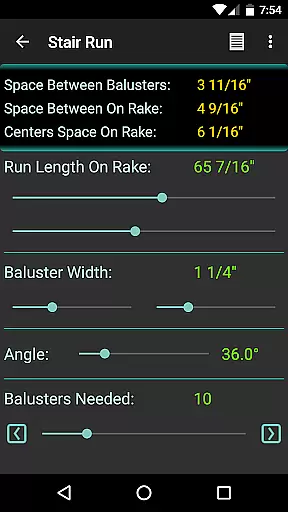
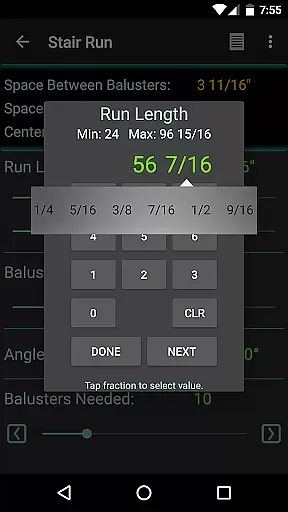
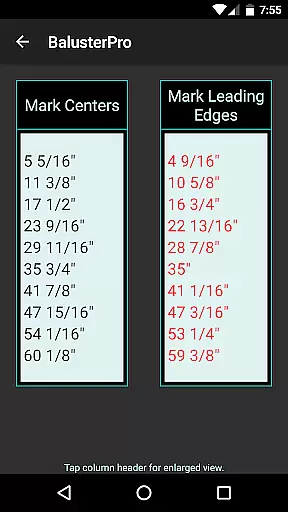
The app's intuitive interface allows users to input run length and baluster width, then adjust the 'Balusters Needed' slider to achieve the desired spacing. Whether you're working on picket fences, bench backs, or decking, BalusterPro ensures accurate calculations that meet code requirements. Its portability enables use at your desk, on the job site, or wherever your phone goes, providing convenience and precision in one package.
BalusterPro stands out with its unique features tailored specifically for woodworking tasks. The app provides precise calculations for baluster spacing, accommodating both flat and stair runs as well as tapered balusters. Users can switch between inch and metric units, catering to different project requirements and regional preferences.
One of the key features is the adjustable slider that displays the number of balusters needed and the spacing between them. This interactive element allows for real-time adjustments, ensuring that users can quickly find a configuration that meets their specific needs. Additionally, the app's flexibility extends beyond handrails to include other projects requiring equal spacing, such as fencing and decking.
BalusterPro also includes customizable preferences, enabling users to set default minimum and maximum values for sliders. This personalization enhances the user experience by allowing quick access to frequently used settings. Overall, these features combine to create a powerful tool that saves time and reduces the tedium of manual calculations.
BalusterPro stands out as a precise and effective tool for anyone involved in carpentry or woodworking. The app's core functionality revolves around simplifying the calculation of spacing between handrail balusters, making it an essential companion for both professionals and DIY enthusiasts.
The application allows users to input run length and baluster width, then adjust the 'Balusters Needed' slider to achieve the desired spacing. This feature ensures that calculations meet specific code requirements, providing accurate results every time. Whether you're working on flat runs, stair runs, or dealing with tapered balusters, BalusterPro handles all scenarios with ease.
With support for both inch and metric measurements, this tool is versatile and adaptable to various project needs. Its ability to be used for other tasks requiring equal spacing, such as picket fences or bench backs, adds to its practicality. Users can rely on BalusterPro to deliver consistent and precise calculations, saving valuable time and effort.
Ultimately, BalusterPro transforms a traditionally tedious task into a quick and elementary one. By removing the complexity from baluster spacing calculations, it empowers users to focus more on the craftsmanship and less on the math, enhancing productivity and accuracy in their projects.
The interface of BalusterPro is designed with simplicity and intuitiveness in mind, ensuring that users can quickly learn and efficiently utilize its features. As a tool aimed at both professional carpenters and homeowners, ease of use is paramount, and BalusterPro excels in providing a straightforward user experience.
Upon opening the app, users are greeted with an uncluttered interface that prioritizes essential inputs: run length, baluster width, and the 'Balusters Needed' slider. These controls are easy to manipulate, allowing users to swiftly adjust parameters until they reach their desired baluster spacing. Such intuitive design reduces the learning curve significantly.
Preferences can be easily modified to suit individual needs, such as setting default minimum and maximum values for sliders. This customization enhances user control without complicating the interface. Additionally, clear display indicators above the slider show the number of balusters needed, providing immediate feedback and aiding decision-making.
By focusing on clarity and ease of navigation, BalusterPro ensures that users spend less time figuring out how to use the app and more time applying its powerful calculation abilities to their projects. This thoughtful design translates into a seamless experience where precision meets simplicity.
Accurate calculations
User-friendly interface
Versatile measurement options
Real-time adjustments
Customizable preferences
Limited to specific tasks
No advanced design tools
Requires manual input
Basic visual presentation
Few customization options

A convenient photo, video, and file recovery tool.
 4.00
4.00
FV File Manager Pro, Fast and powerful file manager for Android
4.60
App that Recover your pictures, videos or files after you delete them.
4.20
Keep track of your Palia friendships, tasks, and inventory with Palia Notebook
4.60
card-reader app
2.20
Mirror your screen to Chromecast and Android TV - Super fast and simple
4.60
Fun lie-detection pranks for friends and parties.
3.80
Clean up your phone, find files, play media, and share files offline
4.50
Fast VPN USA for any country. Super secure VPN for calls, streaming, games, TV.
4.40
Monitor car performance in real time and troubleshoot malfunctions.
4.80
WiFi Signal Strength Meter help you detect WiFi Signal Strength in real time.
4.80
Fast Video Downloader, Movie Downloader, Torrent Downloader & Adblock Browser
4.70
The Ultimate Flex Drivers Utility App - Convenient Tapping & Block Filters
4.70
NFC Tools can read and write NFC tags.
4.70
Universal TV remote control all TVs, Roku, LG, Samsung, Fire, Vizio, Sony, TCL.
4.40
Forza Tuning Calculator App for Forza Horizon 5, Motorsport and Earlier Titles
4.40
Mirror your screen to Fire TV - Super fast and simple
4.40
Carry a FTP server in your pocket and avoid USB cables for file transfer
4.20
This app unlocks the Pro features of the Central for DayZ app
3.60


User Reviews