
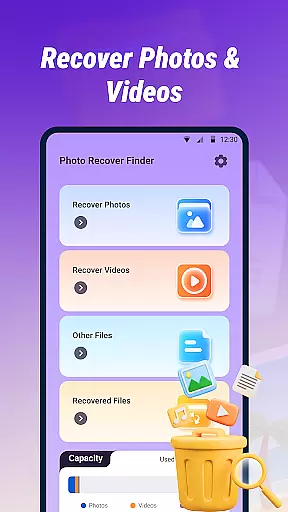
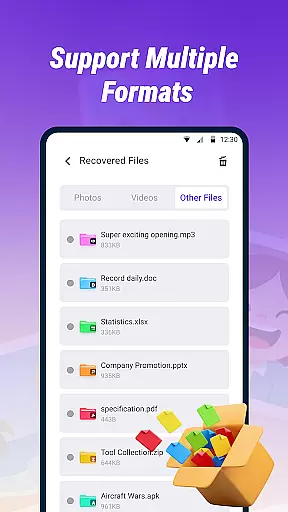



Photo Recover Finder is a powerful tool designed to help users retrieve accidentally deleted photos, videos, and files from their devices. With its Quick Scan feature, the app efficiently searches your device's storage for recoverable media in various formats such as JPEG, PNG, MP4, PDF, and DOC.
In addition to supporting multiple file formats, Photo Recover Finder offers a Preview and Restore function, allowing users to view file contents before recovery. This ensures that you can confirm the integrity of the data you are restoring. The app is suitable for recovering lost memories or important documents and is easy to use with a clear interface and straightforward operation process.
The success rate of recovery depends on whether the files have been overwritten, so it is recommended to attempt recovery as soon as possible. For added security, all operations are performed locally, ensuring privacy and reliability. Download Photo Recover Finder today and restore your valuable memories with confidence.
Photo Recover Finder stands out with its comprehensive set of features tailored for efficient data recovery. One of its key capabilities is the Quick Scan function, which rapidly scans your device's storage to identify recoverable photos, videos, and documents. This feature supports common formats like JPEG, PNG, MP4, PDF, and DOC, making it versatile for different types of media.
Another notable feature is the Preview and Restore option, which allows users to preview file contents before proceeding with recovery. This ensures that you only restore the files you need, saving time and storage space. Additionally, the app is designed to be user-friendly, featuring a simple and intuitive interface that makes the recovery process accessible even to non-technical users.
Privacy and security are prioritized in Photo Recover Finder. All operations are conducted locally on the device, and there is no data collection involved. The app requires storage access solely for scanning and recovering deleted files, as outlined in the Privacy Policy. These features collectively make Photo Recover Finder a reliable choice for anyone looking to recover lost data.
When it comes to data recovery tools, the precision and effectiveness of core functions are paramount. Photo Recover Finder excels in this area by offering a Quick Scan feature that efficiently searches your device's storage for recoverable photos, videos, and documents. This ensures that users can retrieve their lost files with minimal effort and time.
The app supports a wide range of file formats including JPEG, PNG, MP4, PDF, and DOC, making it versatile for various recovery needs. The ability to preview file contents before recovery is another testament to its functional accuracy. Users can verify the integrity and relevance of files, ensuring they recover exactly what they need without any guesswork.
Furthermore, the app's commitment to safety and reliability means all operations are performed locally, safeguarding user privacy. This local processing enhances the speed and security of the recovery process, providing peace of mind while handling sensitive data. With a simple and intuitive interface, even those who aren't tech-savvy can navigate and utilize the app's powerful recovery capabilities effectively.
A user-friendly interface is crucial for any tool, especially one designed for data recovery. Photo Recover Finder boasts a clear and straightforward interface that simplifies the entire recovery process. From the moment users open the app, they are guided through a seamless journey that requires just a few steps to complete the recovery of their precious memories.
The design prioritizes ease of use, ensuring that users can quickly understand and operate the app without a steep learning curve. Key features such as Quick Scan and Preview are prominently displayed, allowing users to initiate scans and review potential recoveries effortlessly. This intuitive layout helps reduce anxiety and frustration often associated with data loss.
Moreover, the app provides friendly tips and notifications to enhance user experience. For instance, it advises users on the importance of attempting recovery promptly and regularly backing up data. These thoughtful touches not only improve usability but also educate users on best practices for data management. Overall, Photo Recover Finder combines functionality with an accessible interface, making it an invaluable tool for anyone looking to recover lost files efficiently and confidently.
User-friendly interface
Multi-format support
Quick scan capability
Preview before recovery
Local data processing
Recovery not guaranteed
Limited by overwrite
No cloud backup
Basic UI design
Premium features locked

HD Camera captures every special moment.
 4.60
4.60
Unit and currency converter with easy and simple UI.
4.80
This app unlocks the Pro features of the Central for DayZ app
3.60
Family Locator, Share location, StayConnect with your family in real time
3.90
Quickly & easily calculate the spacing of handrail balusters
4.20
ADB support Android 4.X-Android 13(Support wireless pair mode).No root required!
4.70
Smart and comfortable browsing experience.
3.80
Button mapper, mouse toggle, sleep timer and a lot of another features
4.50
Clean up your phone, find files, play media, and share files offline
4.50
Powerful collection of electronics tools and reference.A must for any enthusiast
4.90
The ultimate tool for network analysis, wifi scanning and problem detection.
4.90
Excellent scientific calculator with symbolic algebra, integrals, derivatives
4.80
The one-and-only remote control for PC, Mac, and Linux
4.70
With videos, electrical calculators, and built-in ebook, Ugly’s has your answer.
4.50
Mirror your screen to Fire TV - Super fast and simple
4.40
pdf merge, word to pdf, jpg to pdf, edit pdf, convert to pdf and much more!
4.20
Signal Strength, Mobile, Wifi, Speed Test, Bad Signals, Cellular, 5G, LTE, 4G
4.20
An open-source APK explorer for Android!
4.10
Amateur Radio app for APRS: Track friends, exchange messages, get tactical info.
3.90


User Reviews