
LADB is a specialized Android tool that allows users to establish an ADB (Android Debug Bridge) connection locally without requiring a physical USB connection. By leveraging Android's Wireless ADB Debugging feature, the app enables seamless communication between the ADB server and client on the same device. This makes it ideal for developers and power users who need to execute ADB commands directly from their mobile devices.
One of the key features of LADB is its ability to simplify the pairing process through an intuitive interface. Users can easily input pairing codes and ports while following an initial setup guide. The app also provides troubleshooting steps for common issues, ensuring a reliable debugging experience. With its focus on functionality and ease of use, LADB serves as a portable solution for on-the-go debugging needs.
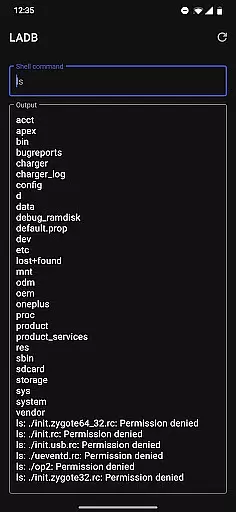
LADB offers several notable features that enhance the local debugging experience. First, it bundles an ADB server within the app itself, eliminating the need for external tools or configurations. This built-in server works seamlessly with Android's Wireless ADB Debugging, allowing users to run shell commands directly from their devices.
The app supports manual pairing for scenarios where the automated Assisted Pairing mode may fail. By providing clear instructions and video tutorials, LADB ensures users can reliably establish connections even on newer Android versions. Additionally, the app includes safeguards such as data clearing and reboot recommendations to resolve potential connectivity issues. These features collectively make LADB a robust tool for both novice and experienced developers.
LADB u2014 Local ADB Shell offers a unique approach to Android debugging by embedding an ADB server within the app itself. This allows developers and power users to execute ADB commands directly on their device without requiring a computer.
The application leverages Android's Wireless ADB Debugging feature, enabling local communication between the bundled server and client. This innovative method ensures that all debugging operations are performed accurately and effectively, maintaining the integrity of the development process.
Users benefit from a reliable debugging environment where they can troubleshoot, test, and modify their Android system or apps with precision. The core functionality is designed to provide a seamless experience, ensuring that every command executes as intended without introducing unnecessary complexity.
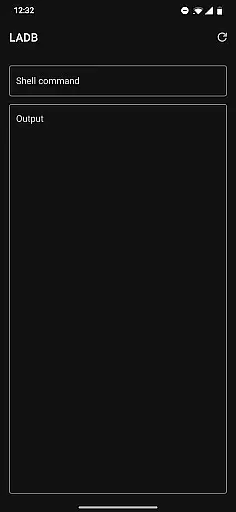
Despite its technical nature, LADB maintains an interface that is both simple and intuitive. The design focuses on providing quick access to essential features while minimizing clutter and confusion for the user.
Key functionalities such as initiating a connection, entering pairing codes, and managing wireless debugging settings are presented in a straightforward manner. Users can easily navigate through different options without needing extensive technical knowledge.
This thoughtful arrangement of features ensures that even those new to ADB can efficiently utilize the appu2019s capabilities. By prioritizing clarity and ease of use, LADB makes advanced debugging tools accessible to a broader audience, enhancing productivity without compromising on usability.
Portable ADB solution
User-friendly interface
Supports manual pairing
Comprehensive troubleshooting
Free to use
Incompatible with Shizuku
Requires wireless debugging
Setup can be complex
No offline support
Limited to Android devices

Complete kernel toolbox with features to manage and tweak your rooted device
 4.30
4.30
Canon PRINT is a companion app for your Canon printer.
4.60
Best leveling tool for your Android device. Hang paintings like a pro.
4.90
Mirror your screen to Chromecast and Android TV - Super fast and simple
4.60
With videos, electrical calculators, and built-in ebook, Ugly’s has your answer.
4.50
The Ultimate Bluetooth Keyboard & Mouse. Securely control your PC, Mac, and more
4.50
Quickly check the frequency of the Earth
4.30
Fun lie-detection pranks for friends and parties.
3.80
A clean app.
4.50
Enjoy smooth gameplay with Game Booster
4.90
The Ultimate Flex Drivers Utility App - Convenient Tapping & Block Filters
4.70
Creation, Learning, Entertainment & More — The All-in-One AI Search Engine
4.70
Forza Tuning Calculator App for Forza Horizon 5, Motorsport and Earlier Titles
4.40
Carry a FTP server in your pocket and avoid USB cables for file transfer
4.20
MS-DOS in your pocket. Play old DOS games anywhere you are ;)
4.10
Automate everything from settings to photos, SMS to speech. ADC2 prize winner.
4.10
Amateur Radio app for APRS: Track friends, exchange messages, get tactical info.
3.90
Create your own live wallpaper or check out thousands already made presets
3.90
Transfer Files, APK from Phone to Watch & Install.
4.0


User Reviews