
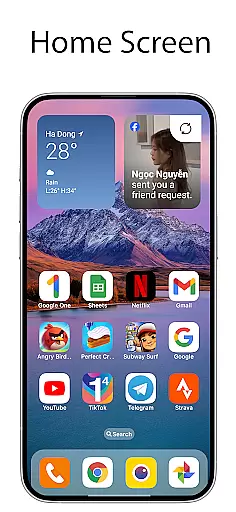
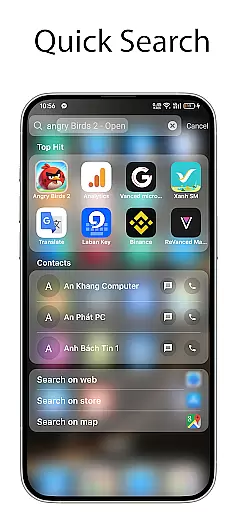
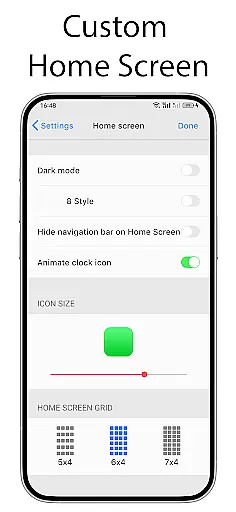
OS Launcher 18 - Phone 16 Max offers a unique way to transform the visual appearance of Android devices, making them more simple and luxurious. This app provides users with a customized interface that includes app icons, wallpapers, and other specific features. It allows Android users to customize their device to match a Simple interface while maintaining the functionality and versatility of the Android operating system.
The launcher is designed for those who appreciate a clean and elegant design without sacrificing the powerful capabilities of Android. With its intuitive layout and customization options, users can enjoy a personalized experience that enhances both aesthetics and usability. Whether you want to organize your apps better or simply refresh your device's look, OS Launcher 18 - Phone 16 Max delivers an optimal solution.
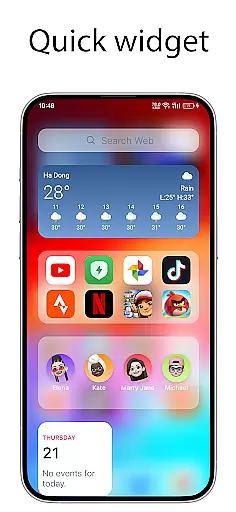
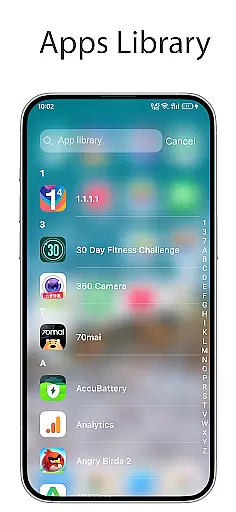
One of the standout features of OS Launcher 18 - Phone 16 Max is the Apps Library, which helps users categorize their apps efficiently. The Today View provides essential information such as weather updates, favorite contacts, and calendar events right on the home screen. Additionally, the Weather feature offers a beautiful forecast with useful details like temperature, wind, and humidity.
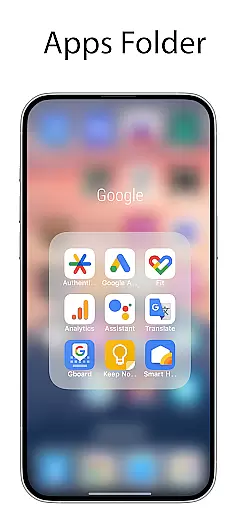
Users can also take advantage of the Lock App feature to prevent unauthorized access to specific apps. The ability to create folders by dragging and dropping apps adds another layer of organization. Customizable icons allow users to modify both the icon and name of applications according to their preferences. Moreover, the option to hide apps from the home screen ensures privacy and decluttering. Unread Notification Dots help keep track of unread messages, enhancing productivity and ensuring no important notification is missed.
OS Launcher 18 - Phone 16 Max offers a wide array of customization options that allow users to personalize their Android devices extensively. This includes the ability to modify app icons, names, and even hide apps from the home screen.
The launcher provides features such as creating folders by dragging and dropping apps onto each other, offering a more organized and personalized home screen layout. Users can also take advantage of customizable widgets that add both functionality and aesthetic appeal.
With options like unread notification dots and today's view, which displays weather information and calendar events, users can tailor their device to fit their daily needs and preferences seamlessly.
This level of customization ensures that each user's experience is unique, providing both visual and functional personalization that enhances usability and satisfaction.
Theme compatibility in OS Launcher 18 - Phone 16 Max ensures that users can apply various themes to create a cohesive and visually appealing interface. The launcher supports different themes, allowing users to match their device's appearance with their personal style or mood.
Users benefit from the integration of beautiful wallpapers and icon packs that are fully compatible with the launcheru2019s theme system. This compatibility extends to third-party themes, giving users access to a vast library of design choices.
The launcher's support for theme compatibility not only enhances the visual experience but also maintains consistency across the user interface. This means that whether users choose a minimalist or vibrant theme, all elements will align perfectly.
By prioritizing theme compatibility, OS Launcher 18 - Phone 16 Max delivers a seamless and engaging user experience that caters to diverse aesthetic preferences while preserving the core functionalities of the Android operating system.
Customizable Interface
Efficient App Organization
Beautiful Weather Forecast
Enhanced Privacy Features
Intuitive User Experience
Limited Widget Options
Occasional Performance Lags
No Advanced Customization
Basic Icon Packs
Frequent Ads in Free Version

A Colorful and Minimal icon pack in an Outline Style - Over 13,600 icons!
 4.70
4.70
Realistic animated snow on your wrist, with 10 images landscapes to choose from
4.00
The definitive Icon pack maker and editor
4.30 4.50
4.50 4.10
4.10 3.50
3.50
Nothing Icon pack with more than 3750+ highly crafted icons.
4.70
Your home screen, just the way you like it.
4.30
A minimalist productivity launcher. One-hand-friendly. Zero ads.
4.70
Customizable Glass widgets. Over 360+ stunning widgets and more!
4.70
Personalize your phone with stunning HD and 4K wallpapers!
4.70
Stunningly Different look with Line Icons and Neon Colors
4.60
Turn text & photos into stunning AI videos, art, and creative visual stories.
4.50
Fingerprint Lock Screen & Live Animations with 4K Wallpapers as Live Wallpaper
4.40
Yandex Browser — stylish and secure, with voice search and data compression
4.40
Themes - Widget & Wallpaper: Customize home screen, icon changer w unique themes
4.30
Wear Os Watch Face - Seasonal - Animated Snow Effect - 9 Animals
4.20
Unique Fonts, typefaces and stylish text. Fonts for Instagram, Whatsapp & others
4.20
Crystal-clear, square icon provides a sleek and sophisticated visual upgrade
4.00


User Reviews