
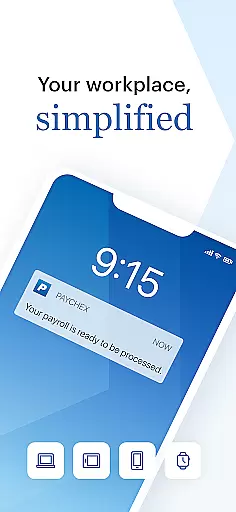
Paychex Flex is a comprehensive business management application designed for employers and employees who are already registered users of Paychex Flex. This app provides seamless access to essential payroll and benefits features, ensuring that businesses can manage their operations efficiently from anywhere. The app supports biometric authentication through Touch ID and Face ID, making it both secure and convenient. Employers can submit payroll on the go, access detailed reports, and manage employee profiles with ease. Employees benefit from accessing their check stubs, W2s, retirement plan details, and health benefits information directly from their mobile devices.
The app's functionality varies based on the company’s plan options, offering tailored solutions to meet specific business needs. Whether you need to review cash requirements, manage tax documents, or update employee benefits, Paychex Flex ensures that all critical data is at your fingertips. This makes it an invaluable tool for businesses looking to streamline their payroll and benefits administration processes while maintaining high levels of security and accessibility.
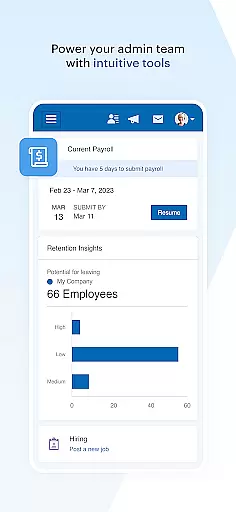
Paychex Flex offers a wide array of features designed to enhance the payroll and benefits management experience for both employers and employees. For employers, the app includes robust payroll submission capabilities, allowing them to enter, review, and submit payroll from any location. It also supports resuming payrolls initiated on other devices like tablets or desktops, providing flexibility and continuity in business operations. Additionally, the app grants access to vital information such as payroll reports, employee check stubs, tax documents, and detailed employee profiles including compensation, taxes, deductions, and time-off balances.
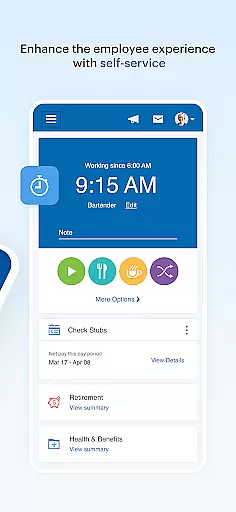
Employees using Paychex Flex can take advantage of features like viewing their check stubs and W2s, managing retirement plan contributions and investments, and updating personal profile information. The app also provides access to health, dental, and life insurance details, deductions, and contact information, along with FSA contributions and reimbursement activities. With Touch ID and Face ID authentication, both employers and employees can enjoy a secure and user-friendly interface that simplifies the management of crucial business and personal data.
Collaborative work features are essential for modern business applications, enabling seamless interaction between employers and employees. Paychex Flex excels in this area by providing a comprehensive suite of tools that facilitate teamwork.
The app allows employers to submit payroll on the go, ensuring that employees are paid accurately and on time. This feature supports entering, reviewing, and submitting payroll from mobile devices, which enhances flexibility and responsiveness.
Additionally, Paychex Flex offers access to vital information such as payroll reports, employee profiles, and benefits data. Employers can retrieve detailed reports, check stubs, tax documents, and benefit enrollment details, fostering transparency and informed decision-making.
For employees, the app provides access to personal data including check stubs, W2s, retirement balances, and insurance benefits. This empowers them to manage their financial and professional information effectively, promoting a collaborative work environment.
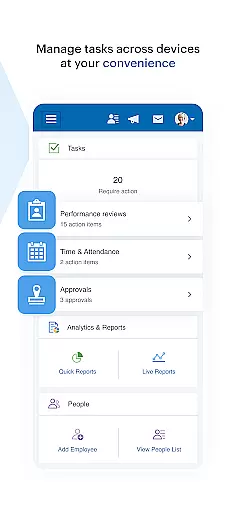
Effective task management is crucial for maintaining productivity and ensuring that all business operations run smoothly. Paychex Flex addresses this need by offering robust task management capabilities tailored for both employers and employees.
Employers can utilize the app to enter, review, and submit payroll, streamlining what is often a complex and time-consuming process. The ability to resume payrolls started on other devices ensures continuity and efficiency in task completion.
Beyond payroll, the app grants access to essential reports and employee data. Employers can monitor cash requirements, tax documents, and benefits enrollment, allowing them to manage tasks related to finance and human resources with ease.
Employees benefit from accessing their check stubs, W2s, and benefits information, enabling them to stay informed about their compensation and benefits. This feature supports better personal task management, contributing to overall job satisfaction and performance.
User-friendly interface
Secure authentication
Comprehensive payroll tools
Detailed reporting features
Flexible device compatibility
Limited customization options
Dependent on company plan
Occasional sync issues
Advanced features require subscription
Steep learning curve for new users

 4.70
4.70
Take the stress out of storage with the all-in-one app to manage your space.
3.70
Recover what matters — quickly and easily.
4.70
All your team communication in one place
4.70
Master crypto trading with real-time simulations and exciting challenges!
4.50
Mobile POS for any business: sales, invoices, retail, restaurants & appointments
4.60
Find part-time earning opportunities near you that pay within days.
3.20
Permission Guard is a security app that helps you manage app permissions.
4.80
Work happy with AI Companion
4.10
FaxCover - Create fax cover pages. Works with any app or fax machine.
4.90
Job search app that finds jobs for you! Takes the work out of looking for a job!
4.90
Manage Your Shop
4.70
Grow your business and connect with more people with Meta Business Suite.
4.60
ANDROID'S TOP MOBILE OFFICE - Word, Excel, PowerPoint and PDF at your fingertips
4.50
Amazon A to Z is the place to manage your work-life at Amazon.
4.50
Collaborate seamlessly with Google Chat, part of Google Workspace
4.50
The revolutionary flexible staffing platform
4.40
All-in-one Mobile solutions for employees & managers to succeed at work
4.30
All document reader, pdf viewer app, read docs & excel files
3.80


User Reviews