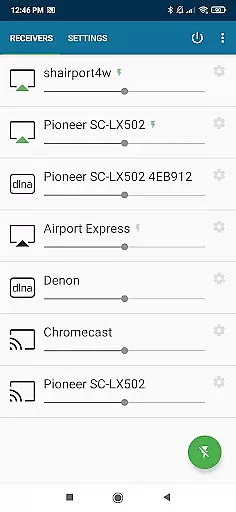
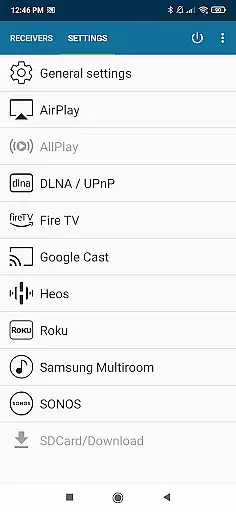
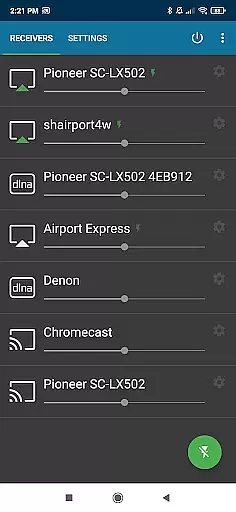
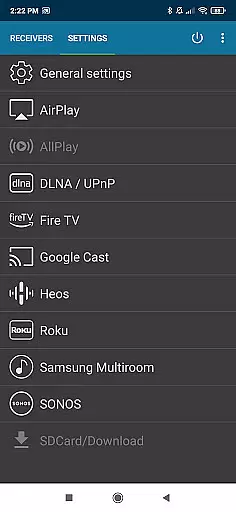
AirMusic is a versatile audio streaming application that allows users to stream all audio from almost any app to multiple receivers with just one click. It supports various platforms including Apple AirPlay, SONOS, Google Cast, DLNA, Amazon Fire TV, Samsung Multiroom, Denon HEOS, and Roku.
The app enables seamless music enjoyment across different devices such as Apple TV, Homepod, Chromecast, Smart TVs, AV-receivers, and more. Whether you're using Android or other systems, AirMusic ensures your music reaches every corner of your home.
With its powerful features and broad compatibility, AirMusic is an ideal solution for those who want to enjoy their favorite tunes on various devices without hassle. Its ability to integrate with popular streaming services makes it a valuable tool for enhancing your audio experience.
AirMusic stands out with its comprehensive support for the latest streaming technologies. The app is compatible with Apple AirPlay, SONOS, Google Cast, DLNA, Amazon Fire TV, Samsung Multiroom, Denon HEOS, and Roku, ensuring that users can connect to a wide range of devices effortlessly.
One of the key features of AirMusic is its ease of use. With just one click, users can start streaming audio from their Android devices to multiple receivers in their home. Additionally, AirMusic sends information and artwork to supported receivers, enhancing the overall listening experience.
For advanced users, AirMusic offers integration with Tasker and MacroDroid, allowing for automation and widget creation. This flexibility makes it possible to customize your audio streaming setup according to personal preferences, providing both convenience and control.
AirMusic offers an extensive streaming solution that supports a wide range of music services including YouTube Music, Deezer, Amazon Music, Apple Music, and Spotify. This ensures users have access to a vast music library with millions of tracks across various genres.
The app guarantees the authenticity of its content by supporting only legal and licensed platforms. By integrating with verified services like SONOS, Google Cast, and DLNA-enabled devices, AirMusic assures users of high-quality, copyright-compliant audio streaming.
With compatibility across multiple streaming technologies, AirMusic provides seamless access to diverse music libraries while maintaining strict adherence to copyright regulations. This makes it a reliable choice for users seeking legitimate music sources.
AirMusic excels in delivering superior audio quality through its support for advanced streaming protocols such as Apple AirPlay, SONOS, and Google Cast. These technologies ensure that audio is transmitted in the highest possible quality to receivers like HomePod, Chromecast, and Smart TVs.
The application supports various audio formats and resolutions, allowing users to experience their music in rich detail. Whether streaming from premium services or local files, AirMusic maintains the integrity of the original audio source.
By offering customizable audio settings and supporting high-fidelity playback on devices like Denon HEOS and Samsung Multiroom, AirMusic empowers audiophiles to tailor their listening experience according to their preferences and equipment capabilities.
User-friendly interface
Wide device compatibility
Seamless streaming experience
Supports popular streaming services
Advanced automation options
Limited support for certain apps
Compatibility issues with older Android versions
Additional steps required for some services
Premium version may be costly
Occasional connectivity problems

Turn your phone into a musical instrument from the future!
 3.90
3.90
Offline and always ad-free - stream in the highest quality available.
4.10
Super Sound Editor, Song Maker & Mixer, Vocal Remover, Voice Recorder & Changer!
4.60
Recording studio w/ 10k beats, pro vocal FX and a network of 20M rappers & fans!
4.60
Play your hearts out on TouchTunes jukeboxes & connect with fellow music lovers.
4.80
Smart piano keyboard, Classical to Pop, Real-time multiplayer connection!
4.20
Offline Music Player&MP3 Player with themes, equalizer, lyrics, music play mode
4.60
Turn Every Moment into Music
3.60
Uninterrupted Tunes, Unmatched Vibes
3.90
Enhance the sound quality of your devices, listen to what you want
4.50
Save hundreds of dollars for a physical strobe tuner and instead use this app.
4.50
Learn and play 2M+ music tabs & chords on guitar, ukulele, bass, and more
4.30
VB-AUDIO Software / VBAN-Receptor allows listening to any VBAN Streams
4.10
Next generation modular control surface
4.10
Versatile MP3 recorder with auto-backup to Dropbox and Google Drive
4.10
Permanently backup Now Playing. Maps, filters & listening stats.
4.00
Simple mp3 and mp4 player with advanced features.
3.40
MilkDrop for Android TV
3.00
Music Streaming suite for Ampache, Nextcloud Music and compatible backends.
4.0


User Reviews