
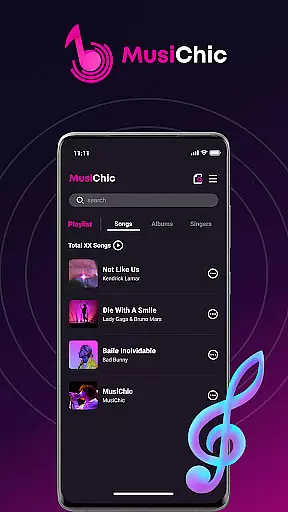

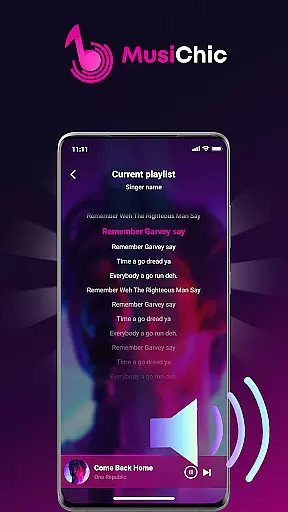
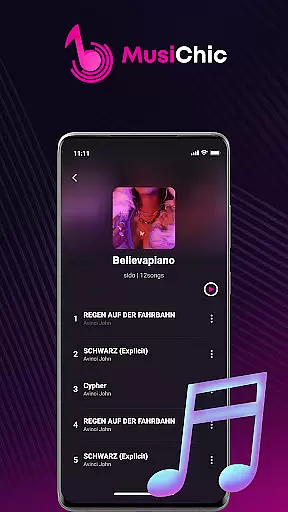
MusiChic is a premium offline music player designed for discerning music enthusiasts who value both quality and functionality. This application transforms your mobile device into a personal concert hall, delivering lossless audio playback across multiple formats while offering an intelligent organizational system that makes managing your music library effortless.
The app's standout feature is its ability to automatically scan and organize your local audio files by album, artist, and genre. Whether you're curating playlists for a quiet evening at home or compiling tracks for your next adventure, MusiChic provides the tools to create a personalized listening experience. Its smart curation capabilities ensure that every track is easily accessible through lightning-fast search functionality.
With support for major audio formats and unlimited custom playlists, MusiChic caters to audiophiles seeking high-fidelity sound without internet dependency. The app's sleek interface and thoughtful design make it an essential tool for anyone looking to elevate their music experience.
MusiChic stands out in the music player category with its comprehensive suite of features tailored for serious music lovers. At its core, the app offers instant access to your local music library through smart scanning technology that detects all compatible audio files on your device. It supports lossless playback in numerous formats, ensuring studio-quality sound for every track.
The app's intelligent music curation system goes beyond basic organization. It automatically categorizes your collection by album, artist, and genre while enabling users to create unlimited personalized playlists. The built-in search function operates at remarkable speed, allowing quick access to specific tracks or albums within large collections.
Additional notable features include advanced collection management tools that let users build exclusive libraries, and a customizable interface that adapts to individual preferences. Whether you're managing extensive music archives or simply looking for a more refined way to enjoy your favorite songs, MusiChic delivers professional-grade tools in an accessible package.
When it comes to digital music players, the size and authenticity of the music library are crucial factors. MusiChic offers an impressive local music library that is instantly accessible through its smart scanning feature. This functionality ensures that all your personal audio files are quickly detected and ready for playback without any legal concerns regarding copyright infringement.
The application supports a wide range of major audio formats, allowing users to enjoy a diverse collection of tracks. Whether you have MP3s or lossless FLAC files, MusiChic handles them with ease, providing a comprehensive and versatile music experience. The ability to manage extensive libraries with different file types emphasizes the app's commitment to delivering a product that respects user freedom while maintaining high-quality standards.
Moreover, MusiChic's offline playback capability guarantees uninterrupted listening pleasure without requiring internet connectivity. Users can indulge in their favorite tunes anytime, anywhere, knowing that their music is curated from legitimate sources within their private collections. This focus on authentic content ownership provides peace of mind while enjoying an expansive musical repertoire.
For audiophiles and casual listeners alike, audio quality is paramount. MusiChic excels in delivering concert-hall quality sound through its advanced audio processing capabilities. The player supports lossless audio playback, ensuring that every note and harmony is reproduced with pristine clarity and fidelity, just as the artists intended.
Understanding that different scenarios may require varying levels of audio detail, MusiChic provides multiple quality options. Whether you're using high-end headphones or standard earbuds, the app optimizes sound output to match your equipment's capabilities. This flexibility allows users to customize their listening experience according to their preferences and current setup.
Furthermore, the application's intelligent curation system enhances the overall audio experience by organizing tracks based on technical characteristics alongside traditional metadata. This approach not only improves navigation but also ensures optimal playback settings for each track. With MusiChic, users can truly appreciate the nuances of their music collection through sophisticated quality management features.
Lossless audio quality
Smart library scanning
Fast search functionality
Custom playlist creation
Offline playback capability
No streaming service
Limited social features
Premium price point
Complex interface
High storage needs

Equalizer, Bass Booster and Volume Booster (Eq & Bass) improve sound quality
 4.30
4.30
Simple & Intuitive Metronome
4.70
Bass Booster Pro takes auto-equalizing to the next level!
4.30
The best music and audio player, with beautiful UI, music search and equalizer.
4.60
Bass Booster & Volume Equalizer Pro improves your music and video sound quality
4.60
Voice recorder - Audio recorder. Best recorder for recording
4.90
Sing, record, and create music together — enhanced by smart voice tools.
4.00
Turn Every Moment into Music
3.60
One-tap booster for max volume - enjoy powerful sound with this audio booster
4.50 4.70
4.70
Listen to live FM radio stations, sports, music and news on global radios online
4.70
Learn the notes on the guitar fretboard fast with this easy and fun app
4.60
Play KORG’s revolutionary touch-based instrument on a variety of devices.
4.40
Smart piano keyboard, Classical to Pop, Real-time multiplayer connection!
4.20
Offline and always ad-free - stream in the highest quality available.
4.10
Turn your phone into a musical instrument from the future!
3.90
The ultimate media player for Android devices
3.90
Offline Tunes, Unlimited Vibes
3.90
The Cubase remote control app
3.60


User Reviews